5
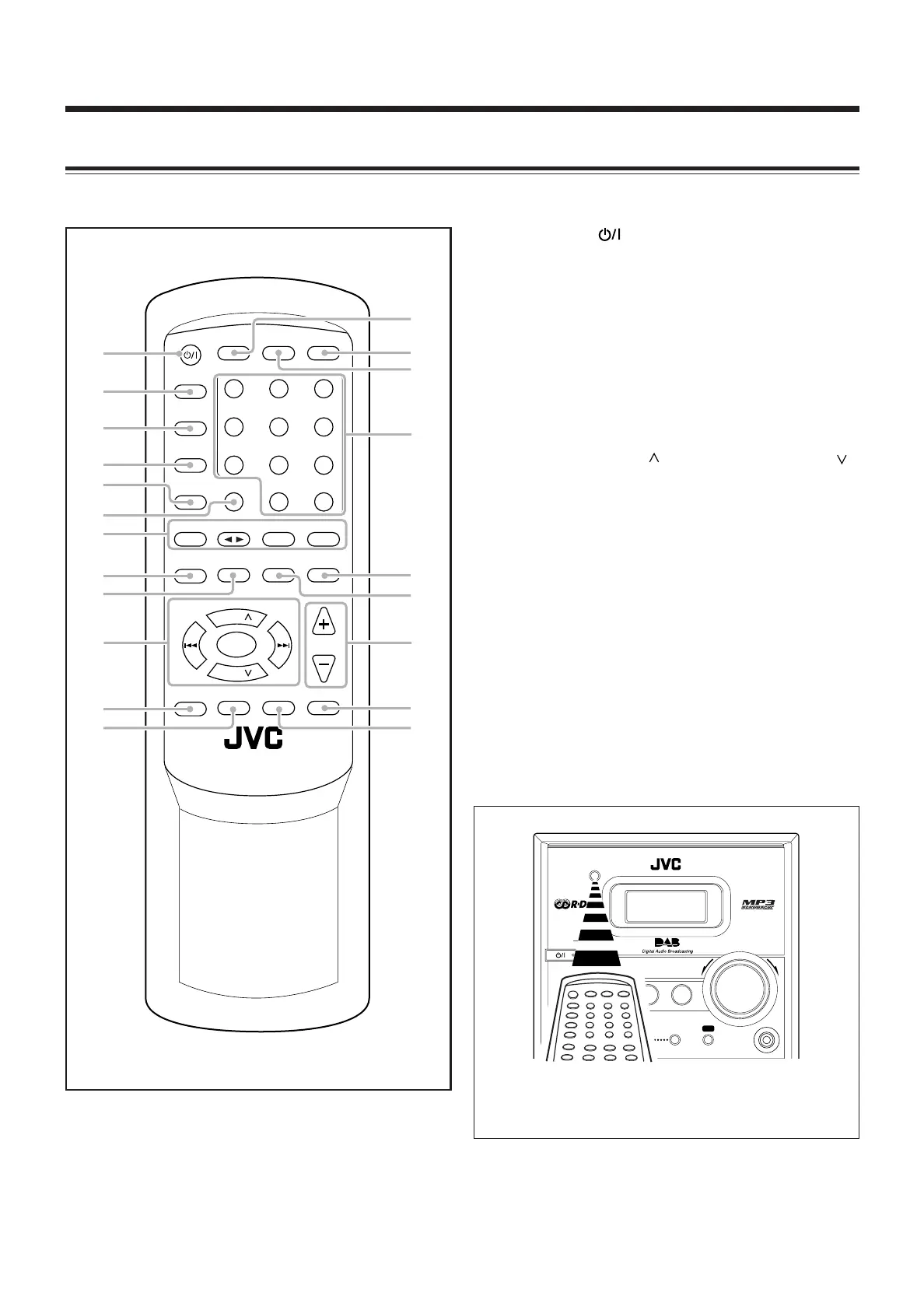
Remote Control
See pages in parentheses for details.
STANDBY
CD
PHONES SCROLL DOWN
4
#/8
7¢
SCROLL UPSELECT AUX
TAPE FM/AM/DAB AUX
VOLUME
+–
When using the remote control, point it at the
remote sensor on the front panel.
1 STANDBY/ON button (10, 28)
2 SLEEP button (29)
3 TIMER button (27)
4 SET button (9, 27, 28)
5 CANCEL button (27, 28)
6 REV. (reverse) MODE button (16, 25, 26)
7 Source buttons
• CD 3¥8, TAPE 2 3, FM/AM/DAB, AUX
Pressing one of these buttons also turns on the unit.
8 PROGRAM button (14, 18, 21)
9 RANDOM button (15)
p Multi control buttons
• UP/PRESET GROUP , DOWN/PRESET GROUP
• SEARCH/SCROLL DOWN, SELECT, SEARCH/
SCROLL UP
• 4, 7, ¢
q RDS/INFO button (17, 19, 20, 23)
w SCAN button (20)
e CLOCK button (9)
r A. (auto) STANDBY button (10)
t DISPLAY button (15, 20, 23)
y Number buttons (13, 14)
u • REMAIN button (15)
• BEAT CUT button (26)
i • REPEAT button (15)
• FM MODE button (21)
o VOLUME + / – buttons (10, 28)
; FADE MUTING button (11)
a SOUND/HBS button (11)
RM-SUX
HB4 REMOTE CONTROL
STANDBY/ON
SLEEP
123
456
78
0
+10
9
TIMER
PRESET
GROUP
SEARCH/
SCROLL
DOWN
SEARCH/
SCROLL
UP
UP
7
/
SELECT
DOWN
PRESET
GROUP
SET
CANCEL
CD
PROGRAM
TAPE
RANDOM
FM/AM/DAB AUX
REPEAT
/FM MODE
REMAIN
/BEAT CUT
RDS/INFO SCAN SOUND/HBS
REV. MODE
FADE MUTING
VOLUME
CLOCK DISPLAY A. STANDBY
3/8
e
r
i
;
1
2
3
4
8
p
q
9
w
a
t
7
u
y
5
6
o
01-05_UX-HB4[B]6.p65 04.8.5, 6:16 PM5



 To Next Page