6
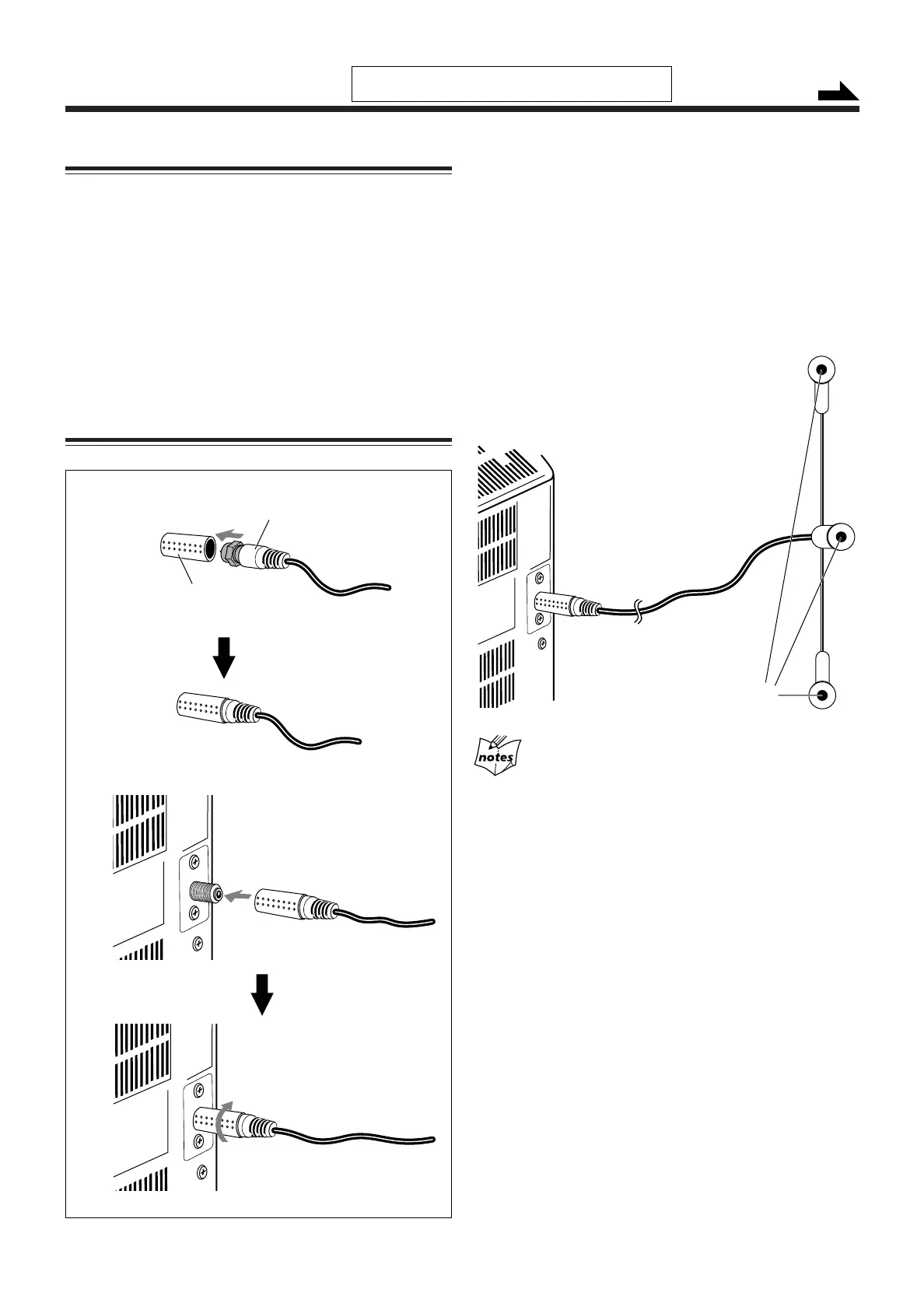
1
Put the DAB antenna into the antenna cover
until the DAB antenna fits in with the
projection inside the antenna cover.
2
Connect the DAB antenna to the DAB ANT.
terminal.
To adjust the DAB antenna
Fix the antenna to pin up the wire with plastic eyelets
vertically.
If reception is poor
It is recommended to use the external antenna instead of supplied
antenna.
Getting Started
Unpacking
After unpacking, check to be sure that you have all the
following items.
The number in parentheses indicates the quantity of each
piece supplied.
• DAB antenna (1)
• AM (MW) loop antenna (1)
• Remote control (1)
• Batteries (2)
• Antenna cover (1)
If any item is missing, consult your dealer immediately.
Do not connect the AC power cord until all other
connections have been made.
Continued
Connecting DAB Antenna
Eyelets
Antenna cover
(supplied)
DAB anntenna (supplied)
06-08_UX-HB4[B]6.p65 04.8.5, 6:16 PM6



 To Next Page