15
Setting the Clock and Daily Timer
Setting the Clock
Without setting the built-in clock, you cannot use Daily Timer and Sleep Timer.
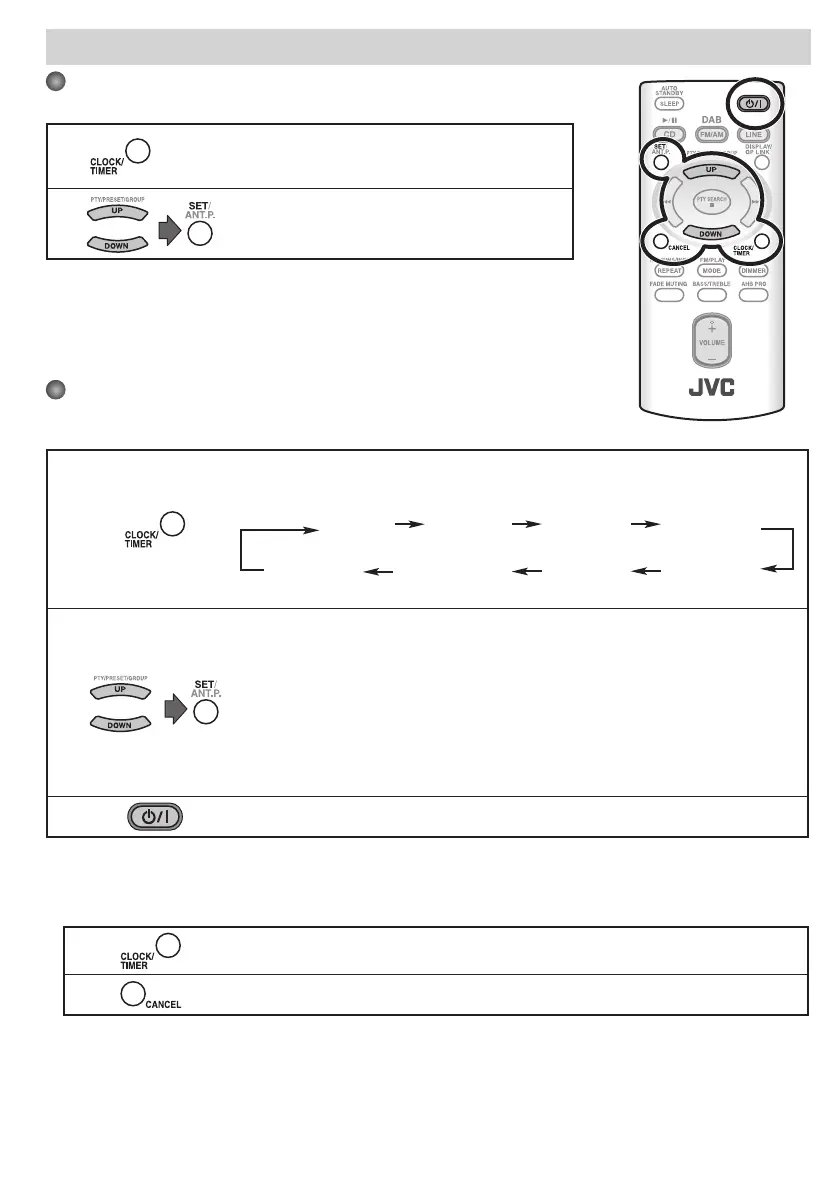
1
Press to activate the clock setting mode.
• If you have already adjusted the clock before, press the
button repeatedly until the clock setting mode is selected.
2
or
Adjust the hour, then the minute.
• To exit from the clock setting, press CLOCK/TIMER as required.
• To go back to the previous step, press CANCEL.
Setting the Daily Timer
Using Daily Timer, you can wake up with your favorite music.
• You can store three Daily Timer settings; however, you can activate only one of Daily Timers at the same time.
1
Press repeatedly to select one of the timer setting modes you want to set—DAILY 1 ON
time, DAILY 2 ON time, or DAILY 3 ON time—as follows:
Daily 1 Timer Daily 2 Timer
DAILY 1 ON (Time) DAILY 2 ON (Time)
Canceled Clock setting ON (Time)
DAILY 3
(See above.) Daily 3 Timer
2
or
1 Adjust the hour then the minute for on-time.
2 Adjust the hour then the minute for off -time.
3 Select the playback source—“DAB/FM/AM,” “CD,” or “LINE.”
4 For “DAB/FM/AM”: Select a preset channel.
For “LINE”: Make the external device ready for playback.
5 Select the volume level.
• You can select the volume level (“VOLUME 0” to “VOLUME 31” and “VOLUME – –”). If
you select “VOLUME – –,” the volume is set to the last level when the System is turned
off .
3
Turn off the System (on standby).
• To exit from the timer setting, press CLOCK/TIMER as required.
• To correct a misentry during the process, press CANCEL. You can return to the previous step.
To turn off the Daily Timer
1
Press repeatedly to select “DAILY 1,” “DAILY 2,” or “DAILY 3.”
2
To turn on the Daily Timer again, select one of the timer settings by pressing CLOCK/TIMER, then press SET.
EN_01_20_UX-NB7DAB[B]ff.indd 15EN_01_20_UX-NB7DAB[B]ff.indd 15 06.7.6 11:27:20 AM06.7.6 11:27:20 AM



 To Next Page