20 EN
INITIAL SETTINGS
On-screen Language Set
This unit offers you the choice to view on-screen messages in 3
different languages.
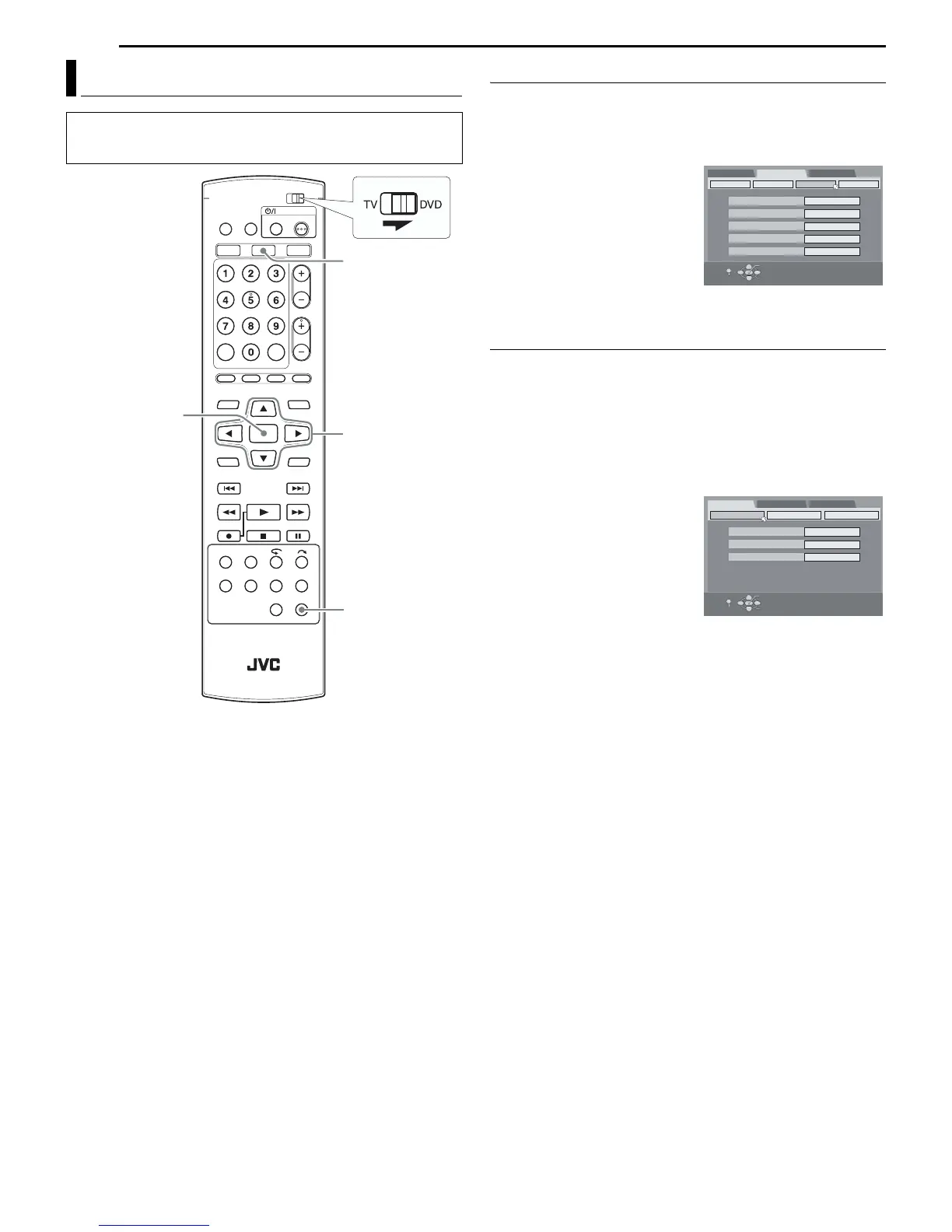
1 Press SET UP to access the Main Menu screen.
2 Press we to select “FUNCTION SET UP”, then press t.
3 Press we to select “DISPLAY
SET”, then press t.
4 Press rt to select “ON
SCREEN LANGUAGE”, then
press ENTER.
5 Press rt to select your
desired language, then press
ENTER.
6 Press SET UP to complete the setting.
Menu/Audio/Subtitle Language Set (DVD deck only)
Some DVD discs contain the DVD menu display, audio and
subtitles in multiple languages. With these discs, you can set the
default language as you like.
● The procedure shows how to set “MENU LANGUAGE” as an
example.
1 Press DVD so that the DVD lamp lights up on the unit.
2 Press SET UP to access the Main Menu screen.
3 Press we to select “DVD SET UP”, then press t.
4 Press we to select
“LANGUAGE SET”, then press t.
5 Press rt to select “MENU
LANGUAGE”, then press ENTER.
6 Press rt to select your
desired language, then press
ENTER.
● See “Language Code List”
(墌 pg. 85).
7 Press SET UP to complete the setting.
NOTE:
When the selected language is not available on the disc, the disc’s
default menu language is played back.
Language
● Turn on the unit.
● Turn on the TV and select the AV mode.
● Slide the TV/DVD switch to DVD.
rtwe
ENTER
SET UP
DVD
SUPERIMPOSE
GRAY BACK
VIDEO IN/OUT
AUTO
ON
RECORDING SET
DISPLAY SET OTHERS
DIMMER BRIGHT
POWER SAVE OFF
ON SCREEN LANGUAGE ENGLISH
DVD SET UP
FUNCTION SET UP
INITIAL SET UP
SELECT WITH [CURSORS]
THEN PRESS [ENTER]
OK
SELECT
EXIT
SET UP
DVD SET UP
FUNCTION SET UP
INITIAL SET UP
SELECT WITH [CURSORS]
THEN PRESS [ENTER]
OK
SELECT
EXIT
SET UP
MENU LANGUAGE
AUDIO LANGUAGE
LANGUAGE SET
ENGLISH
ENGLISH
AUDIO OUTPUT
UTILITY
SUBTITLE ENGLISH



 To Next Page