44 EN
EDITING
You can dub selected audio from a DVD or Audio CD disc to a
digital audio device.
However, it is not possible to dub copy-protected discs.
Example: Dubbing to an MD
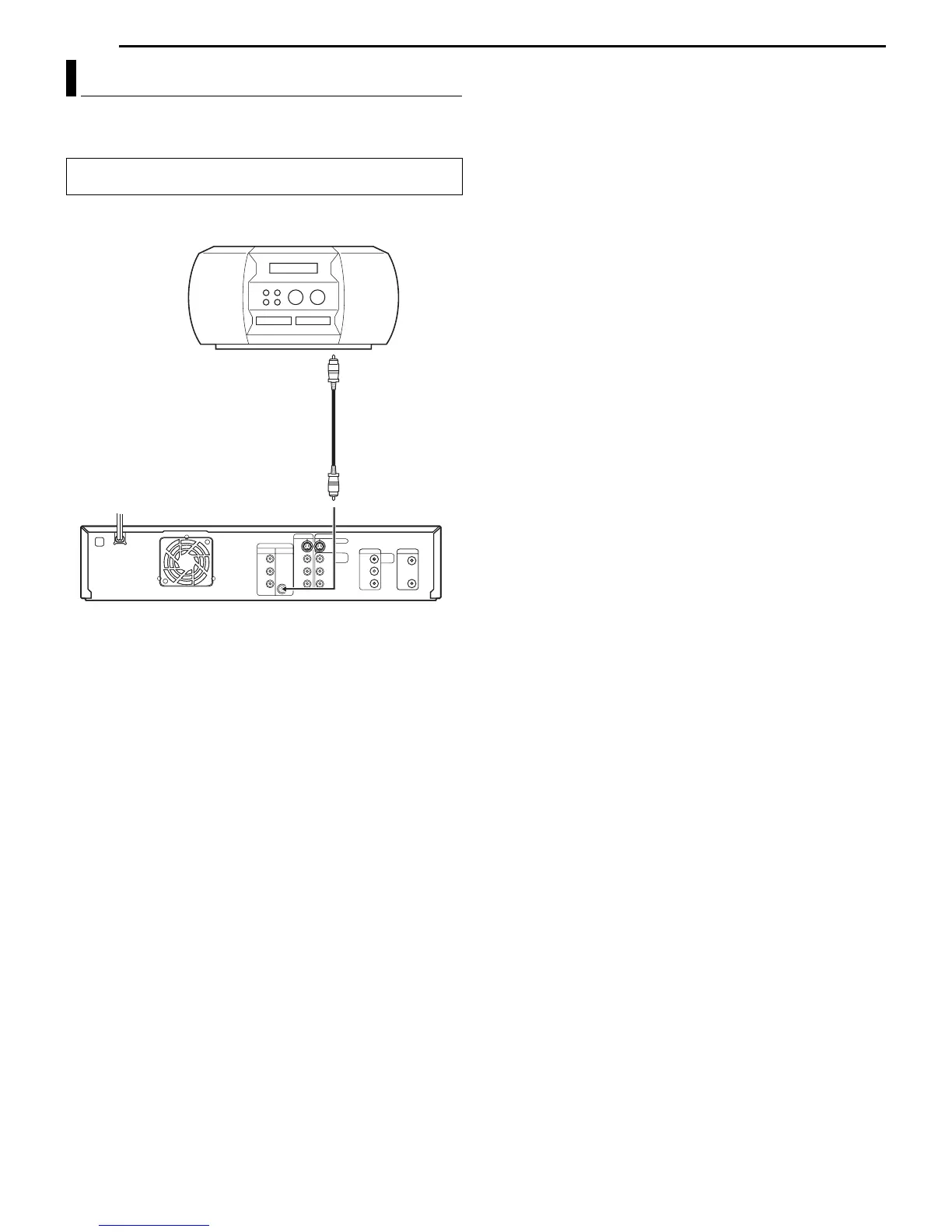
1 Connect the unit and a digital audio device using an optional
coaxial cable.
2 Place a disc on the unit and load an MD or CD on the connected
digital audio device.
3 Select the audio to be dubbed.
4 Start playback slightly before the actual point from where you
wish to start dubbing.
5 Press 9 to pause playback.
6 Select the input mode on the connected digital audio device.
7 Press 4 to start playback on the unit.
8 Start recording on the digital audio device.
9 Stop recording on the digital audio device. Then press 8 to stop
playback on the unit.
NOTE:
There may be a discrepancy of several seconds between where you
intend editing to start, and where it actually starts.
Digital Audio Dubbing
● Turn on the TV and select the AV mode.
● Slide the TV/DVD switch to DVD.
Rear of unit
Digital audio device
(MD deck, etc.)
Coaxial cable
(not supplied)
Player
Recorder
To [DIGITAL AUDIO
OUT (COAXIAL)]



 To Next Page