EN 53
ADVANCED PLAYBACK
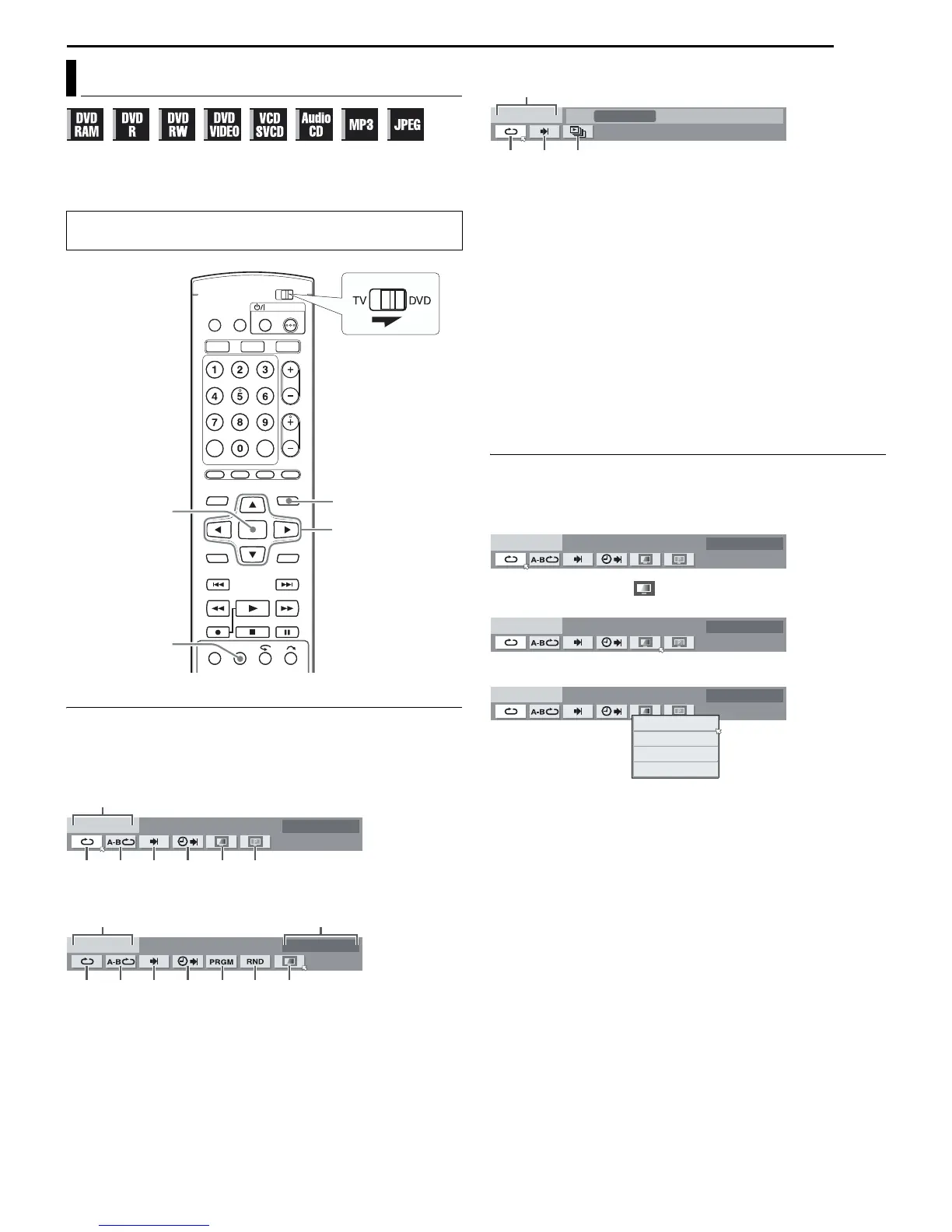
The on-screen bar allows you to control various playback
functions. Some of the functions operated on Navigation Menu can
be controlled on the On-screen bar.
How To Access The On-screen Bar
1 Press ON SCREEN twice whenever a disc is loaded.
Contents of the on-screen bar during playback
DVD VIDEO
Video CD
JPEG disc
A Disc type.
B Select this for Repeat Playback. (墌 pg. 54)
C Select this for A-B Repeat Playback. (墌 pg. 54)
D Select this for search function. (墌 pg. 54)
E Select this for time search function. (墌 pg. 55)
F Select this for Picture Control function. (墌 pg. 55)
G Select this to switch picture source type. (墌 pg. 55)
H Current status area for the selected item.
I Select this for Program Playback. (墌 pg. 56)
J Select this for Random Playback. (墌 pg. 56)
K Select this to control the switching interval of the slide show.
(墌 pg. 56)
NOTE:
Although examples of the on-screen bar are provided here only for 3
types of discs, the on-screen bar will be displayed for whichever disc
indicated in the left column.
Basic Operation On The On-screen Bar
Example: When selecting Picture Control function of DVD
During playback or while stopped
1 Press ON SCREEN twice to access the on-screen bar. The item
currently selected is highlighted and pointed by H.
2 Press we to select “ ”, then press ENTER. The pop-up
window appears under the selected item.
3 Press rt to select the desired option, then press ENTER.
To clear the on-screen bar
Press ON SCREEN.
NOTE:
See the corresponding pages for details on each menu item.
Using The On-screen Bar
Be sure to clear Library Database DVD Navi screen by pressing
NAVIGATION.
ON SCREEN
NAVIGATION
ENTER
rtwe
DVD-VIDEO
A
BCDE FG
AUTO 1
VIDEO-CD
CINEMA
AH
BCDEIJF
JPEG
A
KDB
10 sec
DVD-VIDEO
AUTO 1
DVD-VIDEO
AUTO 1
DVD-VIDEO
NORMAL
CINEMA
SHARP
SOFT
AUTO 1



 To Next Page