8
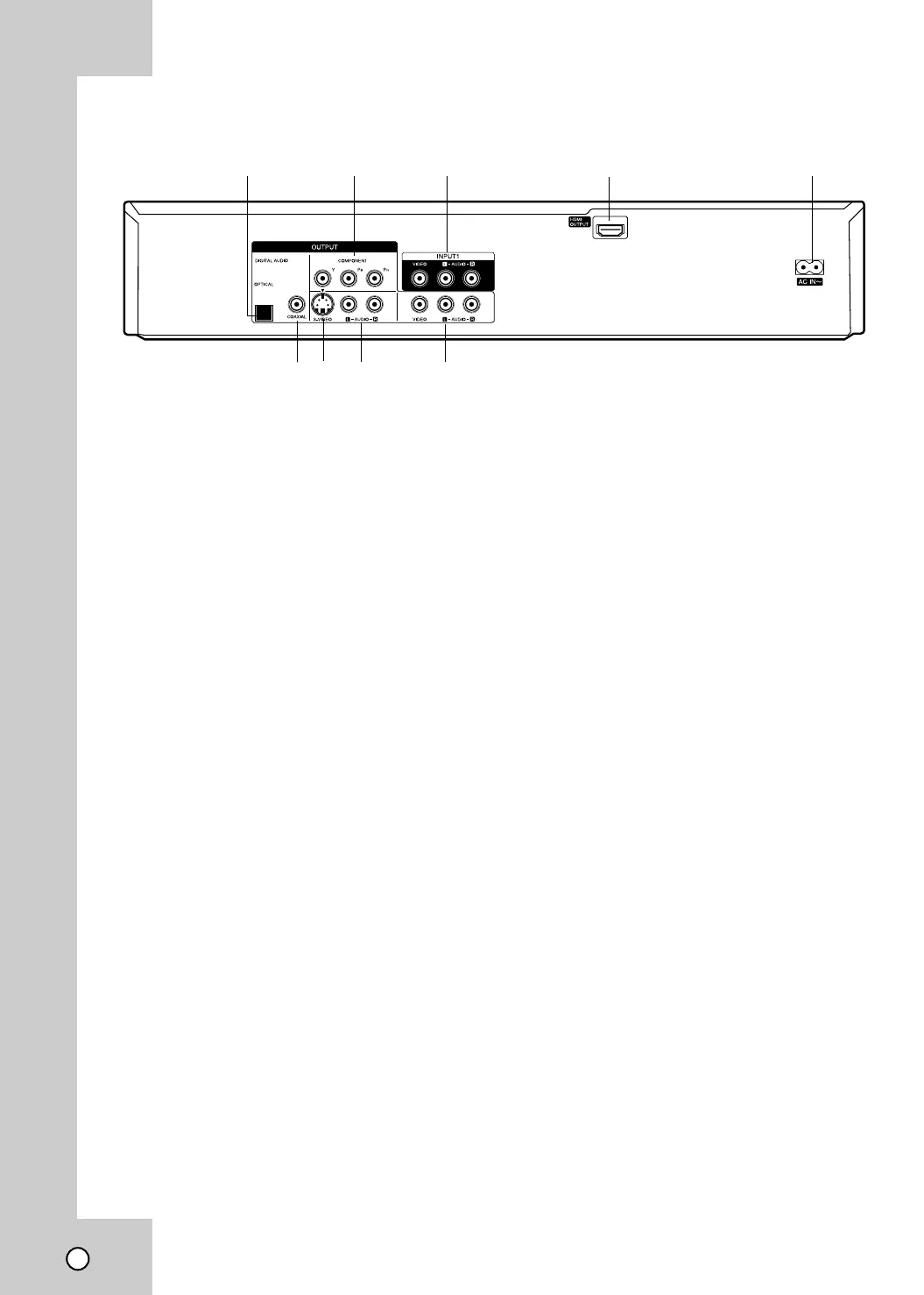
a OPTICAL (DIGITAL AUDIO OUTPUT)
Connect to digital (optical) audio equipment.
b COMPONENT OUTPUT (Y P
B PR)
Connect to a TV with Y P
B
PR inputs
c INPUT 1 (VIDEO/AUDIO (Left/Right))
Connect the audio/video output of an external
source (Cable/Satellite box, Audio system,
TV/Monitor, VCR, Camcorder).
d HDMI OUTPUT
HDMI output providing a high quality interface
for digital audio and video.
e AC Power Cord
Plug into the power source.
f COAXIAL (DIGITAL AUDIO OUTPUT)
Connect to digital (coaxial) audio equipment.
g S-VIDEO OUTPUT
Connect to a S-Video Input on TV.
h
AUDIO OUTPUT (Left/Right)
Connect to a TV or other equipment with audio
inputs.
i VIDEO/AUDIO OUTPUT (Left/Right)
Connect to a TV with video and audio inputs.
abc d e
fg h i
Rear Panel
Caution:
Do not touch the inner pins of the jacks on the rear panel.
Electrostatic discharge may cause permanent damage to the unit.



 To Next Page