13
Basic operations
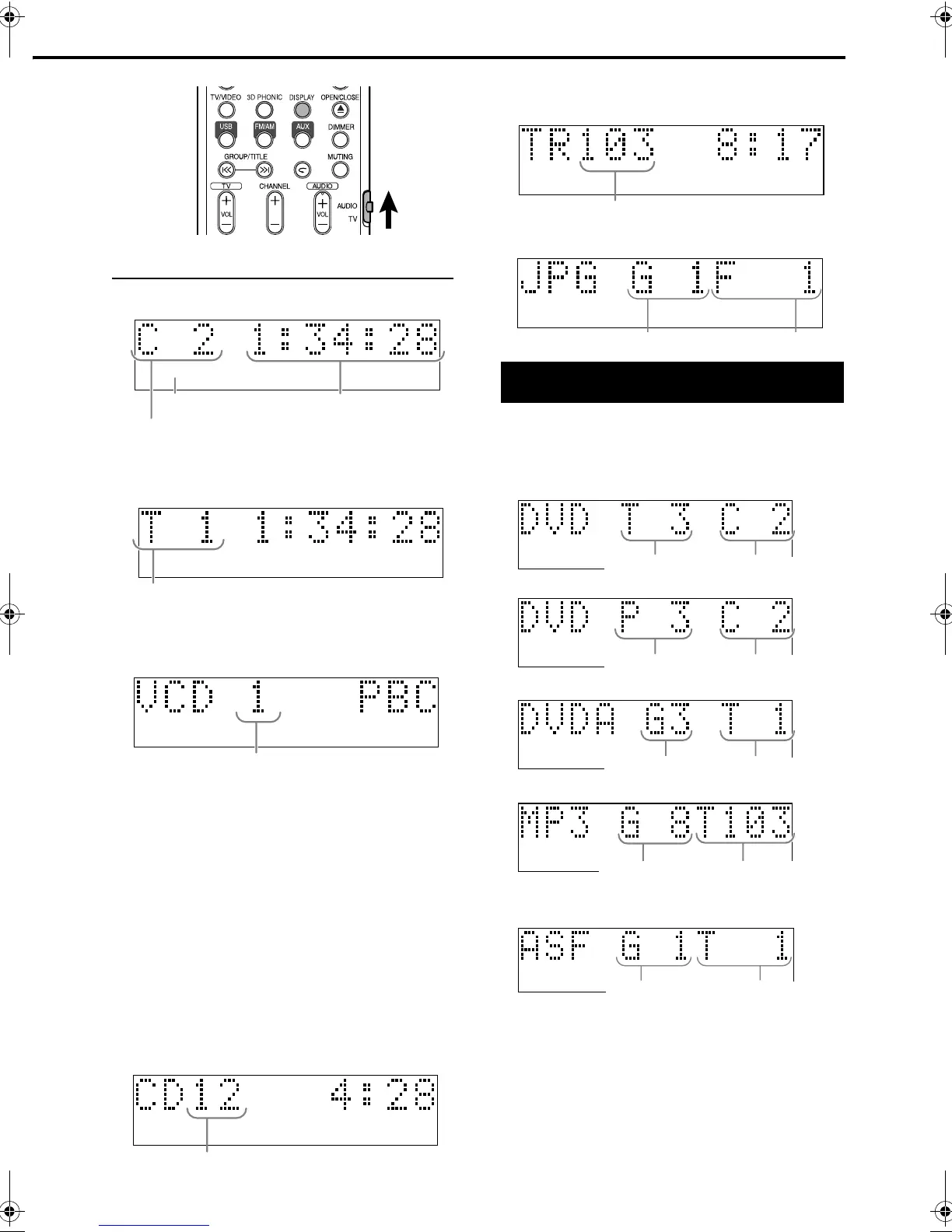
Display window during disc playback
Ex.: When a DVD VIDEO is played
When a DVD VR is played back, PG (original
program) /PL (play list) number is displayed.
Ex.: When a DVD AUDIO is played
If “BONUS” or “B.S.P.” is displayed during a DVD
AUDIO playback, refer to page 27.
Ex.: When an SVCD or VCD is played
• When playing an SVCD, the SVCD indicator
lights instead of the VCD indicator.
• PBC (Play Back Control): A signal recorded in a
VCD (version 2.0) for controlling playback. It is
possible to enjoy interactive software or software
with a search function using a menu screen
recorded in a PBC compatible VCD. To play a
disc with the PBC function OFF, carry out the
following operations.
• Designate the track number using the number
buttons while the disc is stopped.
• Designate the track number using
x
while
the disc is stopped, and then press DVD/CD
3
.
• Press RETURN to go back to the upper layer
during the PBC playback of a VCD or SVCD.
Ex.: When a CD is played
Ex.: When an MP3/WMA/ASF/DivX/MPEG1/
MPEG2 file is played
Ex.: When an JPEG file is played
Press DISPLAY.
Each time you press the button, the display
indication changes temporarily as follows:
• For DVD VIDEO
• For DVD VR
• For DVD AUDIO
• For MP3/WMA
• For ASF/DivX/MPEG1/MPEG2
• While playing a DivX or MPEG1/MPEG2 file,
“DIV (for DivX)” or “MPG (for MPEG1/
MPEG2)” appears instead of “ASF.”
• For SVCD/VCD/CD/JPEG
The clock time indication appears on the display
window.
• Before setting the clock (page 34), “0:00”
appears.
• When the unit is turned off, pressing DISPLAY
turns off the clock indication to save the power
consumption.
SVCDVD-A
Elapsed
playing time
Chapter number
Disc type
SVCDVD-A
Track number
S VCDVD-A
Track number
SVCDVD-A
Track number
To switch the display
SVCDVD-A
Track number
Group number
File number
SVCDVD-A
Title number
Chapter number
SVCDVD-A
PG/PL number
Chapter number
SVCDVD-A
Group number
Track number
SVCDVD-A
Group number Track number
EX.: When an ASF file is played
Group number Track number
EX-D11[U].book Page 13 Tuesday, May 30, 2006 4:13 PM


 To Next Page