24
ENGLISH
~ Select “Bluetooth Phone.”
Ÿ Enter the <Bluetooth> menu.
! Establish the connection with a device,
then make a call (or settings using the
<Bluetooth> menu).
☞ pages 37, 44 – 46
FLAT
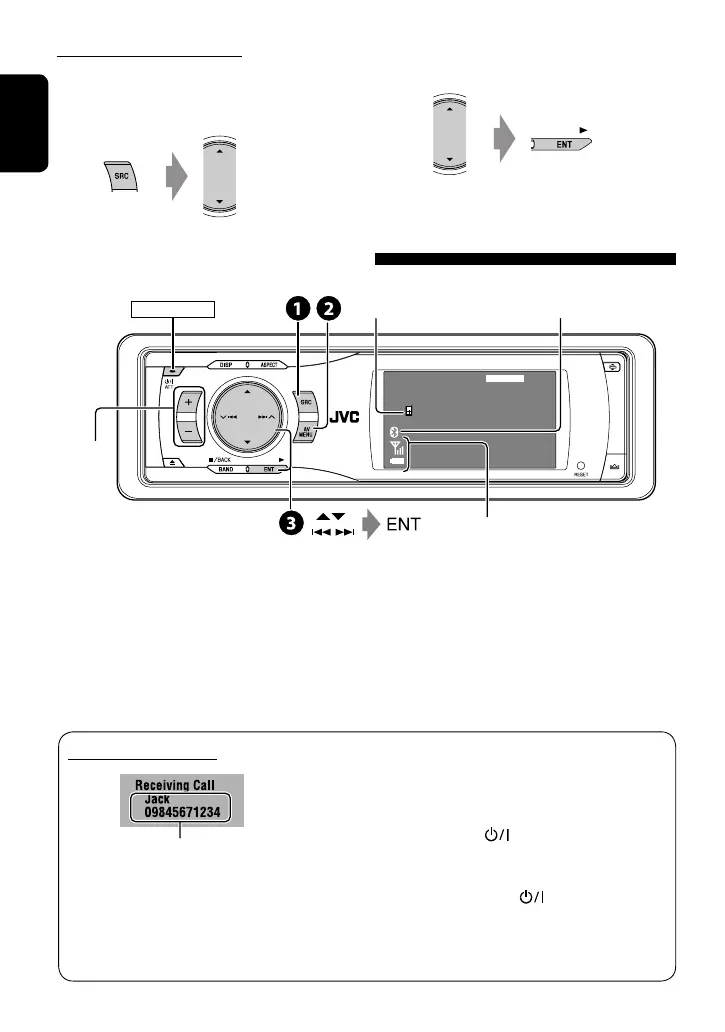
Connected Device Name
Bluetooth Phone
3:45
PM
POWER]ON
Connected device
name
*
1
Using the Bluetooth cellular phone
*
1
Each time you press 5 ∞, the registered device name
(and “NEW DEVICE” when a new device can be registered)
appear in turn.
*
2
Appears only when the information comes from the
device.
Status of the device
*
2
Signal strength/Battery remainder
Bluetooth icon
lights up when the adapter is connected.
Adjust the
volume
When a call comes in...
Name and phone number (if acquired)
• The source is automatically changed to
“Bluetooth Phone.”
When <Auto Answer> is activated...
The unit answers the incoming calls automatically.
(☞ page 46)
• When <Auto Answer> is deactivated, press any
button (except ATT or +/–) to answer the
incoming call.
To end the call
Hold any button (except ATT or +/–).
• You can adjust the microphone volume level. (☞
page 46)
Deleting a registered device
1 Select “Bluetooth Phone” or “Bluetooth
Audio,” then select a registered device you
want to delete.
2 Perform steps 2 and 3 on page 22, then...
• Select <Delete Pair>, then <Yes>.
EN22-27_KD-AVX11J_f.indd 24EN22-27_KD-AVX11J_f.indd 24 06.12.22 2:10:59 PM06.12.22 2:10:59 PM


 To Next Page
 Loading...