ENGLISH
6
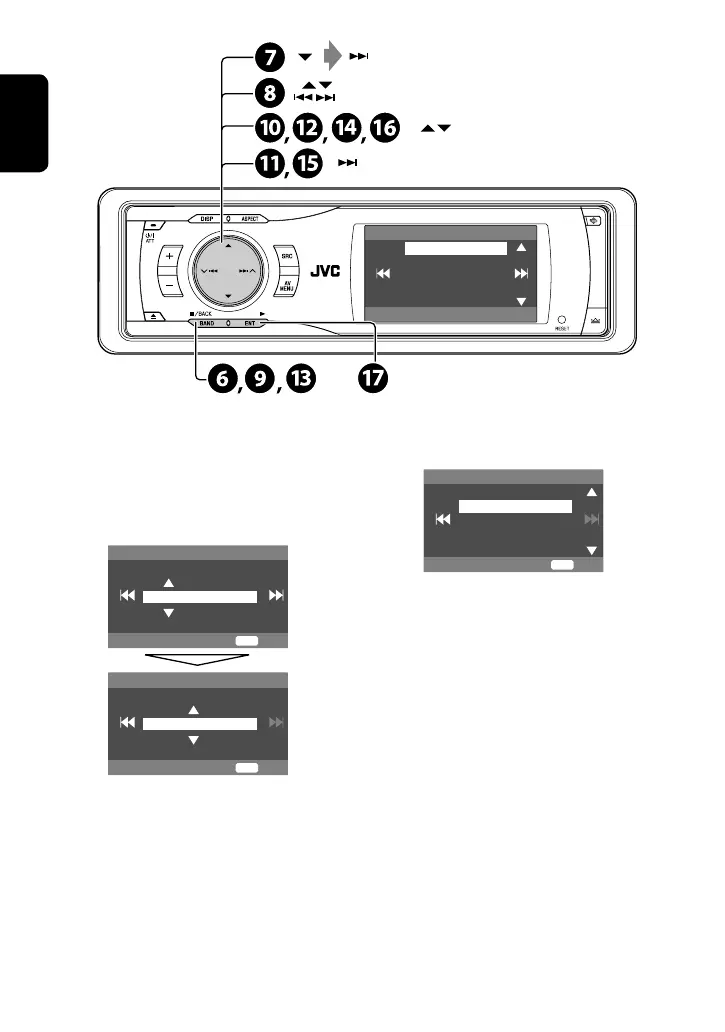
fi Select either the 12-hour or 24-hour
system.
^ Return to the <Clock> menu.
fl Select <OSD Clock>.
& Activate the <OSD Clock> screen.
‡ Select the <OSD Clock> setting.
• Off: The clock time is not displayed while
playing back a video source.
• On: The clock time is displayed while playing
back a video source.
* Finish the procedure.
¤ Return to the <Setup> menu.
# Select <Clock> ]<Time Set>, then
activate the <Time Set> screen.
‹ Set the clock time.
$ Return to the <Clock> menu.
› Select <12Hours/24Hours>.
% Activate the <12Hours/24Hours>
screen.
12Hours/24Hours
12 Hours
24 Hours
Exit
ENT
Time Set
Hours
1 : 00AM
Exit
ENT
Time Set
Minutes
3 : 45PM
Exit
ENT
Clock
1:00AM
Time Set
12Hours/24Hours
OSD Clock
(twice)
EN_KD-AVX11J-f.indb 6EN_KD-AVX11J-f.indb 6 06.12.21 3:28:50 PM06.12.21 3:28:50 PM


 To Next Page
 Loading...