7INTRODUCTIONS
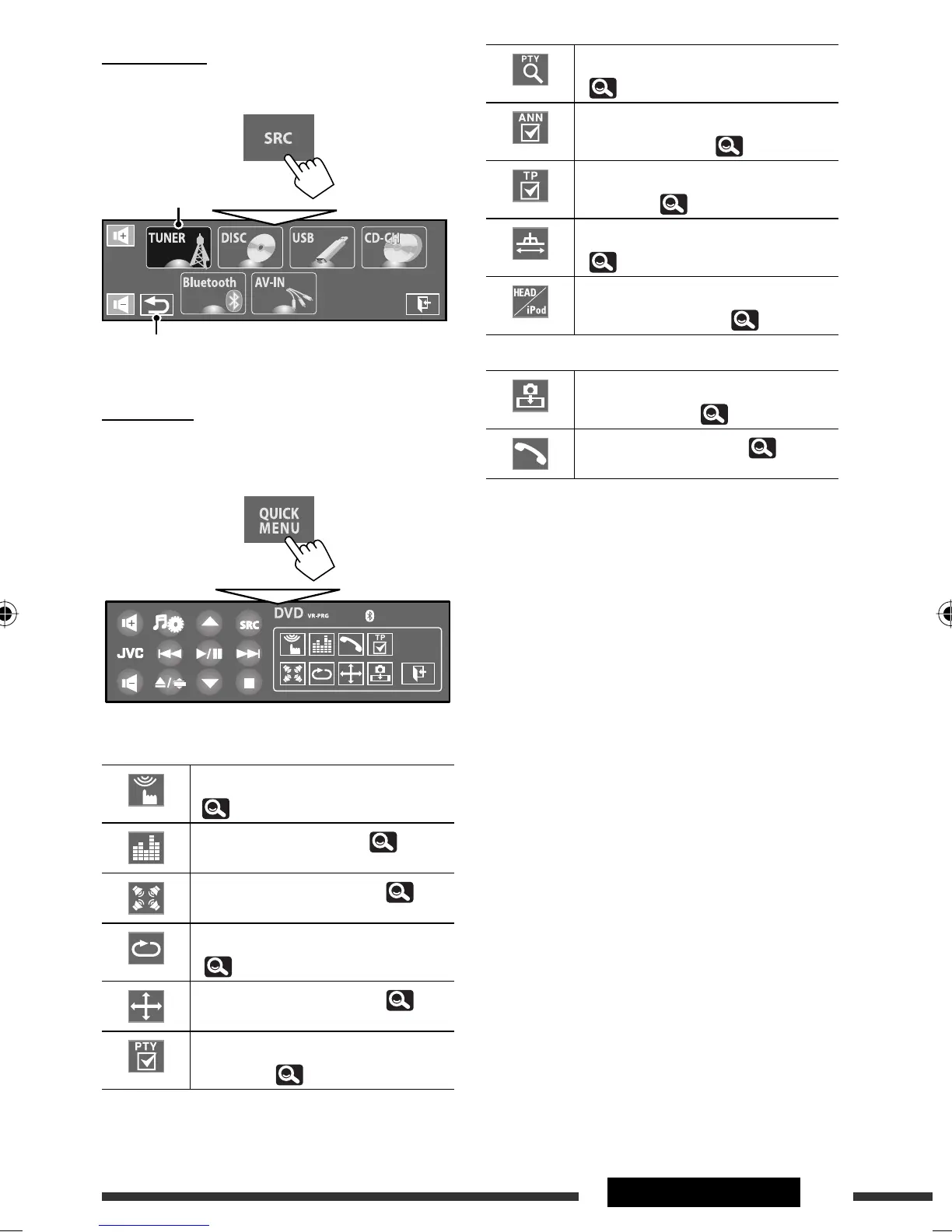
Displays <PTy Search> menu.
( 34)
Activates/deactivates Announcement
Standby Reception. ( 25)
Activates/deactivates TA Standby
Reception. ( 18)
Changes <IF Band Width> setting.
( 18)
Changes the control of iPod/iPhone
device for “iPod USB.” ( 16)
KD-AVX77 only
Enables to capture the current
playback picture. ( 13)
Displays <Dial Menu>. ( 29)
Source Menu
You can select a source on Source Menu.
Quick Menu
You can easily access some frequently used functions by
using Quick Menu.
• Available icons vary among the sources.
Displays <Monitor/Sensor> menu.
( 20)
Changes the sound mode. ( 23)
Turns on or off the surround. ( 21)
Turns on or off Track/Chapter Repeat.
( 26)
Changes <Aspect> setting. ( 15)
Activates/deactivates PTY Standby
Reception. ( 25)
Current source
Returns to the previous screen.
EN_KDAVX7755[A]f.indb 7EN_KDAVX7755[A]f.indb 7 09.4.3 4:47:25 PM09.4.3 4:47:25 PM












 To Next Page