ENGLISH
23
SETTINGS
Continued on the next page
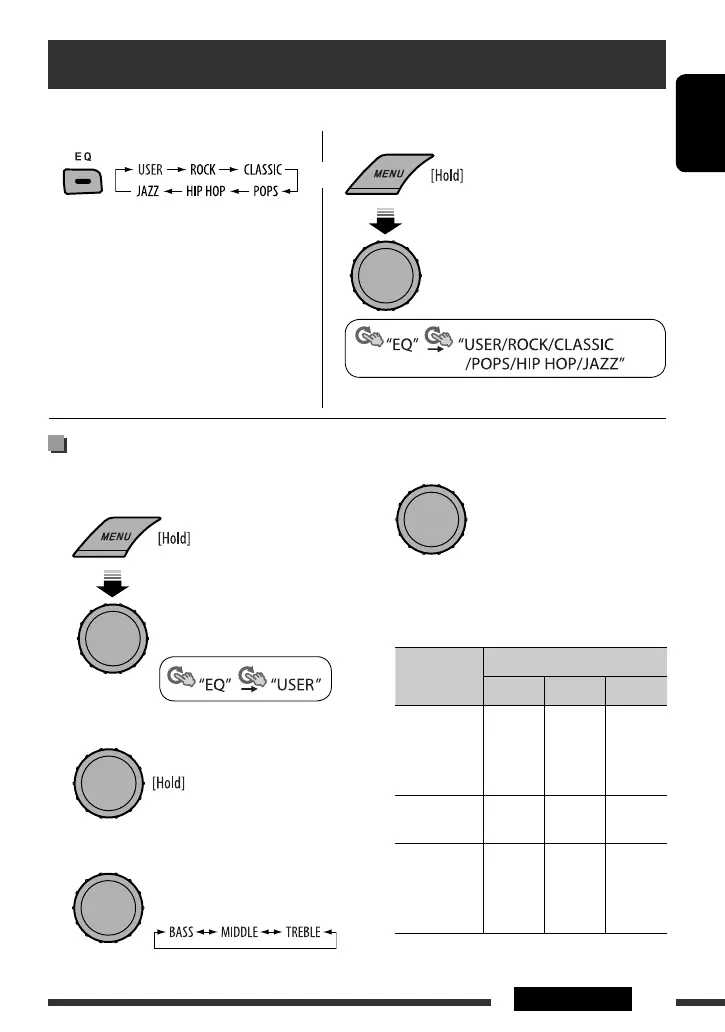
Storing your own sound mode
You can store your own adjustments in memory.
1 Select “USER.”
2 While “USER” is shown on the display...
3 Select a tone.
You can select a preset sound mode suitable to the music genre.
• See also page 26.
Selecting from Menu.
• See the following for “USER” settings.
Selecting a preset sound mode
or
[Turn] = [Press]
[Turn] = [Press]
[Turn] = [Press]
4 Adjust the sound elements of the selected
tone.
1 Adjust the frequency.
2 Adjust the level.
3 Adjust the Q-slope.
Sound
elements
Range/selectable items
BASS MIDDLE TREBLE
Frequency 60 Hz
80 Hz
100 Hz
200 Hz
0.5 kHz
1.0 kHz
1.5 kHz
2.5 kHz
10.0 kHz
12.5 kHz
15.0 kHz
17.5 kHz
Level –06 to
+06
–06 to
+06
–06 to
+06
Q Q1.0
Q1.25
Q1.5
Q2.0
Q0.75
Q1.0
Q1.25
Fix
[Turn] = [Press]
EN20-25_KD-S36[J]_1.indd 23EN20-25_KD-S36[J]_1.indd 23 8/7/09 1:51:31 PM8/7/09 1:51:31 PM


 To Next Page