To Next Page

D
Dawn MedinaSep 12, 2025
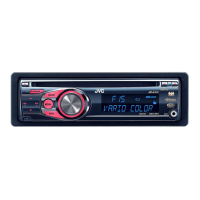
What does “PLEASE” and “EJECT“ mean alternately on JVC GET0686-001A display?
- AAmanda FernandezSep 12, 2025
If “PLEASE” and “EJECT“ appear alternately on the display, press 0, then insert a disc correctly.

What does “PLEASE” and “EJECT“ mean alternately on JVC GET0686-001A display?
If “PLEASE” and “EJECT“ appear alternately on the display, press 0, then insert a disc correctly.
What does “NO DISC” mean on my JVC GET0686-001A?
If “NO DISC” appears on the display, insert a playable disc into the loading slot.
What to do if disc sound is sometimes interrupted in JVC Car Receiver?
If the disc sound is sometimes interrupted, stop playback when driving on rough roads. You can also try changing the disc or checking the cords and connections.
Why is there static noise while listening to the radio on my JVC GET0686-001A?
If you are experiencing static noise while listening to the radio, ensure the antenna is firmly connected.
How to fix JVC GET0686-001A when no sound is coming from the speakers?
If you cannot hear any sound from the speakers of your JVC Car Receiver, first, adjust the volume to the optimum level. Then, make sure the unit is not muted or paused. Finally, check the cords and connections to ensure they are properly connected.
Why the elapsed playing time is not correct on JVC GET0686-001A Car Receiver?
If the elapsed playing time is not correct on your JVC Car Receiver, this sometimes occurs during playback. This is caused by how the tracks are recorded on the disc.
Why tracks do not play back in the order I have intended them to play on JVC GET0686-001A Car Receiver?
If tracks do not play back in the order you intended on your JVC Car Receiver, the playback order is determined when the files are recorded.
What does it mean if “READING” keeps flashing on the display of my JVC GET0686-001A?
If “READING” keeps flashing on the display of your JVC Car Receiver, a longer readout time is required. Do not use too many hierarchical levels and folders.
What does “IN DISC” mean on JVC Car Receiver?
If “IN DISC” appears on the display of your JVC Car Receiver, the disc cannot be ejected properly. Make sure nothing is blocking the loading slot.
What to do if “PLEASE” and “EJECT“ appear alternately on the display of JVC Car Receiver?
If “PLEASE” and “EJECT“ appear alternately on the display of your JVC Car Receiver, press 0, then insert a disc correctly.
 General
| Model | GET0686-001A |
|---|---|
| Category | Car Receiver |
| Brand | JVC |
| Tuner | AM/FM |
| Supported Media | USB |
| Output Power | 50W x 4 Channels |
| Display | LCD |
| Audio Features | Equalizer |
| Connectivity | USB, AUX |