10 EN
©
R
D
W
S
T
D
©
N
E
.
I
–
A
I
R
E
C
D
V
P
S
E
X
Z
E
H
E
P
T
T
M
O
S
L
U
S
O
O
L
A
R
Y
D
M
E
E
Y
N
S
E
T
N
T
G
E
T
M
H
ME
S
5
O
O
T
F
N
P
0
F
N
3
U
U
x
F
0
LL
©
R
D
W
S
T
D
©
N
E
.
I
–
A
I
R
E
C
D
V
P
S
E
X
Z
E
H
E
P
T
T
M
O
S
L
U
S
O
O
L
A
R
Y
D
M
E
E
Y
N
S
E
T
N
T
G
E
T
M
H
ME
S
5
O
O
T
F
N
P
0
F
N
3
U
U
x
F
0
LL
O
O
E
N
F
X
F
IT
S
–
VHS ET
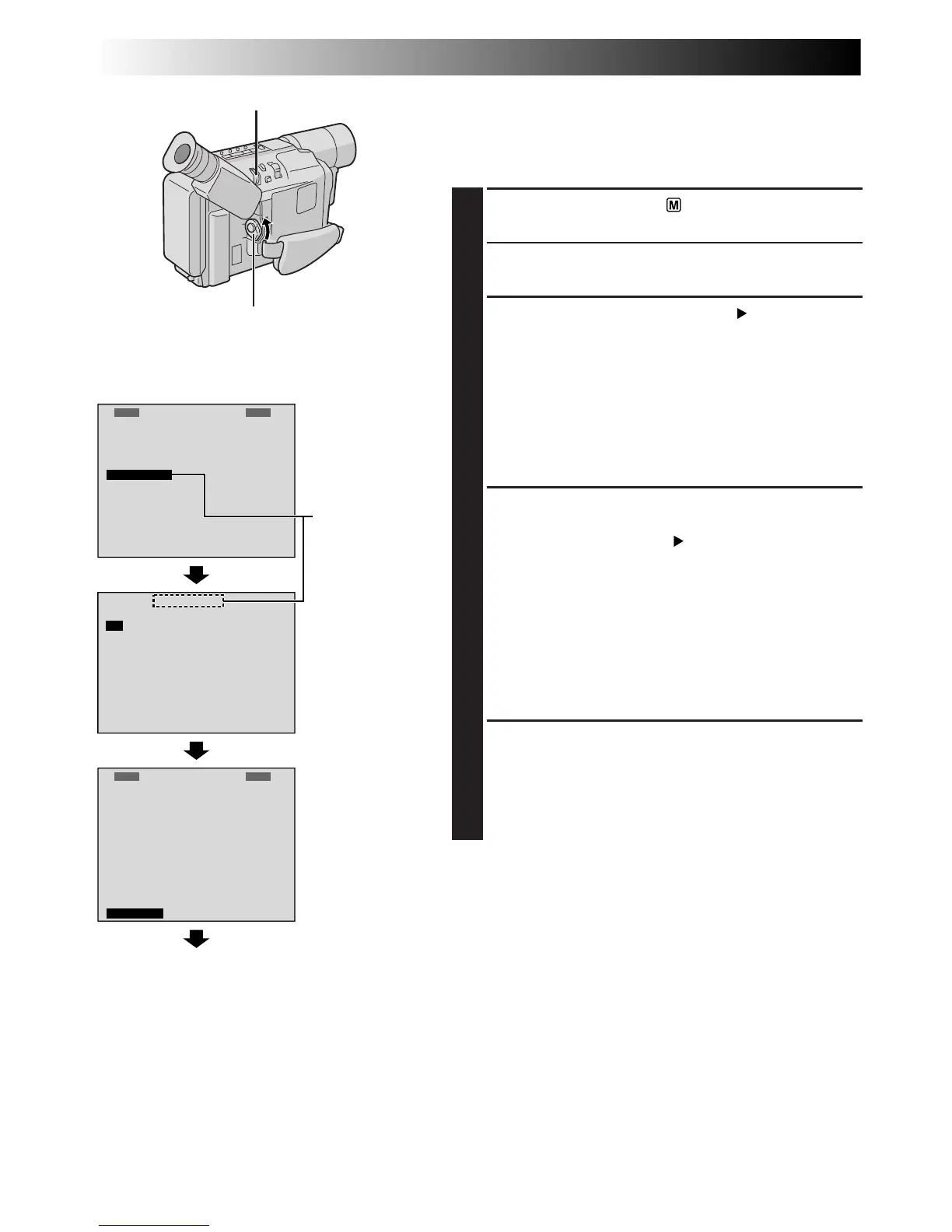
Normal Screen
MENU Wheel
Power Switch
Setting Menu
Display: when a VHS cassette is loaded.
Menu Screen
Recording Format Setting
(GR-SXM330/SX960 only)
Set the recording format according to the format of the
tape used or type of recording you wish to perform.
1
Set the Power Switch to “ ”. The power lamp
comes on.
2
Press the MENU Wheel in. The Menu Screen
appears.
3
Rotate the MENU Wheel to select “ TO SYSTEM
MENU” and press it to display SYSTEM MENU.
If a VHS cassette is loaded . . .
.... rotate the MENU Wheel to select “S-VHS ET”,
then press it. The S-VHS ET Setting Menu
appears.
If an S-VHS cassette is loaded . . .
.... rotate the MENU Wheel to “S-VHS”, then press it.
The S-VHS Setting Menu appears.
4
Rotate the MENU Wheel to set to either of the
parameters, then press it. The Menu Screen reappears
with the highlight bar on “
RETURN”.
In the S-VHS ET Setting Menu,
ON : Records with S-VHS picture quality on a VHS
cassette. This is called Super VHS ET
(Expansion Technology).
OFF: Records in VHS.
In the S-VHS Setting Menu,
ON : Records in S-VHS on an S-VHS cassette.
OFF: Records in VHS on an S-VHS cassette.
5
Press the MENU Wheel in to close the Menu Screen.
•When the S-VHS ET mode is engaged, “S-ET” is
displayed.
•During S-VHS record mode, “S“ is displayed.
•When S-VHS ET or S-VHS recording starts,
“S-VHS REC” is displayed for approx. 3 seconds.
NOTE:
If a cassette is not loaded, “S-VHS” will be displayed in the
Menu Screen.
When an S-VHS
cassette is
loaded: S-VHS
GETTING STARTED
(cont.)


 To Next Page