40
USING REMOTE CONTROL UNIT
(RM-V700U optional)
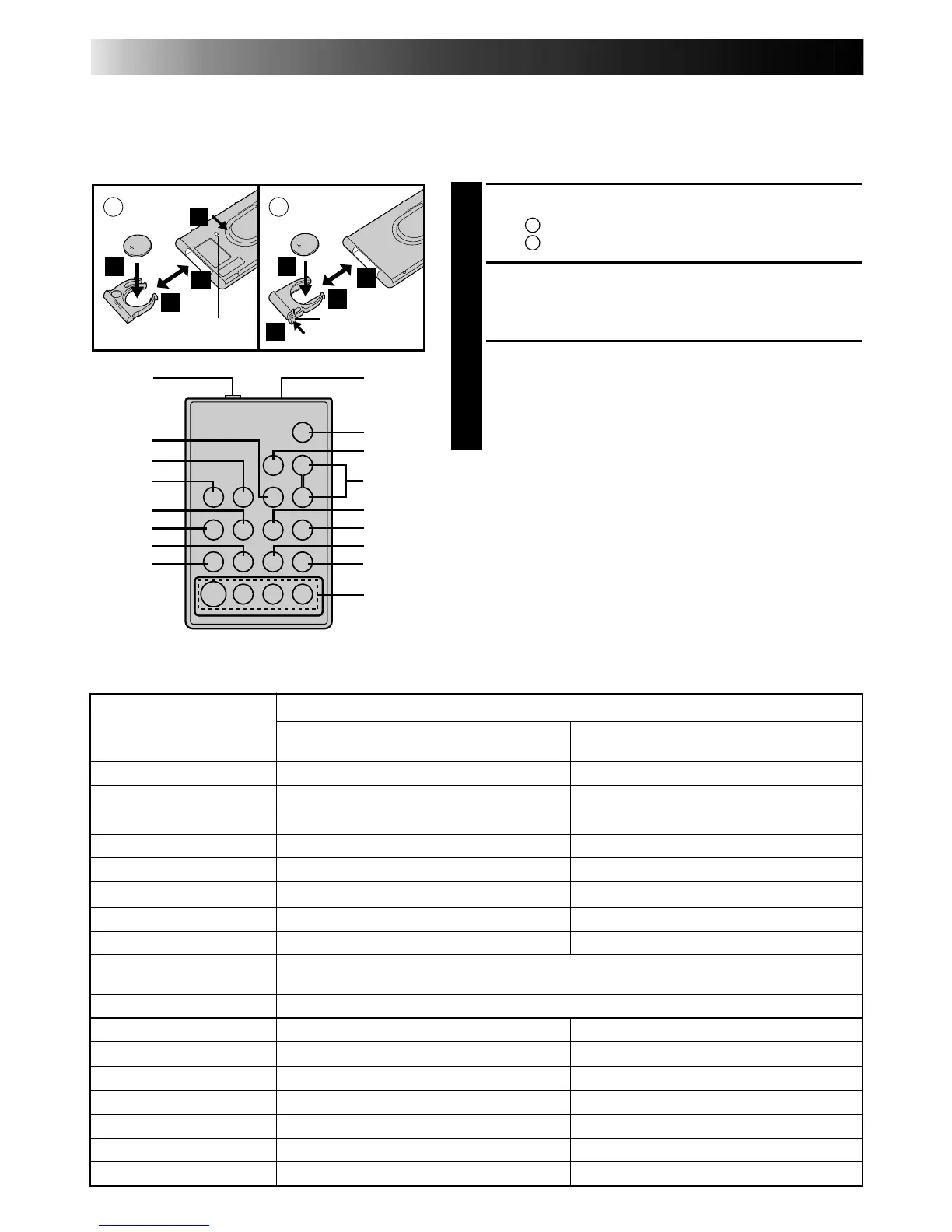
The Full-Function Remote Control Unit can operate this camcorder from a distance as well as the basic
operations (PLAY, STOP, PAUSE, FF, and REW) of your VCR. This remote control unit makes additional
recording functions possible.
BUTTONS
FUNCTIONS
With the camcorder’s power switch set With the camcorder’s power switch set
to “CAMERA”. to “PLAY”.
1 PAUSE IN Connector — Z pg. 38
2 MBR SET Button — Z pg. 37
3 INT. TIME Button Self-Timer/Time-Lapse (Z pg. 41) —
4 REC TIME Button Animation/Time-Lapse (Z pg. 41) —
5 FF Button Retake (forward) (Z pg. 15) FF/FF Shuttle Search (Z pg. 34)
6 REW Button Retake (rewind)/Quick Review (Z pg. 15) Rew/Rew Shuttle Search (Z pg. 34)
7 PAUSE Button — Pause (Z pg. 35)
8 PLAY Button — Playback start (Z pg. 34)
9 Infrared beam
Transmits the beam signal.
transmitting window
0 START/STOP Button Functions same as the Recording Start/Stop button on the camcorder.
! VISS Button Index Code marking (Z pg. 41) —
@ ZOOM (T/W) Buttons Zoom (invariable speed, Z pg. 15) —
# VCR CTL Button — Z pg. 37
$ A.DUB Button — Audio dubbing (Z pg. 43)
% STOP Button — Stop (Z pg. 34)
^ INSERT Button — Insert Editing (Z pg. 42)
& R.A.EDIT Buttons — Z pg. 38
A
B
1
9
2
3
4
5
6
7
8
0
!
#
@
$
%
^
&
1
1
2
3
1
2
3
1
Installing The Battery
PULL OUT BATTERY HOLDER
1
Type
A
: Pull out while sliding the lock hole.
Type
B
: Pinch the release tab and pull out.
INSERT BATTERY
2
Making sure the plus (+) side is up, insert the lithium
battery (CR2025)* into the battery holder.
REPLACE BATTERY HOLDER
3
Insert the battery holder into the remote control unit,
and push the holder until it clicks into place.
* Read the caution concerning lithium batteries
(
Z pg. 2).
Release tab
RM-V700U (optional)
Lock hole


 To Next Page