—11—
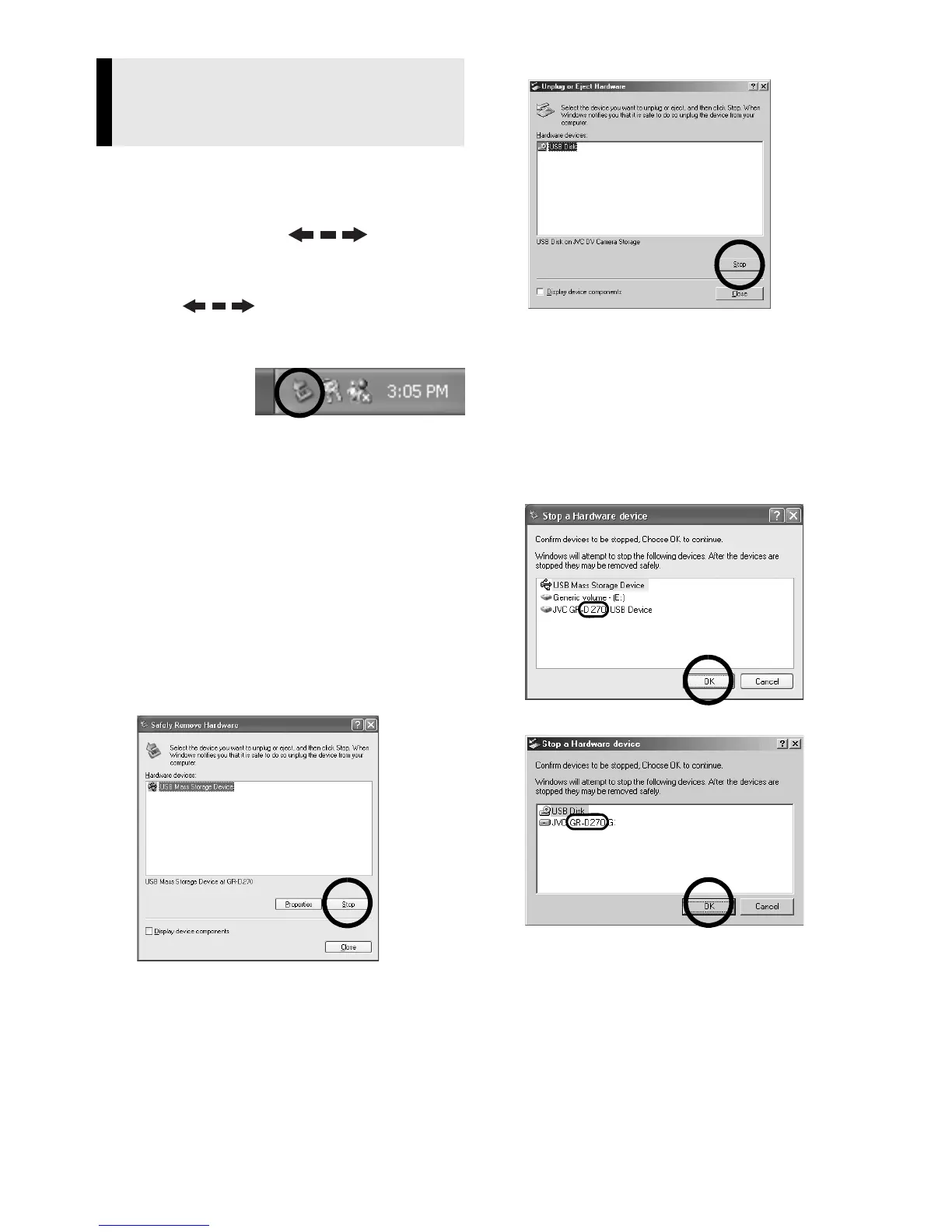
Before loading or unloading memory cards
or turning off the PC, first disconnect the
USB cable and turn off the camcorder.
1 Confirm that “ ” is not
currently displayed on the LCD
monitor of the camcorder.
● If “ ” is currently displayed,
wait until it disappears before
proceeding.
2 Double-
click the
[Safely
Remove Hardware] or [Unplug
or Eject Hardware] icon in the
status bar.
The [Safely Remove Hardware] or
[Unplug or Eject Hardware] dialogue
box appears.
Windows
®
XP: If not, wait a while then
go to step 5.
3 Select [USB Mass Storage
Device] or [USB Disk], and then
click [Stop].
● Windows
®
2000/XP
● Windows
®
Me
The [Stop a Hardware device] dialogue
box appears.
4 Click [OK].
Windows
®
2000/Me: If a message
indicating that the device can be safely
removed appears, click [OK] and then
click [Close].
● Windows
®
2000/XP
● Windows
®
Me
*The model name depends on the
connected camcorder.
5 Disconnect the USB cable.
6 Set the camcorder’s Power
Switch to “OFF”.
The camcorder turns off.
Disconnecting the USB cable
(Windows
®
)


 To Next Page