1-12 (No.YF173)
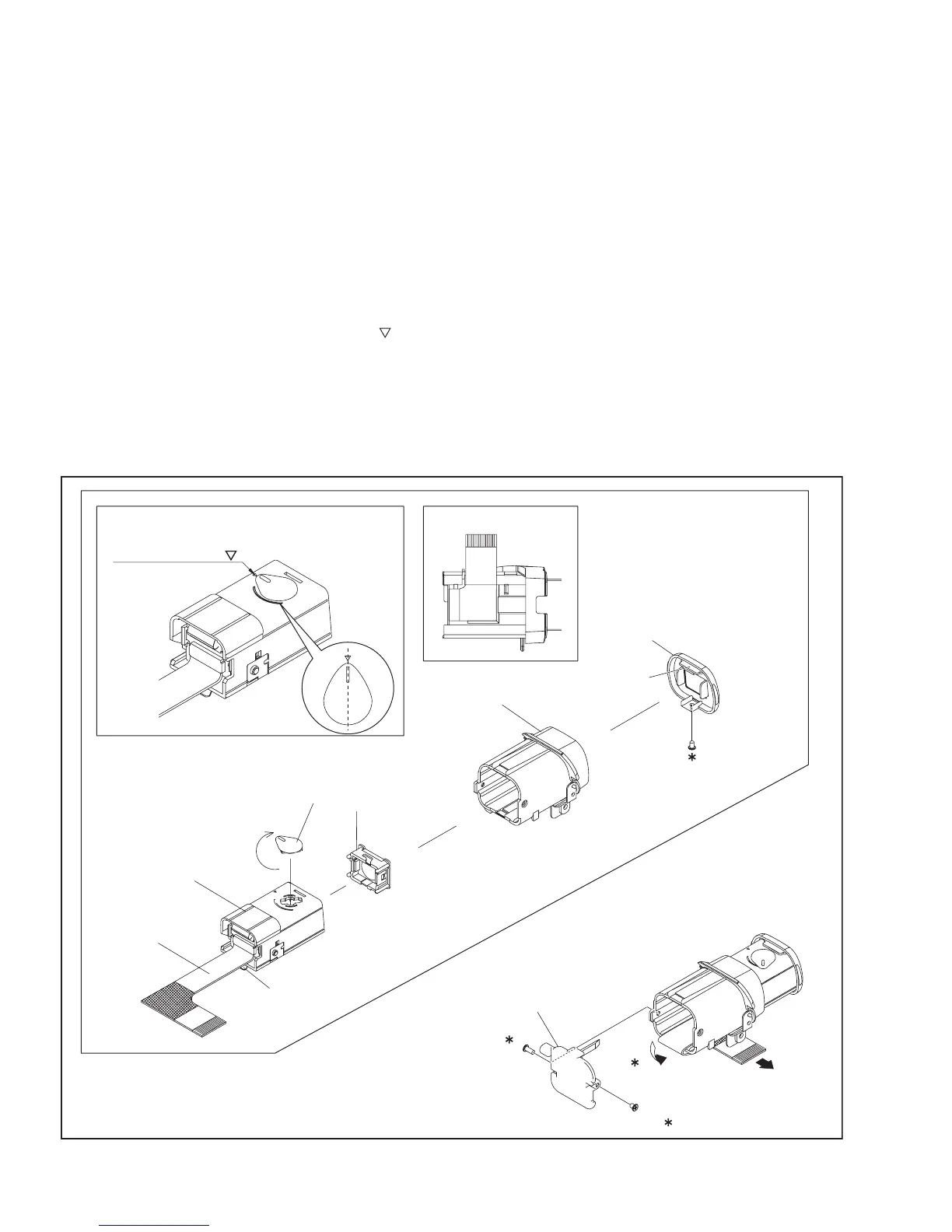
3.2.3 DISASSEMBLY OF [4] VF ASSEMBLY
zBefore disassembly
As the VF ASSY has complicated structure, do not disassem-
ble if not needed.
When assembling, be careful to prevent dust or any foreign
materials from entering inside, and avoid soils on both the
LENS and the SHEET.
zDisassembly procedure
(1) Pull out the CASE(VF) from the VF ASSY, remove the
screw (1), and then remove the EYE CUP.
(2) Remove the screw (2), and remove the BKT.(COVER).
(3) Peel off the FPC, and then remove the CASE(VF).
NOTE4a:
During the procedure, be careful in handling the FPC.
(4) Set the LEVER(VF) to the TRIANGLE MARK( ) of the
CASE(VF), and then remove the LENS ASSY.
NOTE4b:
During the procedure, be careful in handling the parts.
Pay special attention not to damage, soil, or leave fin-
gerprints on the surface.
NOTE4c:
After attaching the LENS ASSY, rotate the LE-
VER(VF) counterclockwise to check the smooth slid-
ing operation of the LENS ASSY.
(5) Press hooks (L4c,d) on both sides of the HOLD-
ER(LCD)to remove the LCD SA from the CASE(VF).
NOTE4d:
During the procedure, be careful not to damage the VF
SWITCH.
NOTE4e:
Refer to Fig. 3-2-4-2 for the disassembly of the LCD
SA, and disassemble the LCD SA if necessary.
During the procedure, be careful to prevent dust or any
foreign materials from entering inside.
NOTE4f:
During the procedure, be careful not to damage the
parts.
Fig.3-2-4-1
0.069Nm(0.7kgfcm)
<NOTE4c> <NOTE4a>
L4b
L4a
2
(S4a)
1
(S4a)
3
(S4b)
NOTE4b
FPC
NOTE4a
bb
a
MARKING
LEVER(VF)
CASE(VF)
LENS ASSY
COVER(SLIDE)
BKT.(COVER)
EYE CUP
TRIANGLE MARK( )


 To Next Page