EN 79
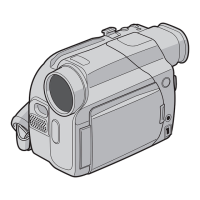
^ Progressive Dial (PROGRESSIVE)
(Z pg. 30, 46)
Turn for Progressive Video Recording or Pro
Snapshot Recording.
& Progressive Button (Z pg. 30, 46)
When this button is pressed, the camcorder starts
Progressive Mode Recording (high resolution).
When pressed during playback, a playback
snapshot is taken.
* OPEN/EJECT switch (Z pg. 14)
Slide the switch down when loading/unloading a
tape.
( Speaker (Z pg. 52)
During playback, the sound can be heard.
) PUSH-OPEN button (Z pg. 14)
Press to open the LCD monitor.
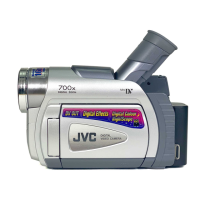
q Power dial (Z pg. 20)
Turning the camcorder on/off, recording or
playback is possible.
w MENU button (Z pg. 33)
Press this button to make the Menu appear.
ON/OFF button (Z pg. 24)
Press and hold this button for more than approx.
1 second to make the indications appear on the
LCD monitor or the viewfinder.
e Function Navigator Dial (Select Dial)
(
Z pg. 24, 33)
Adjusts the brightness of the LCD monitor or
selects the Menu etc. Referred to in this manual
as “Select Dial”.
r START/STOP button (Z pg. 20)
Starts recording or stops recording to make the
camcorder enter the record-standby mode.
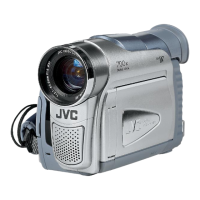
t Viewfinder (Z pg. 17)
Pull out when recording.
1 Zoom switch or volume switch (VOL.)
(Z pg. 26, 52)
Adjusts zoom during recording or the sound
volume during playback.
2 Grip strap (Z pg. 16)
3 Lens hood
4 Tally lamp
Lights during recording.
5 Remote sensor (Z pg. 54)
Receives the signal from the remote control.
When using the remote control, point it at the
remote sensor.
6 Lens cover
Opens when the viewfinder is pulled out or the
LCD monitor is opened fully.
7 Stereo microphone (Z pg. 70)
For use when recording or audio dubbing.
8 External microphone input connector
(MIC) (Stereo) (Z pg. 70)
An optional microphone can be connected.
9 JLIP (Joint Level Interface Protocol)
(DIGITAL STILL) output connector
(
Z pg. 60)
Outputs the digital still image to a personal
computer.
0 EDIT jack (Z pg. 65)
Using an editing cable, connect to the remote
control or VCR.
! RESET button (Z pg. 76)
When a malfunction occurs, press this button
after removing the power supply (battery etc.).
Pressing this button also resets the date/time or
various settings.
@ Stop button (5) (Z pg. 52)
Stops playback of the tape.
# Play/Pause button (6/
4
) (Z pg. 52)
Plays back or stops the tape temporarily.
$ Rewind button (
2
) (Z pg. 52)
Rewinds the tape.
% Fast-Forward button (
3
) (Z pg. 52)
Fast-Forwards the tape.



 To Next Page