EN 5
Master Page: Right
NOTES:
● In order to maintain optimum performance of the camcorder, provided cables may be equipped with one or
more core filter. If a cable has only one core filter, the end that is closest to the filter should be connected to
the camcorder.
● Make sure to use the provided cables for connections. Do not use any other cables.
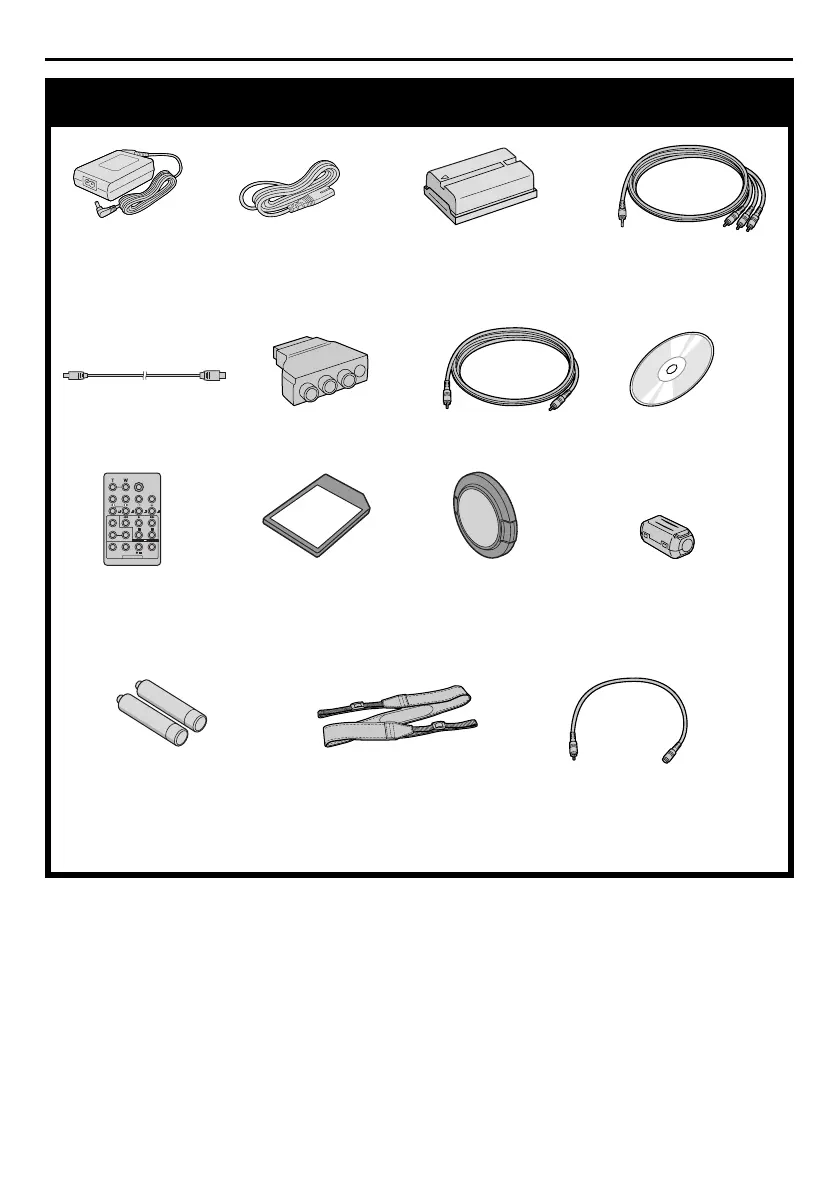
Provided Accessories
● AC Adapter
AP-V13E or AP-V11E
● Power Cord ● Battery Pack
BN-V408U-B
● Audio/Video Cable
(ø3.5 mini-plug to RCA
plug)
● USB Cable ● Cable Adapter ● Editing Cable ● CD-ROM
● Remote Control Unit
RM-V717U
● Memory Card 8 MB
(Already inserted in the
camcorder)
● Lens Cap
(墌 pg. 7 for
attachment)
● Core Filter (for optional
S-Video cable 墌 pg. 6
for attachment)
● AAA (R03) Battery x 2
(for remote control unit)
● Shoulder Strap
(墌 pg. 7 for attachment)
● Audio Cable x 2
(for connection of optional
headphones and external
microphone 墌 pg. 6)
GR-DV700PAL_03Acce.fm Page 5 Wednesday, February 26, 2003 9:13 AM



 To Next Page