50 EN
IN UTS/AV P
OFF–
MDOESOUND
MDOE
12
BIT
ROSYNCH
ODEREC M
COPY
STEREO–
SOUND
1
SP
OFF
–
–
–
–
NRETUR
O.O
RE NEON SC LCD / TV
UAOT
IMETDATE /
T I ME CODE
–
–
– FFO
NRETUR
BEEP
MELODY
NO
TALLY
–
–
DEMO M.ODE – NO
CAM ERSET
NRETUR
MSYSTE
AYDISPL
YMEMOR
VIDEO SOUND MODE
MOD E
MOD E
12
BIT
SYNC ROH
REC
END
COPY
MSYSTE
AYDISPL
YMEMOR
VIDEO INDEX
TCPROTE
DELE ET
DPOF
ATFORM
END
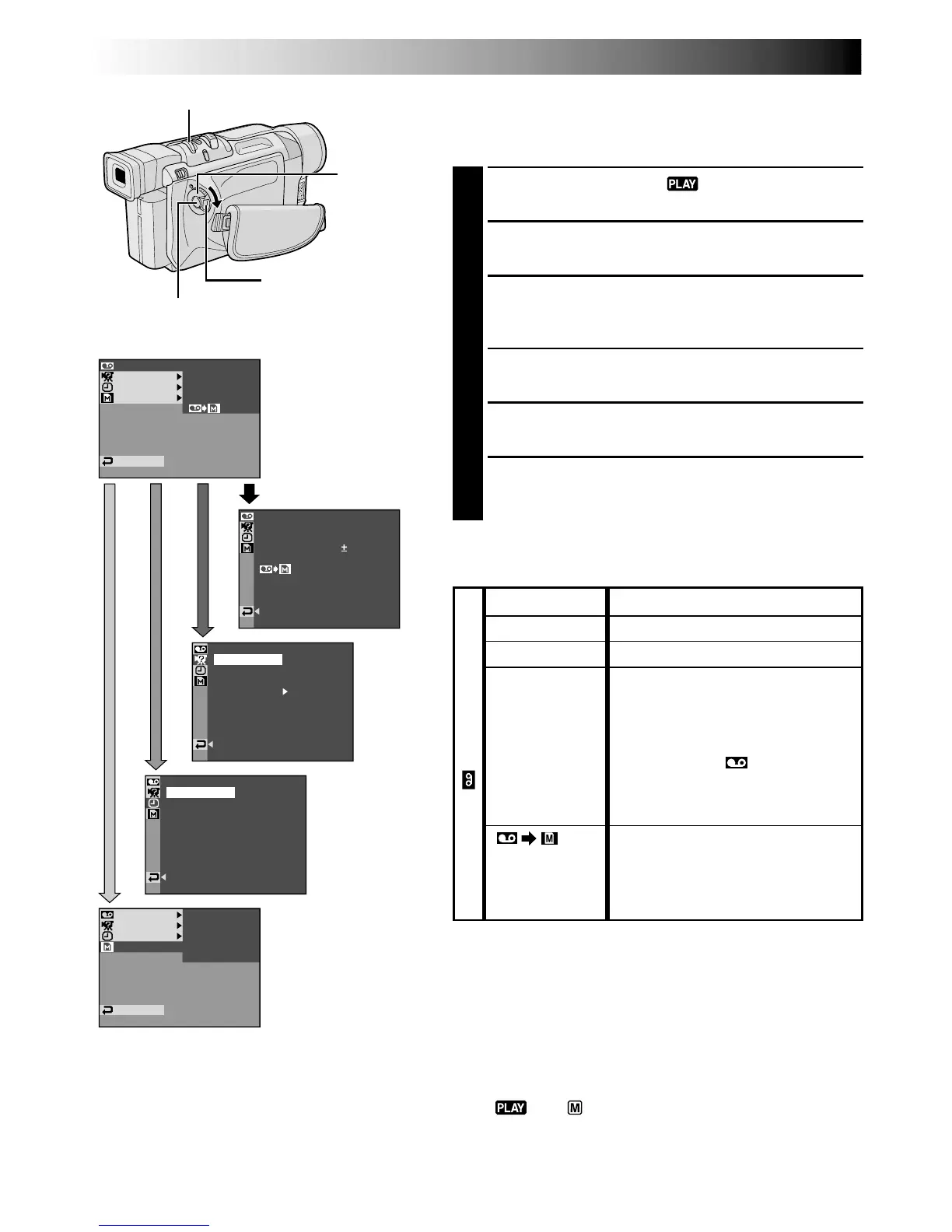
For Playback Menu
The following procedure applies to all except
Synchro
Comp (
墌
pg. 65).
1
Set the Power Switch to “ ” while pressing down
the Lock Button located on the switch.
2
Press the MENU/BRIGHT wheel in. The Menu
Screen appears.
3
Rotate the MENU/BRIGHT wheel to select the desired
function menu, and press it. The selected function
menu appears.
4
Rotate the MENU/BRIGHT wheel to select the desired
function, and press it to display the Sub Menu.
5
Rotate the MENU/BRIGHT wheel to select the
desired parameter and press it. Selection is complete.
6
Rotate the MENU/BRIGHT wheel to select
“
1
RETURN” and press it twice to close the Menu
Screen.
Display
Power
Switch
MENU/BRIGHT Wheel
Lock Button
Recording Start/Stop Button
NOTES:
●
It is also possible to change the ON SCREEN settings by
pressing DISPLAY on the remote control (provided).
●
“REC MODE” can be set when the Power Switch is set
to “ ” or “ ” (
墌
pg. 13, 47).
USING MENUS FOR DETAILED ADJUSTMENT
(cont.)
Menu Screen Explanations
CONTINUED ON NEXT PAGE
墌 pg. 51.
墌 pg. 51.
墌 pg. 65.
Allows you to set the video
recording mode (SP or LP)
depending on your preference
(墌 pg. 13).
It is recommended you use “REC
MODE” in the “ VIDEO” Menu
when using this camcorder as a
recorder during digital dubbing
(墌 pg. 53).
ON: Enables dubbing of images
recorded on a tape to a memory
card (墌 pg. 55).
OFF: Enables snapshots to be taken
during video playback.
SOUND MODE
12BIT MODE
SYNCHRO
REC MODE
COPY
VIDEO



 To Next Page