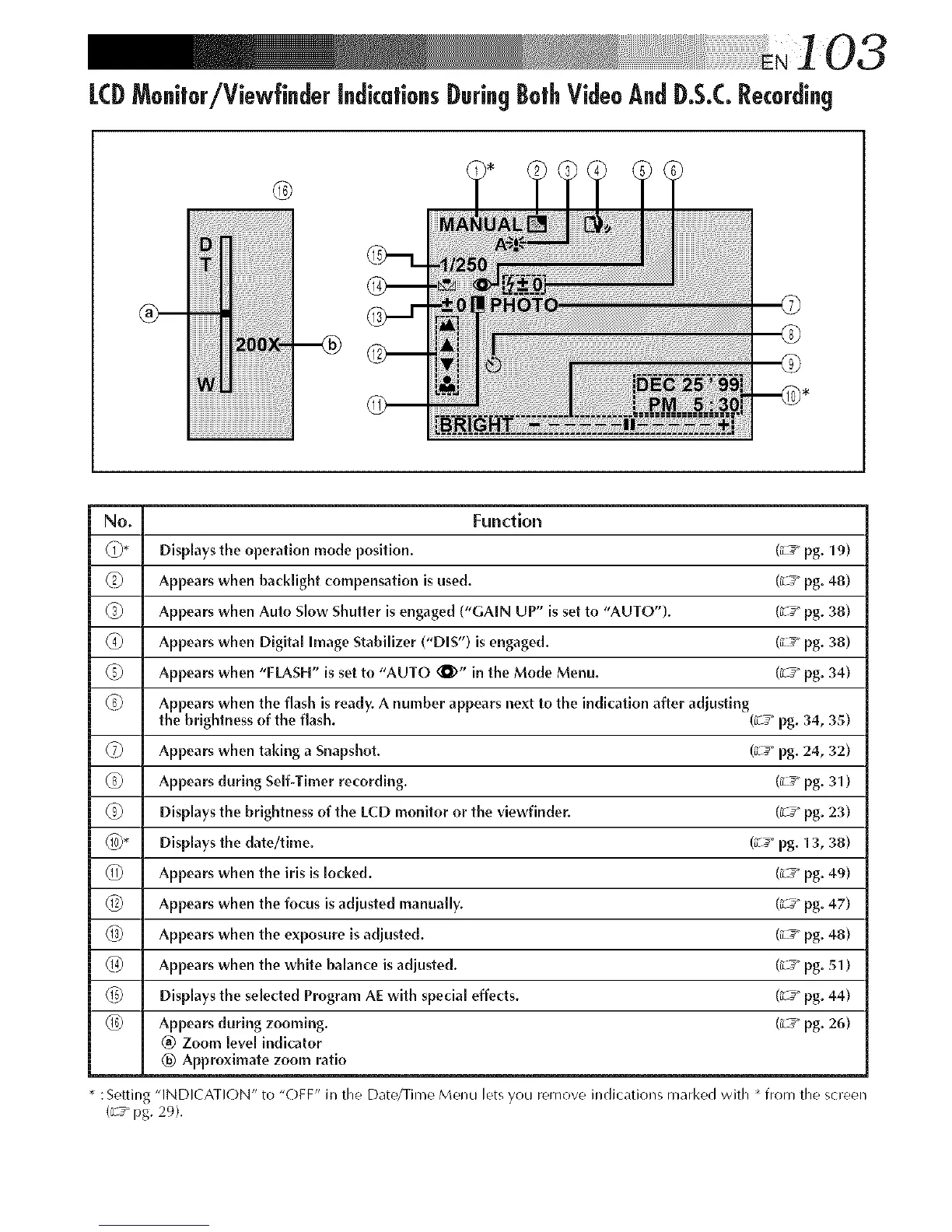
LCDMonitor/Viewfinder indicationsDuringBothVideoAndD.S.C.Recording
®
_iii!iiiii¸_ili!i!:i¸IJiiiiiiiiiiiiiiiiiiiiii'ii_i!iiiiiiiiiiiiiiill
iiiiiiiiiiiiiiiiiiiiiiiiiiiiiiiiiiiiiiiiiiiiiiiiiiiiiiiiiiiiiiiiiiiiiiiiiiiiiiiiiiiiiiiiii
No. Function
(Z)* Displays the operation mode position. (_ _" pg. 19)
6) Appears when backlight compensation is used. (_-_" pg. 48)
(_) Appears when Auto Slow Shutter is engaged ("GAIN UP" is set to "AUTO"). (_-_" pg. 38)
(_ Appears when Digital Image Stabilizer ("DIS") is engaged. (_-7_"pg. 38)
6) Appears when "FLASH" is set to "AUTO (_)" in the Mode Menu. (_-_" pg. 34)
(_ Appears when the flash is ready. A number appears next to the indication after adjusting
the brightness of the flash. (iL__"pg. 34, 35)
(7) Appears when taking a Snapshot. (_-_" pg. 24, 32)
@ Appears during Self-Timer recording. (_-_" pg. 31)
(_) DispLays the brightness of the l-CD monitor or the viewfinder. (_-_" pg. 23)
@* Displays the date/time. (_-7_"pg. 13, 38)
(_) Appears when the iris is locked. (_-_" pg. 49)
@ Appears when the focus is adjusted manually. (_-7_"pg. 47)
@ Appears when the exposure is adjusted. (_-_" pg. 48)
1@ Appears when the white balance is adjusted. (_-7_"pg. 51)
_5) Displays the selected Program AE with specia[ effects. (_-_" pg. 44)
_6) Appears during zooming. (_-_" pg. 26)
@ Zoom [eve[ indicator
® Approximate zoom ratio
* : Setting "INDICATION" to "OFF" in the Date/Time Menu lets you remove indications marl<ed with * from the screen
(_s pg. 29).



 To Next Page