1
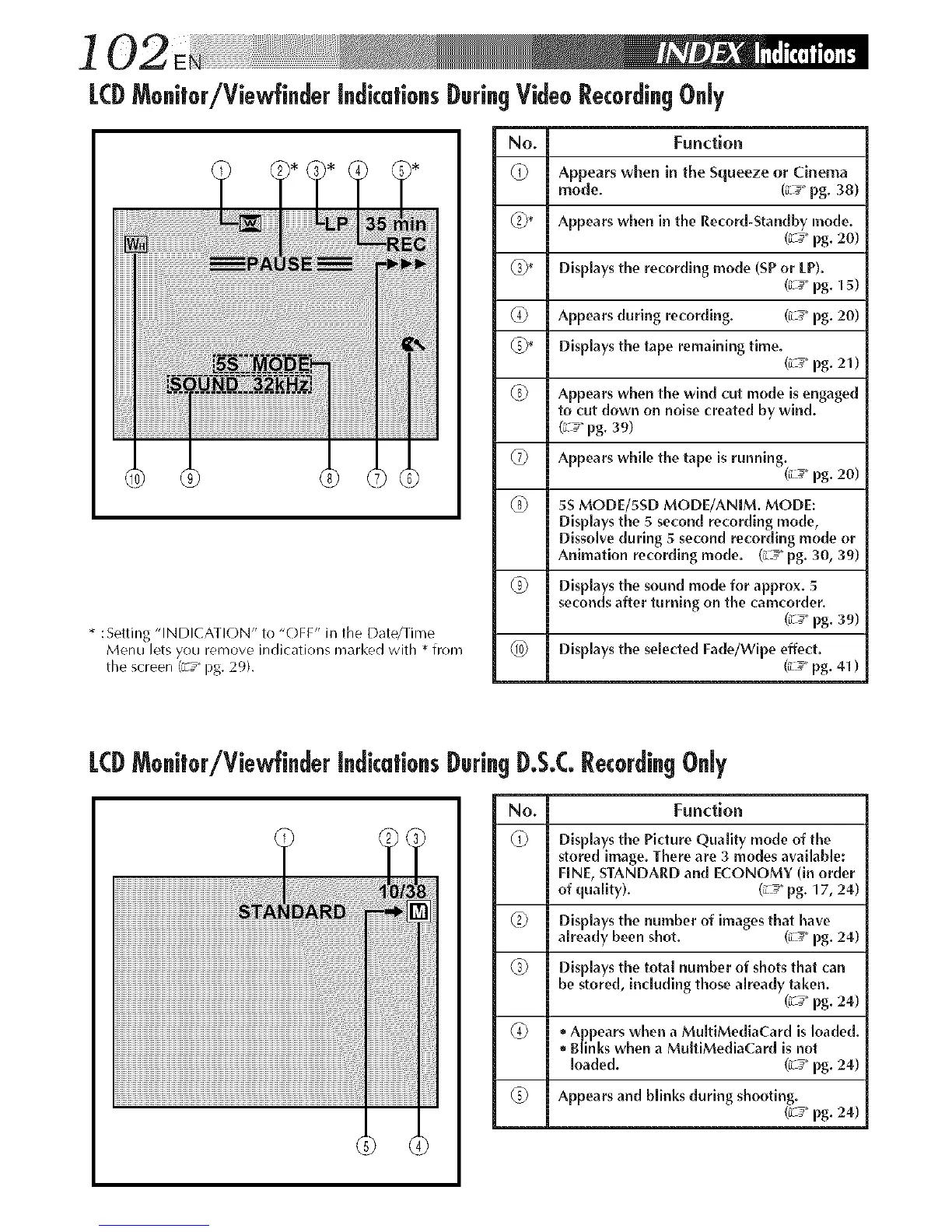
LCDMo.itor/Viewfi.der i.dicatio.sDuri.gVideoRecordi.gO.ly
* :Setting "INDICATION" to "OFF" in the Date/Time
Menu lets you remove indications marked with * from
the screen (z _" pg. 29).
No. Function
Appears when in the Squeeze or Cinema
mode. (iL_" pg. 38)
_2_* Appears when in the Record-Standby mode.
(z _ pg. 20)
_* Displays the recording mode (SP or [P).
(z_ pg. 15)
(_ Appears during recording. (_L_ pg. 20)
_* Displays the tape remaining time.
(L _ pg. 21 )
(_ Appears when the wind cut mode is engaged
to cut down on noise created by wind.
(L_" pg. 39)
_ Appears while the tape is runningii L
20)
pg.
(_ 5S MODE/5SD MODE/ANIM. MODE:
Displays the 5 second recording mode,
Dissolve during 5 second recording mode or
Animation recording mode. (L _" pg. 30, 39)
Displays the sound mode for approx. 5
seconds after turning on the camcorder.
(_ pg. 39)
(_0) Displays the selected Fade/Wipe effect.
(;L_ pg. 41 )
LCDMo@or/Viewfi.der i.dica|io.s Duri.gD.S.CRecordi.gO.ly
i
i' il illi
No. Function
Displays the Picture Quality mode of the
stored image. There are 3 modes available:
FINE, STANDARD and ECONOMY (in order
of quality). (L_" pg. 17, 24)
_ Displays the number of images that have
already been shot. (:d_" pg. 24)
(_ Displays the total number of shots that can
be stored, including those already taken.
(;_ pg. 24)
(_ ° Appears when a MultiMediaCard is loaded.
° Blinks when a MultiMediaCard is not
loaded. (;L__pg. 24)
_ Appears and blinks during shooting.
(L _ pg. 24)



 To Next Page