107
When using the AC Power Adapter/Charger in areas
other than the USA
[] The provided AC Power Adapter/(halger features
automatic voltage selection in the AC range from 1I 0
V to 24[) V.
USiNG HOUSEHOLD AC PLUG ADAPTER
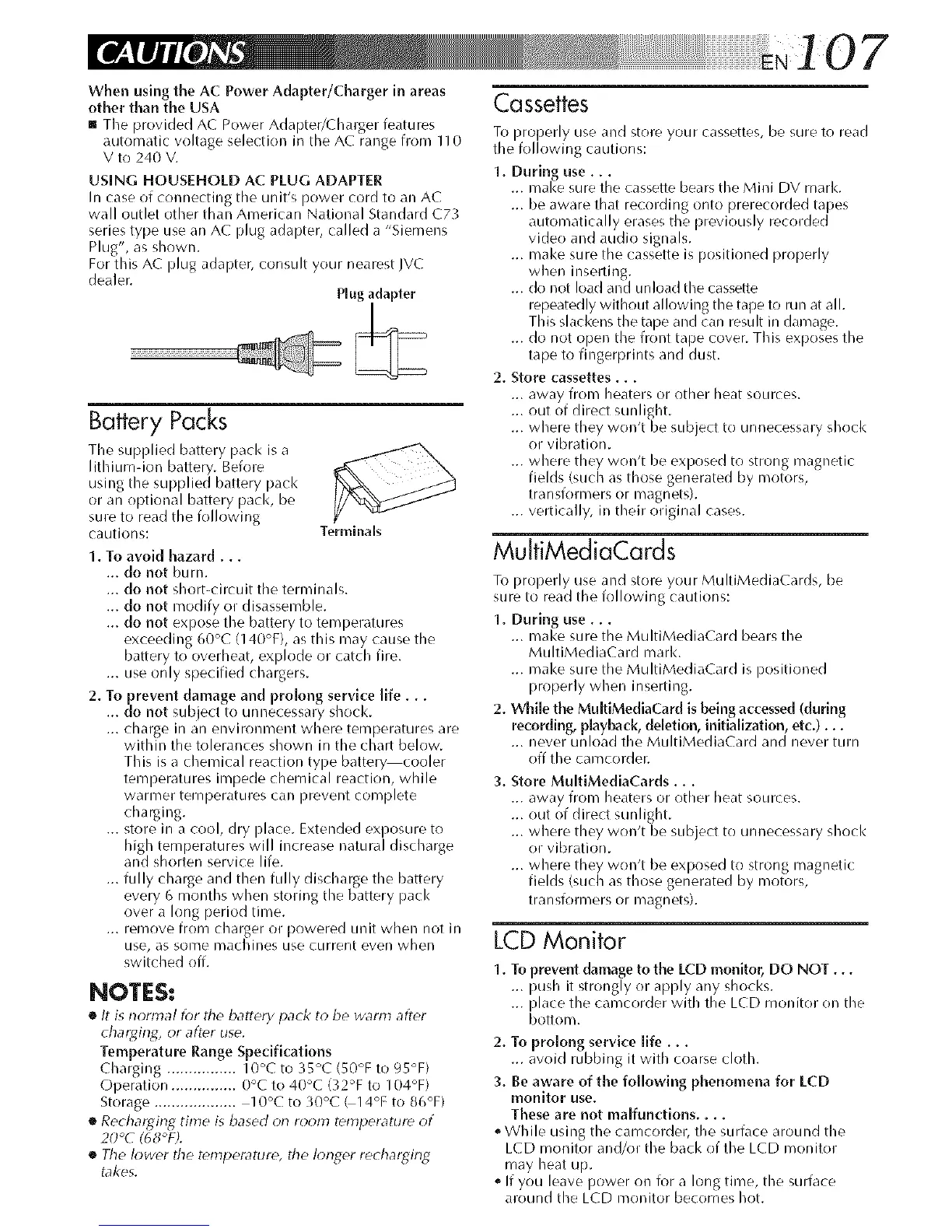
In case of connecting the unit's power cord to an AC
wall outlet other than American National Standard C73
series type Elsean AC plug adapter, called a "Siemens
Plug", as shown.
For this AC plug adapter, consult your nearest JVC
dealer.
Plug adapter
Battery Packs
The supplied battery pack is a
lithium-ion battery. Before
using the supplied battery pack
or an optional battery pack, be
sure to read the following
cautions:
1. To avoid hazard...
... do not burn.
Terminals
... do not short-circuit the terminals.
... do not modify or disassemble.
... do not expose the battery to temperatures
exceeding 60°C (140°F), as this may cause the
battery to overheat, exl-_lode or catch fire.
... use only specified chargers.
2. To prevent damage and pro[ong service life...
... do not subject to unnecessary shock.
... charge in an el]vironl_ent where temperatures are
within the tolerances shown in the chart below.
This is a chemical reaction type batter_cooler
temperatures impede chemical reaction, while
warl_er temperatLires can prevent cocnplete
charging.
... store in a cool, dry place. Extended exposure to
high temperatures will increase natural discharge
and shorten service life.
... fully charge and then fully discharge the battery
every 6 months when storing the battery pack
over a long period time.
... remove from charger or powered LII]it when not Jr]
use, as some cnachines use cLirrent ever] when
switched off.
NOTES:
[] It is r]ormal f_?rthe battery pack to be warm after
chargirlg, or after use.
Temperature Range Specifications
Charging ................ 10°C to 35°C (50°F to 95°F)
Operation ............... 0°C to 40°C (32°F to 104°F)
Storage ................... 10°C to 30°C G14°F to 86°F)
[] Recharging time is based or] room temperature of
20°C (68°F).
[] The lower the temperature, the k?nger rechargirlg
takes.
Cassettes
To properly use and store your cassettes, be sure to read
the following cautions:
1. During use...
... make sure the cassette bears the Mini DV mark.
... be aware that recording onto prerecorded tapes
automatically erases the previously recorded
video and audio signals.
... make sure the cassette is positioned properly
when inselling.
... do not load and unload the cassette
repeatedly without allowing the tape to run at all.
This slackens the tape and can result in damage.
... do not opel] the front tape cover. This exposes the
tape to fingerprints and dust.
2. Store cassettes...
... away from heaters or other heat sources.
... out of direct sunlight.
... where they won't be subject to unnecessary shock
or vibration.
... where they won't be exposed to strong magnetic
fields (such as those generated by motors,
transformers or magnets).
... vertically, in their original cases.
MulfiMediaCards
To properly use and store your MultiMediaCards, be
sure to read the following cautions:
1. During use.,.
... make sure the MultiMediaCard bears the
MultiMediaCard mark.
... make sure the MultiMediaCard is positioned
properly when inserting.
2. While the MultiMediaCard is being accessed (during
recording, playback, deletion, initialization, etc.)...
... never unload the MultiMediaCard and never turn
off the camcorder.
3. Store MultiMediaCards...
... away from heaters or other heat sources.
... out of direct sunlight.
... where they won't be subject to unnecessary shock
or vibration.
... where they won't be exposed to strong magnetic
fields (such as those generated by motors,
transforcners or magnets).
LCD Monitor
1. To prevent damage to the LCD monitor, DO NOT...
... push it strongly or apply any shocks.
... place the camcorder with the LCD monitor on the
bottom.
2. To prolong service life...
... avoid rubbing it with coarse cloth.
3. Be aware of the following phenomena for LCD
monitor use.
These are not maffunctions ....
o While using the camcorder, the surface around the
LCD monitor and/or the back of the LCD monitor
may heat up.
o If you leave power on for a long time, the surface
around the LCD monitor becomes hot.


 To Next Page
 Loading...









