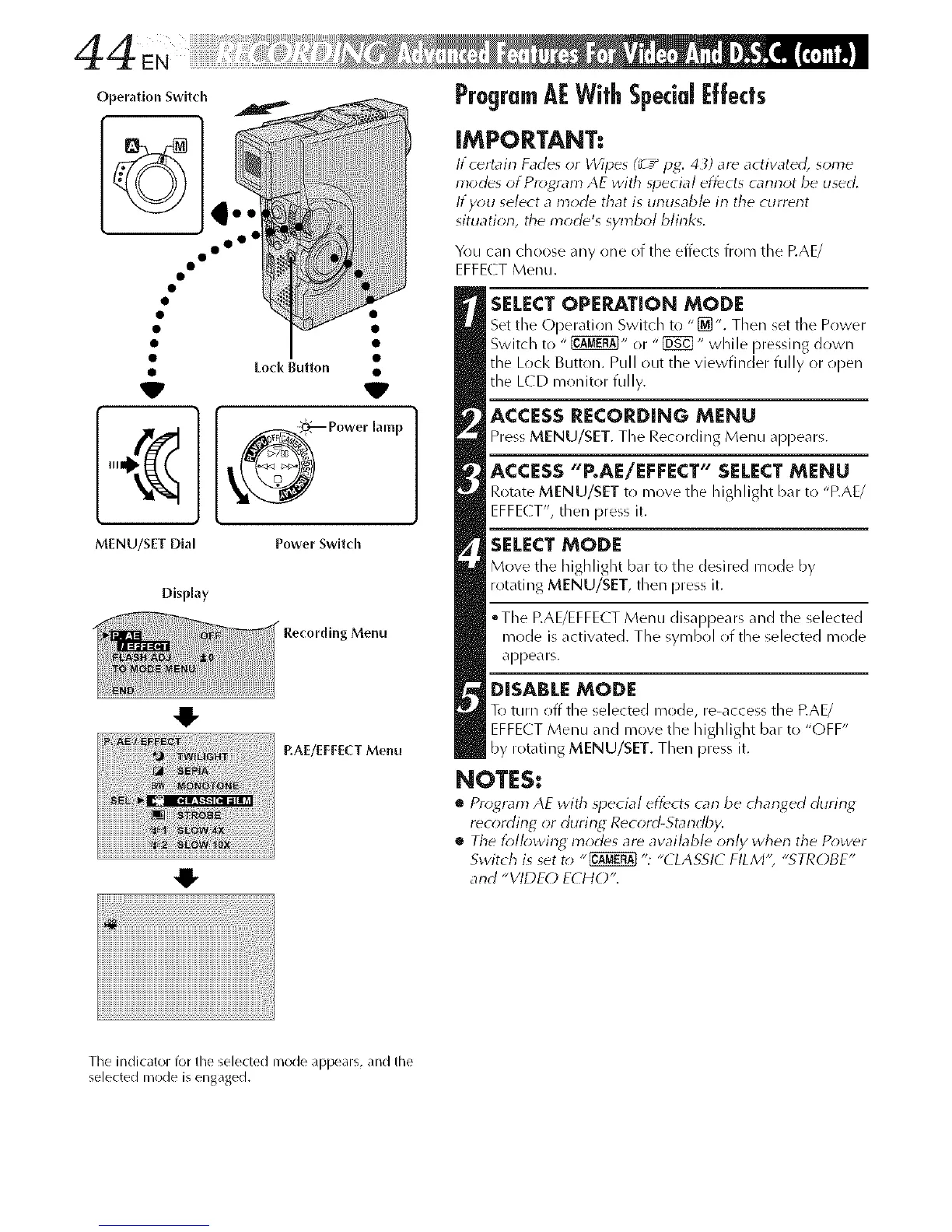
Operation Switch
° oo°
MENU/SET Dial Power Switch
DispNay
41-
O
Menu
RAE/EI:EECT Menu
ProgramAFWithSpecial|:fleets
IMPORTANT:
lf c_rtain Fades <Jr Wipes (_ T_Hg: 43) are actiw_ted, some
modes of Program AE with _pecia/ effects cannot be used,
If y_>u select a mode that is unusable in the current
situatiorl, the n'lode's symbol blinks.
You can choose any one of the effects from the P.AE/
EFFECT Menu.
SELECT OPERATION MODE
Set the Operatior/Switch to "[_]". Then set the Power
Switch to " _" or "_ " while pressing down
the Lock Button. Pull out the viewfinder fully or open
the L(D monitor fully.
ACCESS RECORDING MENU
Press MENU/SET. The Rec_rding Menu appears.
ACCESS "P.AE/EFFECT" SELECT MENU
Rotate MENU/SET to move the highlight bar to "P.AE/
EFFE( T', then press it.
SELECT MODE
Move the highlight bar to the desired mode by
rotating MENU/SET, then press it.
• The EAE/EFFECT Menu disappears and the selected
mode is activated. The symbol of the selected mode
appears.
DISABLEMODE
To turn _ff the selected mode, re-access the P.AE/
EFFECT Menu and move the highlight bar to "OFF"
by rotating MENU/SET. Then press it.
NOTES:
• Program AE with _pecia/effects carl be charlged during
rec_rding or during Record-Standby.
• The lbllowing modes are awfflable only when the Po_,uer
Switch is set t_* "_ ": "(LASSI( FILM'; "STROBE"
and "VIDEC) ECHO",
Tile indicator for tile selected nlode appears, and the
selected nlode is engaged.



 To Next Page