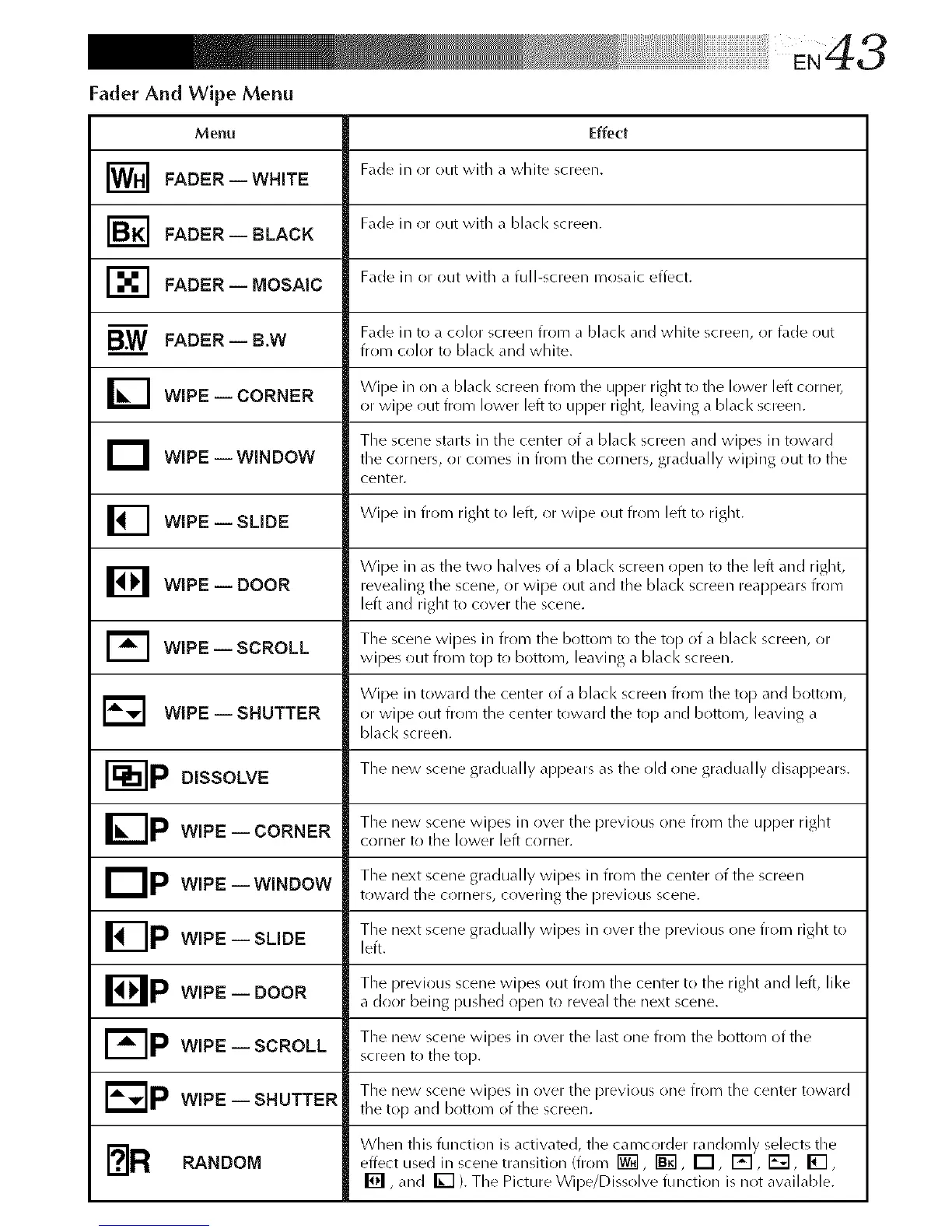
Fader And Wipe Menu
Effect
Fade in or out with a white screen.
Fade in or out with a black screen.
Fade in or out with a full-screen mosaic effect.
Menu
I_1 FADER--WHITE
I_] FADER-- BLACK
r-_ FADER-- MOSAIC
B.W FADER--B.W
I_I WIPE-- CORNER
D WIPE--WINDOW
WIPE -- SLIDE
WIPE -- DOOR
WIPE -- SCROLL
WIPE -- SHUTTER
Fade in to a color screen from a black and white screen, or fade out
from color to black and white.
Wipe in on a blacl< screen from the upper right to the lower left corner,
or wipe out from lower left to upper right, leaving a blacl< screen.
The scene starts in the center of a black screen and wipes in toward
the corners, or comes in from the corners, gradually wiping out to the
center.
_l Wipe in from right to left, or wipe out from left to right.
B Wipe in as tile two halves of a blacl< screen open to tile left and right,
revealing the scene, or wipe out and tile black screen reappears from
left and right to cover the scene.
1_ The scene wipes in from tile bottom to the top of a blacl< screen, or
wipes ()Lit from top to bottom, leaving a black screen.
Wipe in toward the center of a black screen from the top and bottom,
E_ or wipe out from the center toward the top and bottom, leaving a
black screen.
r --IP The new scene gradually api)ears as the old one gradually disal)pears.
DISSOLVE
IZ-Ip The new scene wipes in over the previous one from the upper right
WIPE CORNERi
corner to tile lower left corner.
liP The next scene gradually wipes in from the center of the screen
WIPE WINDOW
i
toward tile corners, covering the previous scene.
The next scene gradually wipes in ()vet tile previous one from right to
WIPE -- SLIDE left.
Bp The previous scene wipes ()Lit from the center to the right and left, like
WIPE DOOR
i
a door being pushed open to reveal the next scene.
I- IP The new scene wipes in ()vet the last one from the bottom of the
WIPE SCROLLi
screen to tile top.
The new scene wipes in ()vet the previous one from the center toward
WIPE -- SHUTTER tile top and bottom of the screen.
[?IR When this function is activate{], the camcorder randomly selects theRANDOM effect used in scene transition (from _, _, _, _, _, _,
[] , and _ ). The Picture Wipe/Dissolve function is not available.



 To Next Page