iii ! i ii ii ii ii ii ii ii ii ii ii ii ii ii ii ii ii ii ii ii ii ii ii ii ii ii ii ii ii ii ! !iiEN 4 7
Operation Switch
oo o°
V
MENU/SET Dial
Display
MANUAL FOCUS
Power [amp
Power Switch
Recording Menu
%
NOTE:
Y_)u _h_mld alr_ndy have mad_ the necessary viewfind_r
adjustmerlts (_/ iJ_, 12), If you have riot, cl_; so bef_*re
continuing,
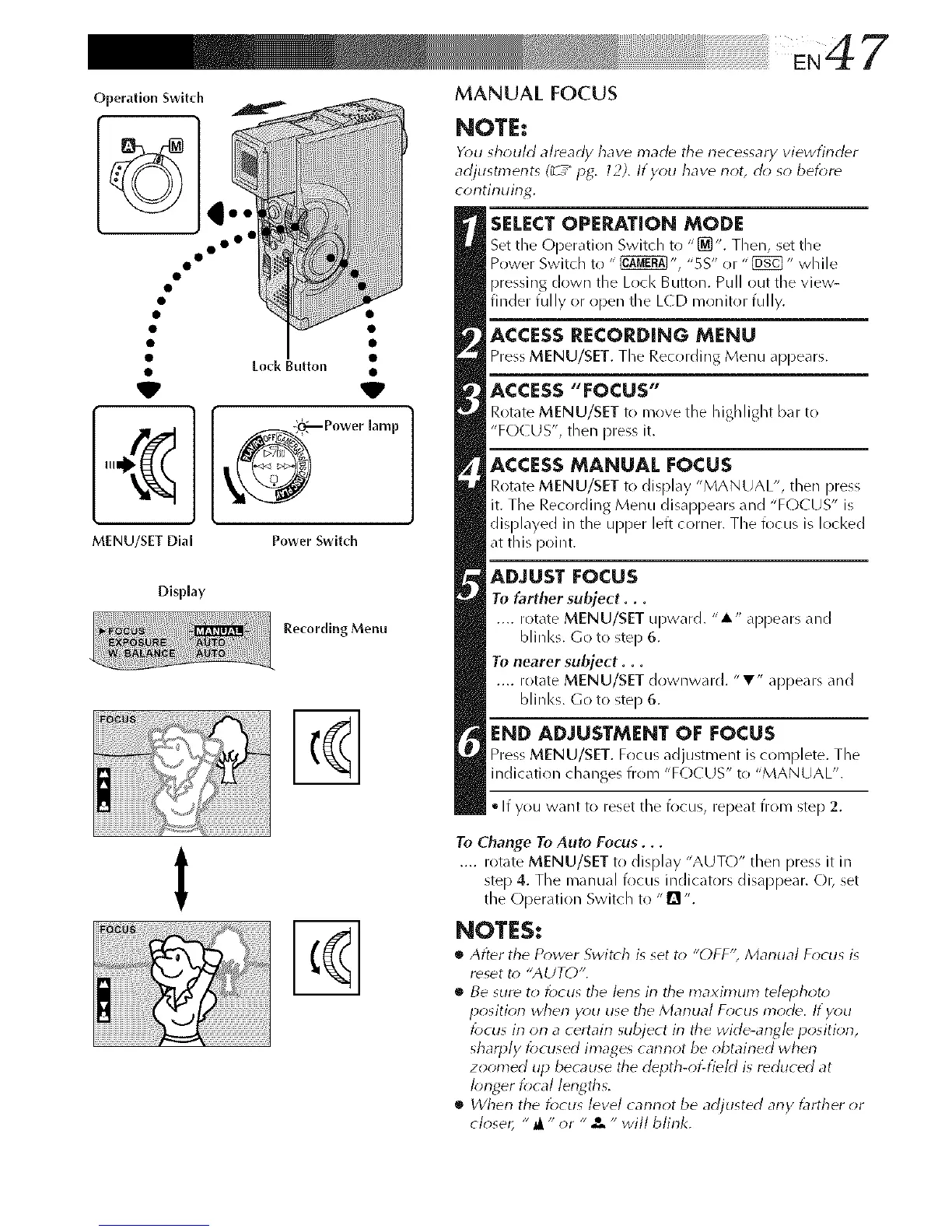
SELECT OPERATION MODE
Set the C_per,_tion Switch to "_". Then, set Lhe
Power Switdl to " _ ", "5S" or "_" while
pressing down the Loci< Button. Pull out tile view-
finder fully or open the L(D monitor fully.
ACCESS RECORDING MENU
Press MENU/SET. The Recording Menu appears.
ACCESS"FOCUS"
Rotate MENU/SET to move the highlight bar to
"FO( US', then press it.
ACCESSMANUAL FOCUS
Rotate MENU/SET to display "MANUAL", then press
it. The Recording Menu disappears and "FOCUS" is
displayed in the upper left corner. The focus is locked
at this point.
ADJUST FOCUS
To farther subject...
.... rotate MENU/SET upward. "A" appears and
blinks. Go to step 6.
To nearer subject...
.... rotate MENU/SET downward. "T" appears and
blinks. Go to step 6.
END ADJUSTMENT OF FOCUS
Press MENU/SET. Focus _djustment is complete. The
indication changes from "FC)CUS" to "MANUAL".
• If you want to reset the focus, repeat from step 2.
t
%
To Change To Auto Focus...
.... rotate MENU/SET to display "AUTO" then pro% it in
step 4. The manual focus indicators disappear. O1_ set
the Operation Switch to "1_ ".
NOTES:
• After tile P_)w_r Switch is set t_) "()FF'; Manual F_cus is
reset t_) "AUTO",
• Be sure to locus tile I_ns in the maximum telephoto
position when y_)u use the Manual F_*cus mode. If you
f_)cus irl orl a certairl subject irl the wide-angle positiorl,
sharply f_)cused images carlrlot be obtairled whorl
zoomed up because tile depth-of-field is reduced at
I_;nger f_cal lengths.
• When the focus level carlnot be adjusted any _lrther or
closer, "_ " or " x - will blink.



 To Next Page