Operation Switch
000 Oe
MENU/SET Dial
Display
_posure control indicator
o_ Power lamp
Power Switch
Recording Menu
To darken the image
%
%
To bdghten the image
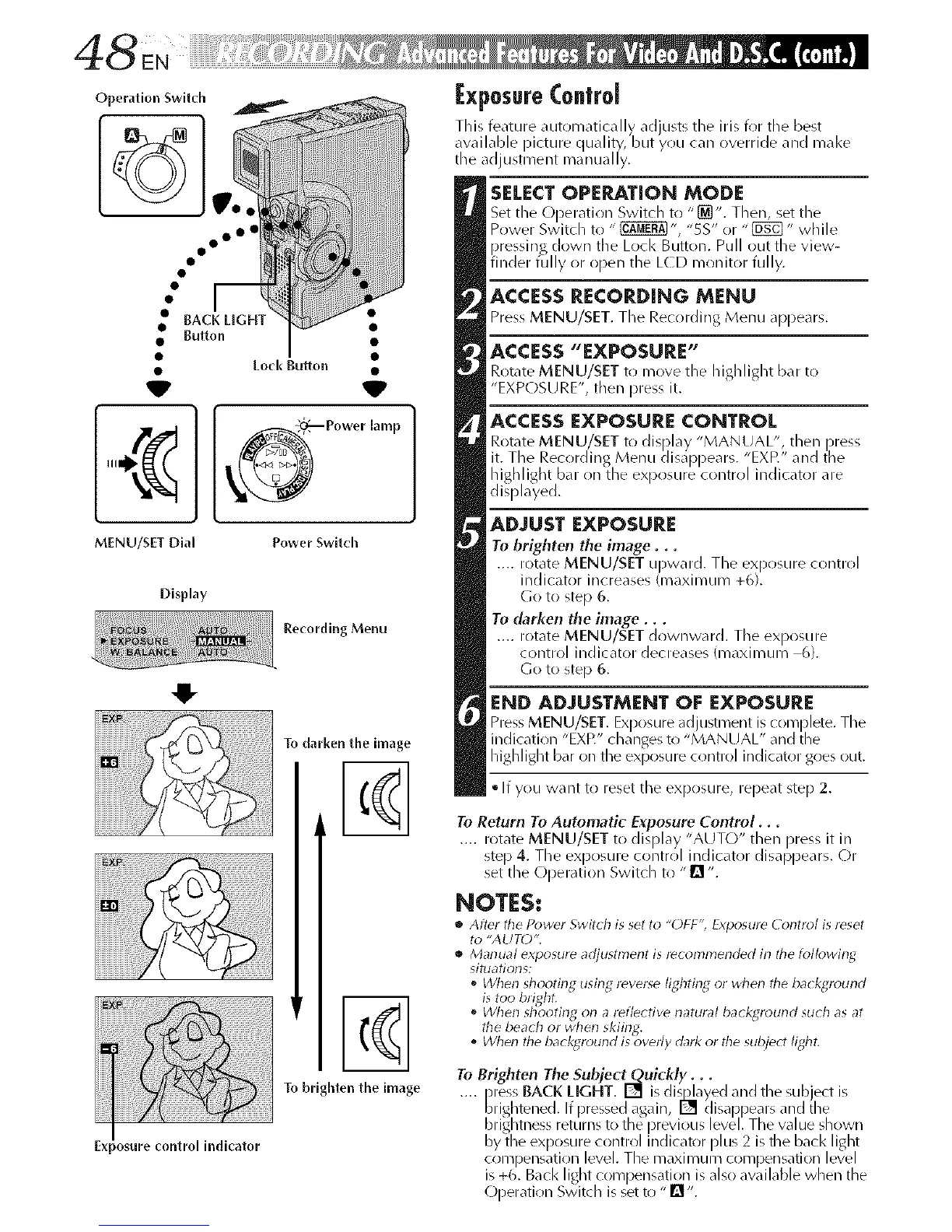
l:xposureControl
This feature automatically ad usts tile iris for the best
available )icture c uality, but you can override and mal<e
t Le adjustment manua ly.
SELECTOPERATION MODE
Set the ODeratirln Switch to "[]". Then, set the
Power Switch to " _", "5S" or "_" while
)ressing down tile Lock Button. Pull out the view-
fincerfu yoropentleL(Dmonitorfu y.
ACCESS RECORDING MENU
Press MENU/SET. The Recording Menu appears.
ACCESS "EXPOSURE"
Rotate MENU/SET to move the highlight bar to
"EXPOSU RE", then Dress it.
ACCESS EXPOSURE CONTROL
Rotate MENU/SET to display "MANUAL", then press
it. The Recording Menu disa ))ears. "EXP." and tile
highlight bar on the ex )osure control indicator are
displayed.
ADJUST EXPOSURE
Tu brighten the image...
.... rotate MENU/SET upward. The ex )osure control
inc icator increases (maximum +6.
(3o to steD 6.
To darken the image...
.... rotate MENU/SET downward. TILe exl)osure
control indicator decreases (maximum 6).
Go to ste D 6.
END ADJUSTMENT OF EXPOSURE
Press MENU/SET. Ex _osure adjustment is corn )lete. TILe
incication "EXP." clanges to "MANUAL" ant t2e
highlight bar on the exposure control indicator goes out.
• If you want to reset the exposure, repeat step 2.
To Return To Automatic Exposure Control...
.... rotate MENU/SET to display "AUTO" then press it in
ste) 4. The ex )r)sure contrr)l indicator disa ))ears. (-)r
set tie Oi)eration Switcl to "[] ".
NOTES:
• After the Power Switch is set to "OFF", Exposure Control is reset
to "AUTO".
• Manual exlaosure adjustment is recommended in the followin_d
situatiolls:
• When shooting using reverse lighting or when tile background
is too bright.
When shooting on a reflective natural ba( kground su( h as at
the beach or when skiing.
o When tile background is overly dark or the subjec! light.
To Brighten The Subjec
.... _ress BACK LIGHT. and the subject is
brightened. If pressed again, _ (llsappears and the
bnghtness returns to the i)revlous level. The value shown
by the ex )osure control indicator )lus 2 is the bacl< light
corn )ensation level. The maximum corn )ensation level
is +6. Back light corn )ensation is also available when the
(-)peratir)n Switch is set to "[]".


 To Next Page
 Loading...









