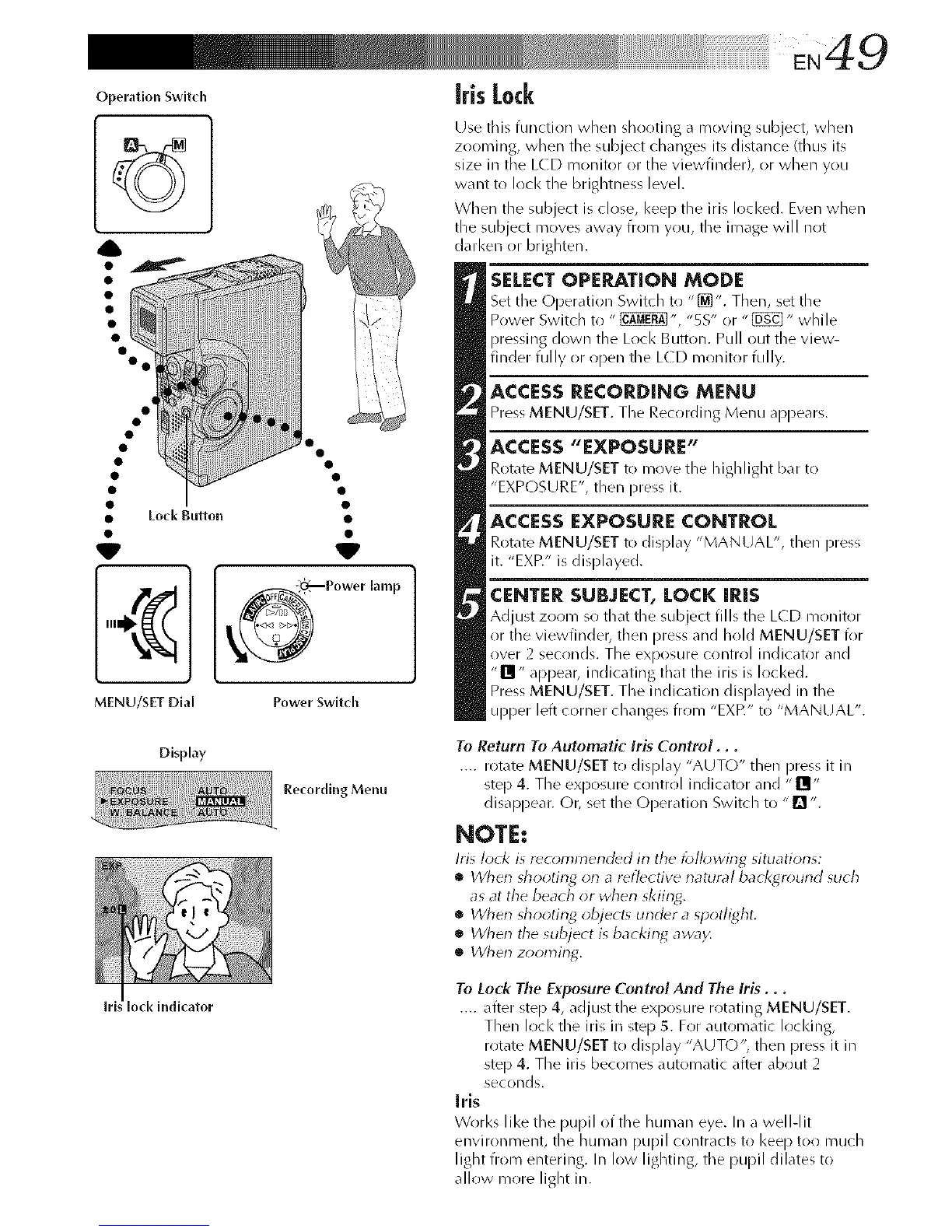
OperationSwitch
MENU/SET Dial
Display
lock indicator
Power Switch
Recording Menu
iris Lock
Use this function when shooting a moving subject, when
zooming, when the subject changes its distance (thus its
size in the LCD monitor or the viewfinder), or when you
want to lock the brightness level.
When the subject is close, keep the iris locked. Even when
the subject moves away from you, the image will not
darken or brighten.
SELECT OPERATION MODE
Set the Operation Switch to "[_". Then, set the
Power Switch to " _", "5S" or "_" while
pressing down the Lock Button. Pull out the view-
finder fully or open the L(D monitor fully.
ACCESS RECORDING MENU
Press MENU/SET. The Recording Menu appears.
ACCESS "EXPOSURE"
Rotate MENU/SET to move the highlight bar to
"EXPOSURE", then press it.
ACCESS EXPOSURE CONTROL
Rotate MENU/SET to display "MANUAL", then press
it. "EXff" is displayed.
CENTER SUBJECT, LOCK IRiS
Adjust zoom so that the subject fills the LCD monitor
or the viewfinder, then press and hold MENU/SET for
over 2 seconds. The exposure control indicator and
"Ill" appear, indicating that the Ms is locked.
Press MENU/SET. The indication displayed in the
upper left corner changes from "EXP." to "MANUAL".
To Return To Automatic Iris Control...
.... rotate MENU/SET to display "AUTO" then press it in
step 4. The exposure contrr!l indicator and "II;
disappear. Or, set the (-)peration Switch to "n ".
NOTE:
Iris lock is r_commend_d in tile lbll_wing situations:
• Wherl shooting orl a reflective rlatural bacl<gr_)und such
as at the beach or wherl skiing.
• When shooting object_ under a spotlight,
• Wher_ the subject is backin_ away,
• When zooming.
To Lock The Ex,posure Control And The Iris...
.... after step 4, adjust the exposure rotating MENU/SET.
Then lock the iris in step 5. For automatic loci<ins,
rotate MENU/SET to display "AUTO", then press it in
step 4. The iris becomes automatic after about 2
seconds.
Iris
Works like the pupil of the human eye. In a well-lit
environment, the human pupil contracts to keep too much
light from entering. In low lighting, the pupil dilates to
allow more light in.



 To Next Page