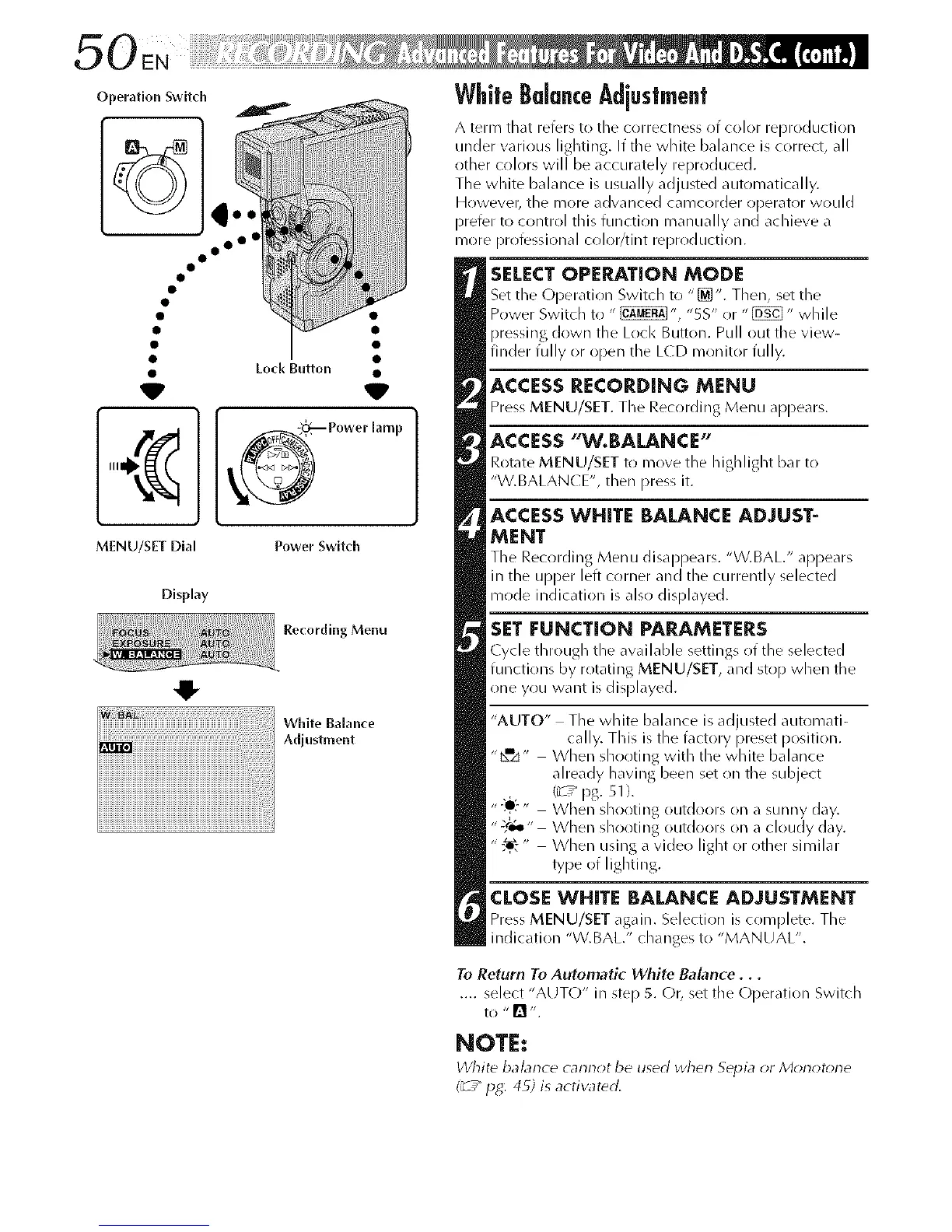
Operation Switch
° oo°
W
MENU/SET Dial
Display
Recording Menu
White Balance
Adjustment
WhiteBalanceAdjustment
A term that refers to tile correctness of color reproduction
under varirlus lighting. If tile white balance is correct, all
other colors will be accurately reproduced.
The white balance is usually adjusted automatically.
Howevel; the more advanced camcorder operator would
prefer to control this function manually and achieve a
more professional color/tint reproduction.
SELECTOPERATION MODE
Set the L)[)eratirlr/ Switch to "_". Then, set the
Power Switch to " _", "5S" or "[E_" while
pressing down the Lock Button. Pull out the view-
finder fully or open the L(D monitor fully.
ACCESSRECORDING MENU
Press MENU/SET. The Recording Menu appears.
ACCESS"W.BALANCE"
Rotate MENU/SET to move the highlight bar to
"W.BALAN(E", then press it.
ACCESS WHITE BALANCE ADJUST-
MENT
The Recording Menu disappears. "W.BAL." appears
in the upper left corner and the currently selected
mode indication is also displayed.
SET FUNCTION PARAMETERS
Cycle through the available settings of the selected
functirlns by rotating MENU/SET, and stop when tile
one you want is displayed.
"AUTO" The white balance is adjusted automati-
cally. This is the factory preset position.
"bmzJ" When shooting with the white balance
already having been set on the subject
(_7_ pg. 51 ).
"-:e?, When shooting outdoors on a sunny day.
";,r_" When shooting outdoors on a cloudy day.
" When using a video light or other similar
type of lighting.
CLOSE WHITE BALANCE ADJUSTMENT
Press MENU/SET again. Selection is c(implete. The
indication "W.BAL." changes to "MANUAL".
To Return To Automatic White Balance...
.... select "AUTO" in step 5. C)r, set tile Operation Switch
to "[] ".
NOTE:
White balance cannot be used wherl Sepia or Morlot_ne
(_7" pg: 49; is activated.



 To Next Page