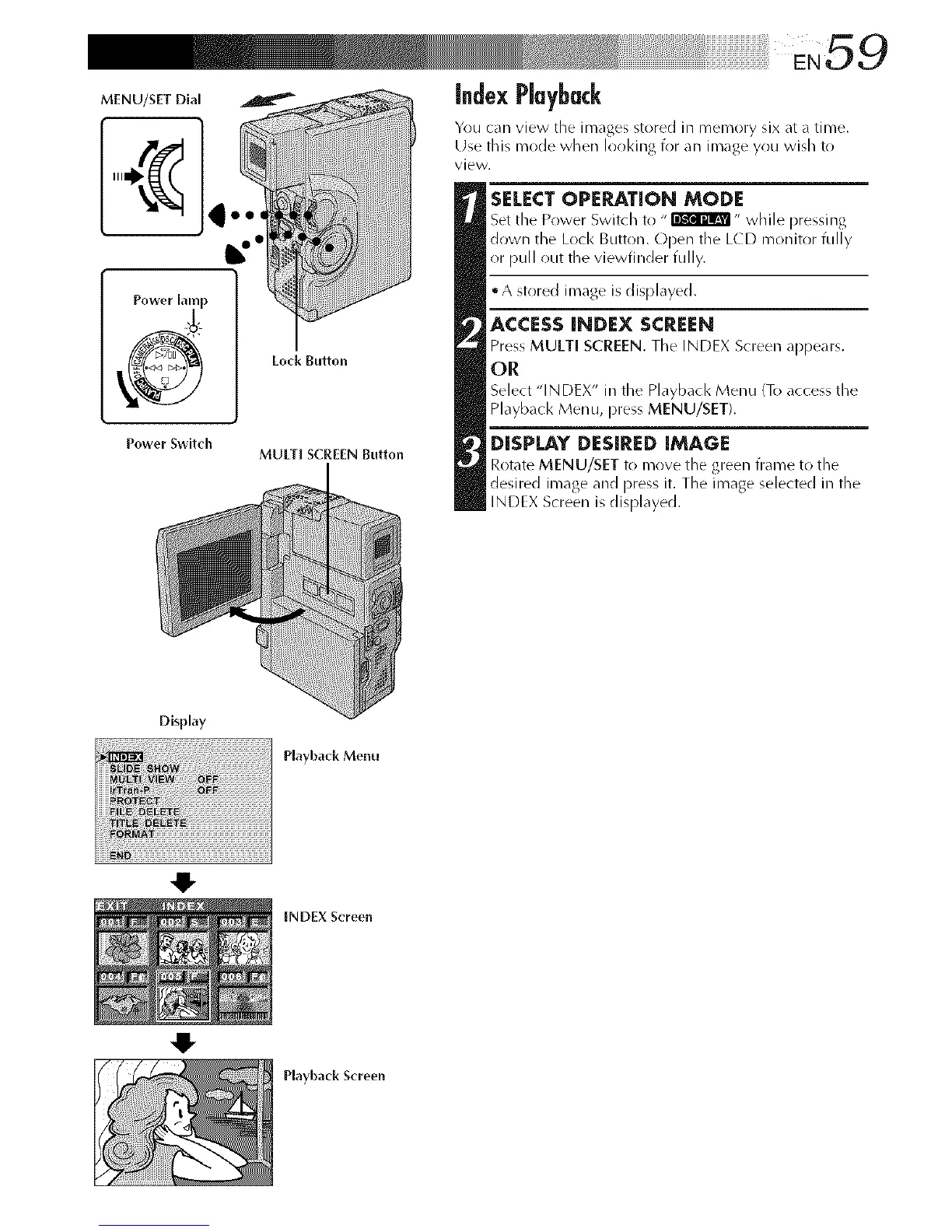
MENU/SET Dial
Power lamp
Power Switch
Lock Button
MULTI SCREEN Button
index Playback
Yr)u can view tile images stored in memory six at a time.
Use this mode when lot)king for an image you wish to
view.
SELECT OPERATION MODE
Set tile Power Switch to " _" while pressing
down the Loci< Button. Open the LCD monitor fully
or pull out the viewfinder fully.
• A stored image is displayed.
ACCESS INDEX SCREEN
Press MULTI SCREEN. Tile INDEX Screen appears.
OR
Select "INDEX" in the Playback Menu To access the
Playback Menu, press MENU/SET).
DISPLAY DESIRED IMAGE
Rotate MENU/SET to mr)re tile green trame t(/tile
desired image and press it. The image selected in the
INDEX Screen is displayed.
Display
Playback Menu
O
4!,
INDEX Screen
Playback Screen



 To Next Page