EN8 /
0 @
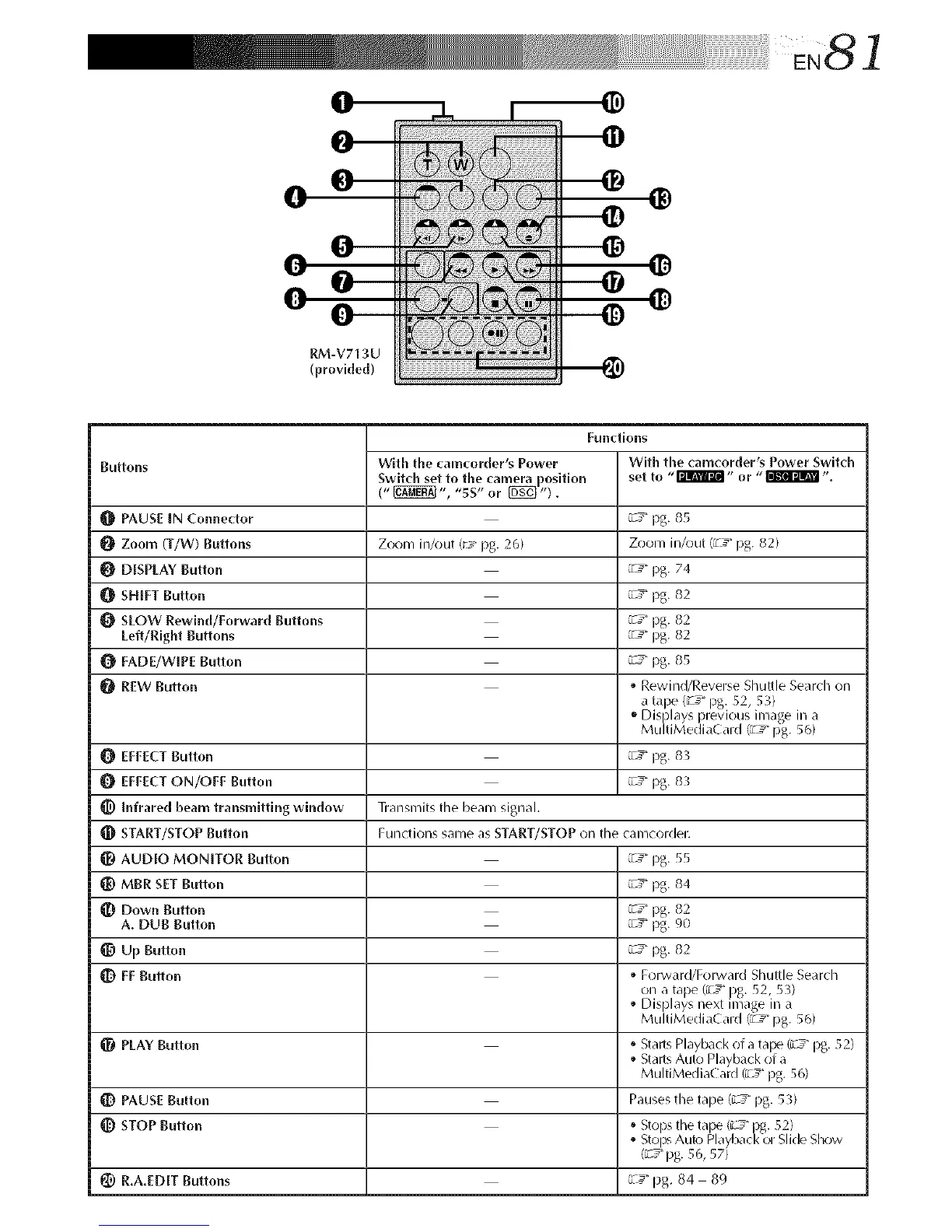
RM-V713U
(provide{[)
Buttons
_[_ PAUSE IN Connector
O Zoom (T/W) Buttons Zooln in/out (_- pg. 26)
DISPLAY Button
SHIFT Button
O SLOW Rewind/Forward Buttons
Left/Right Buttons
FADE/WIPE Button
O REW Button
EFFECTButton
EFFECTON/OFF Button
_) Infrared beam transmitting window Transmits the beam signal.
Functions
With the camcorder's Power With the camcorder's Power Switch
Switch set to the camera position set to "_" or "_ %
(" _ ", "sS" or _ ").
_c7"pg. 85
Zoom in/out (a_7"pg. 82)
_c_" pg. 74
_c7"pg. 82
_c7"pg. 82
_c_" pg. 82
_c_" pg. 85
• Rewind/Reverse Shuttle Search on
a ta3e (u"J" )g. 52, 53)
,, Dis)lays 3revious inlage in a
Mu t Med aCard _" pg. 56
_c7"pg. 83
_c3" pg. 83
_[_ START/STOP Button Functions same as START/STOP on tile canlcorder.
AUDIO MONITOR Button _cy" pg. 55
_) MBR SET Button _c7"pg. 84
Down Button _c7"pg. 82
A. DUB Button _c_"pg. 90
Up Button _c_"pg. 82
q[_ FF Button • ForwarWForward Shuttle Search
on a tape (a_y pg. 52, 53)
• Displays next inlage in a
MultiMedia( ard (a__ pg. 56)
PLAY Button • Starts Playback of a tal_ (a_3 pg. 52)
• Starts Auto Playback of a
MultiMediaCard/a_ g pg. 56)
_) PAUSE Button Pausesthe tape (_T pg. 53)
STOP Button • Sto)s tile ta3e (i T pg. 52)
• Stol_ Auto Payback or S i( e S_ow
{_7" pg. 56, 57)
_) R.A.EDIT Buttons L_" pg. 84 89



 To Next Page