[::N _i_i_i_i_i_i_i_i_i_i_i_i_il_l_l_l_l_l_l_l_l_lllllllll!!!!!!li_iiiiiiiiiiiiiiiiiiiiiiiiiiiiiiiiiiiiiiiiiiiiiiiii_ii
The Full-Function Remote Control Unit can operate this
camcorder from a distance as well as tile basic operations
(Playback, Stop, Pause, Fast-Forward and Rewind) of your
VCR. This remote control unit mal<es additional playback
functions possible.
Installing TheBattery
The remote control uses one lithium battery (CR2025).
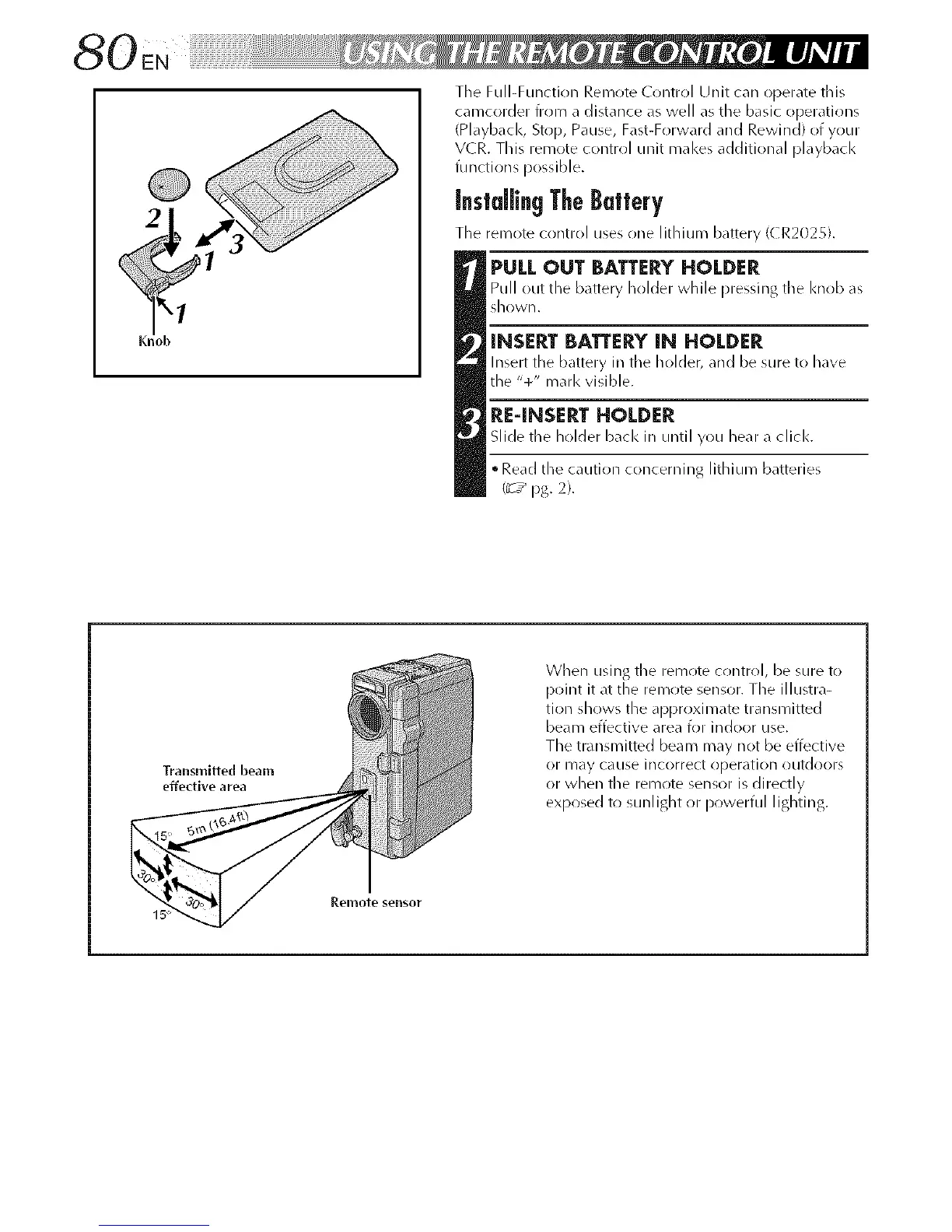
PULL OUT BATTERY HOLDER
Pull out the battery holder while pressing tile knob as
sho'vVll.
INSERT BATTERY IN HOLDER
Insert the battery in tile holder, and be sure to have
the "+" marl< visible.
RE-INSERT HOLDER
Slide tile holder bacl< in until you hear a click.
• Read the caution concerniilg lithium batteries
(_7 _ pg. 2).
Transmitted beam
effective area
When using tile remote control, be sure to
point it at the remote sensor. The illustra-
tion shows the approximate transmitted
beam effective area for indoor use.
The transmitted beam may not be effective
or may CaLISe incorrect operation outdoors
or when tile remote sensor is directly
exposed to sunlight or powerful lighting.
Remote sensor
15 _¸



 To Next Page