©
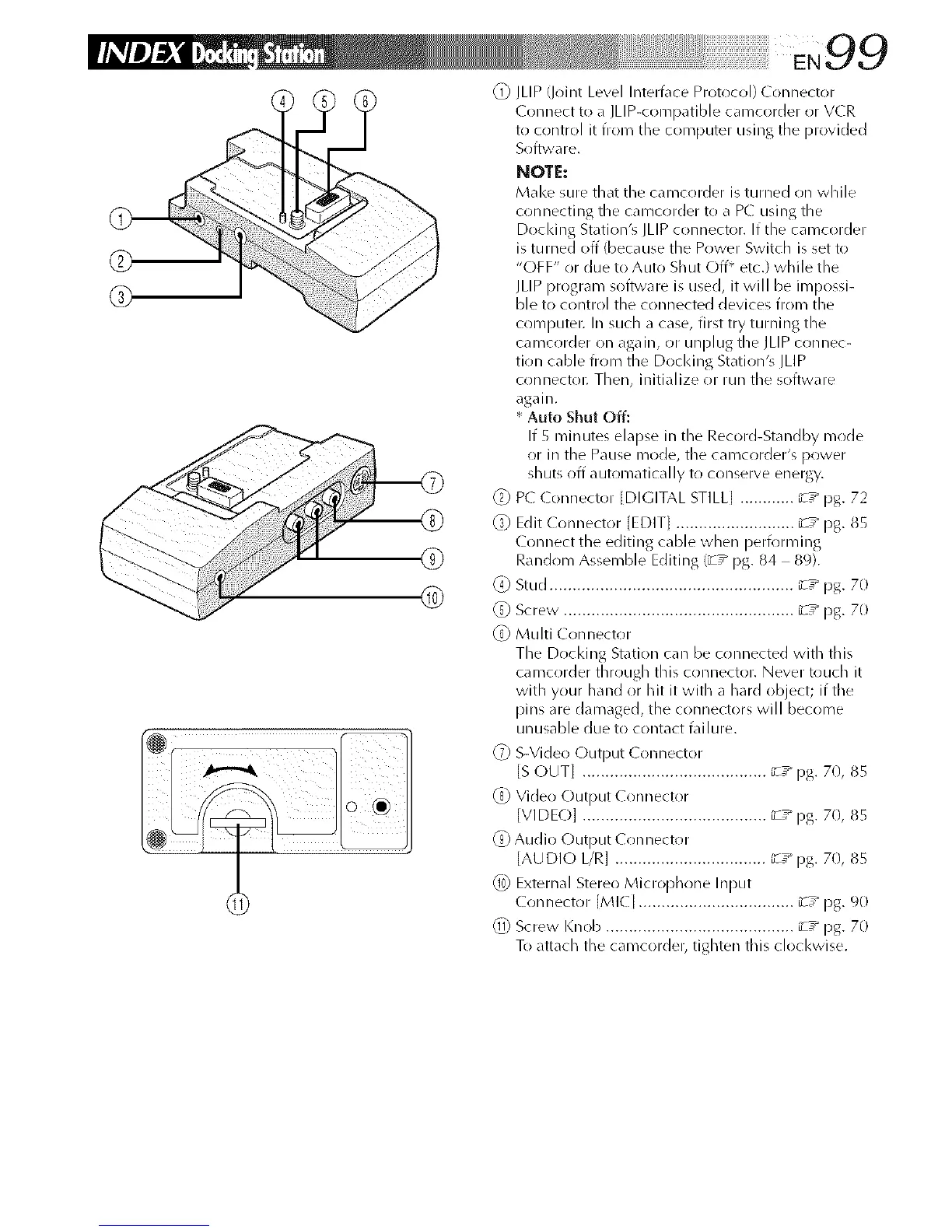
(_) JLIP (Joint Level Intert\lce Protocol) Connector
(onnect to a JLIP-coFnpatible camcorder or VCR
to control it from the computer using the provided
Soft_vare.
NOTE:
Make sure that the camcorder is turned on while
connecting the caFncorder to a PC using the
Docl<ing Station's JLIP connector. If the camcorder
is turned off (because the Power Switch is set to
"OFF" or due to Auto Shut Off* etc.) while the
JLIP progra Fn soflwa re is used, it will be iFnpossi-
ble to control the connected devices froln the
computei: In such a case, first try turning the
camcorder on again, or unplug the JLIP connec-
tion cable froFn the Dockillg Station's ILIP
connectoi: Then, initialize or run the software
again.
* Auto Shut Off:
If 5 Fninutes elapse in the Record-Stalldby Fnrlde
or in the Pause Fnode, the cal-ncorder's power
shuts off automatically to COllserve energy.
_) P( ( onnector [DIGITAL STILL[ ............ _z_ pg. 72
_) Edit ( onnector [EDIT[ .......................... _z_ pg. 85
C(mnect the editing cable when peri))rl_/illg
Randr_m AsseFnble Editing (_T_ pg. 84 89).
(4) Stud ..................................................... _-T_ pg. 70
@ Screw. ................................................. _-T_ pg. 70
@ Muhi Conllector
The Docl<ing Station can be connected with this
caFncorder through this conllector. Never touch it
with your hand or hit it with a hard object; if the
pinsare damaged, the connectors will become
unusable due to contact t\fi lure.
@ S-Video C)lltDtlt ( Ollllector
IS OUT] ........................................ _T_ pg. 70, 85
@ Video Output Connector
]VIDEO] ........................................ _-T_ pg. 7(1, 85
@ Audio Output ( onnector
]AUDIO I/R] ................................. _-z_ pg. 70, 85
@) External Stere()Microphrme Input
( onllector [MI(I .................................. _-T_ [)g. 90
@ Screw Knob ......................................... _T_ pg. 70
To attach the camcorder, tighten this clockwise.



 To Next Page