H To assure safety, make sure all units are turned off before making any connections.
n
We recommend that you use the AC Power Adapter/Charger.
n
When connecting a cable with a core filter attached, be sure to plug the connector equipped
with the core filter into the video camera.
H Do not make any connections to the video camera’s DV OUT connector.
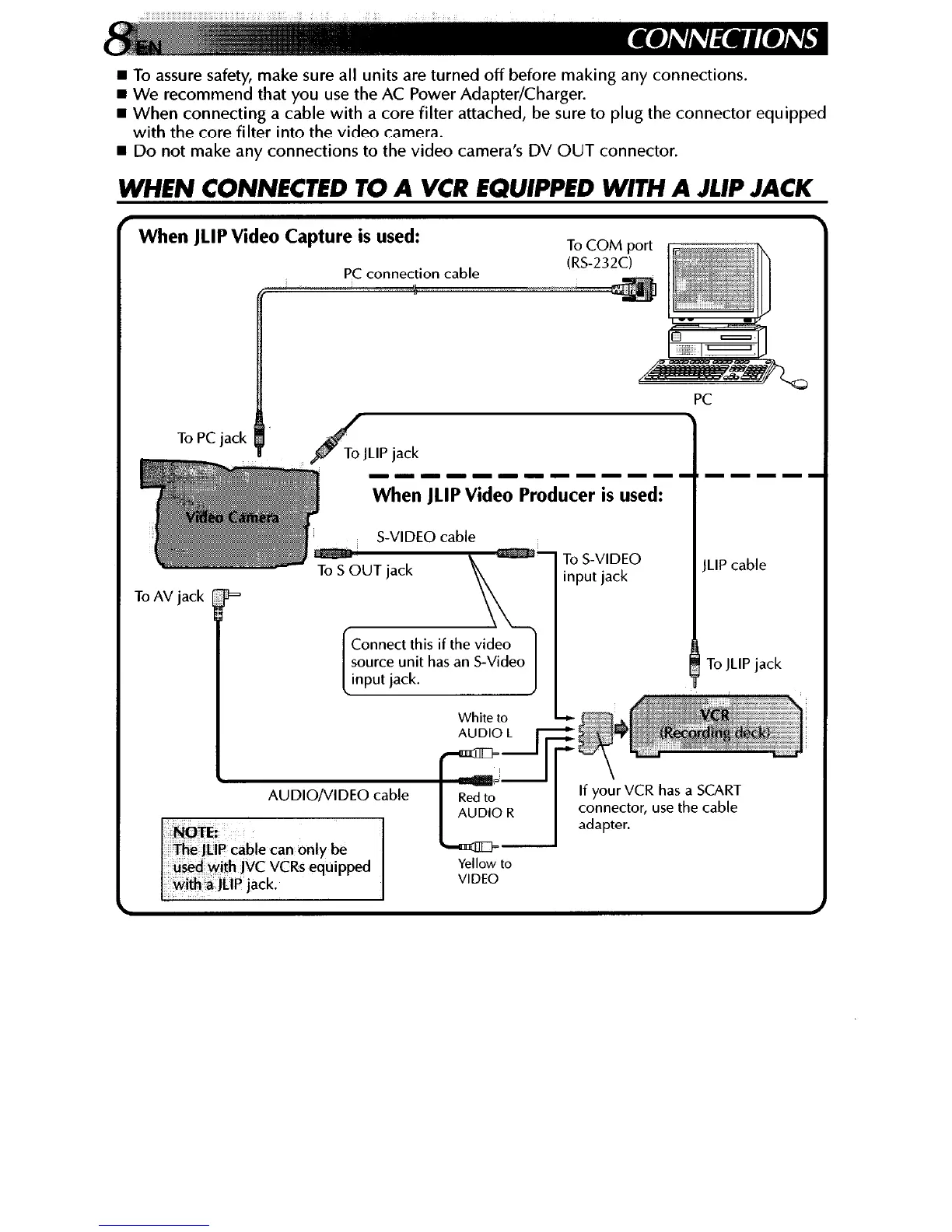
WHEN CONNECTED TO A VCR EQUIPPED WITH A JLIP JACK
When JLIP Video Cal pture is used:
PC
ToPC’ ’ JacK
JLIP jack
--------IIIII
When JLIP Video Producer is used:
Connect this if the video
source unit has an S-Video
input jack.
White to
To S-VIDEO
input jack
ILIP cable
To JLIP jack
If yo& VCR has a SCART
connector, use the cable
adapter.



 To Next Page