Connections
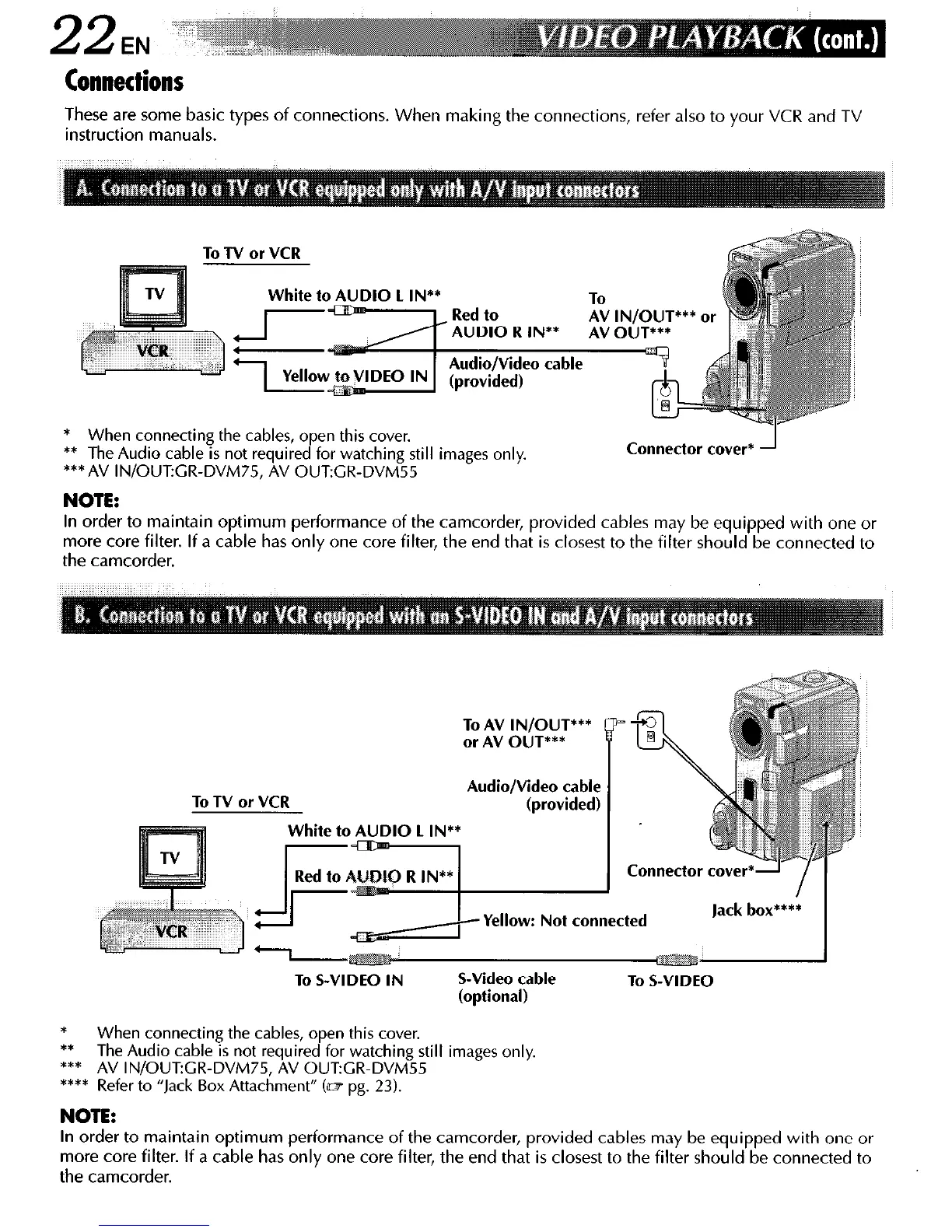
These are some basic types of connections. When making the connections, refer also to your VCR and TV
instruction manuals.
To TV or VCR
White to AUDIO 1 IN**
AUDIO R IN**
a cable
* When connecting the cables, open this cover.
** The Audio cable is not required for watching still images only.
***AV IN/OUFGR-DVM75, AV OUTGR-DVM55
Connector cover*
NOTE:
In order to maintain optimum performance of the camcorder, provided cables may be equipped with one or
more core filter. If a cable has only one core filter, the end that is closest to the filter should be connected to
the camcorder.
To TV or VCR
To AV IN/OUT***
or AV OUT***
Audio/Video cable
(provided)
Connector cove
Yellow: Not connected
To S-VIDEO IN
S-Video cable
(optional)
To S-VIDEO
*
When connecting the cables, open this cover.
** The Audio cable is not required for watching still images only.
*** AV IN/OUT:GR-DVM75, AV OUTCR-DVM55
**** Refer to “Jack Box Attachment” tar; pg. 23).
NOTE:
In order to maintain optimum performance of the camcorder, provided cables may be equipped with one or
more core filter. If a cable has only one core filter, the end that is closest to the filter should be connected to
the camcorder.



 To Next Page