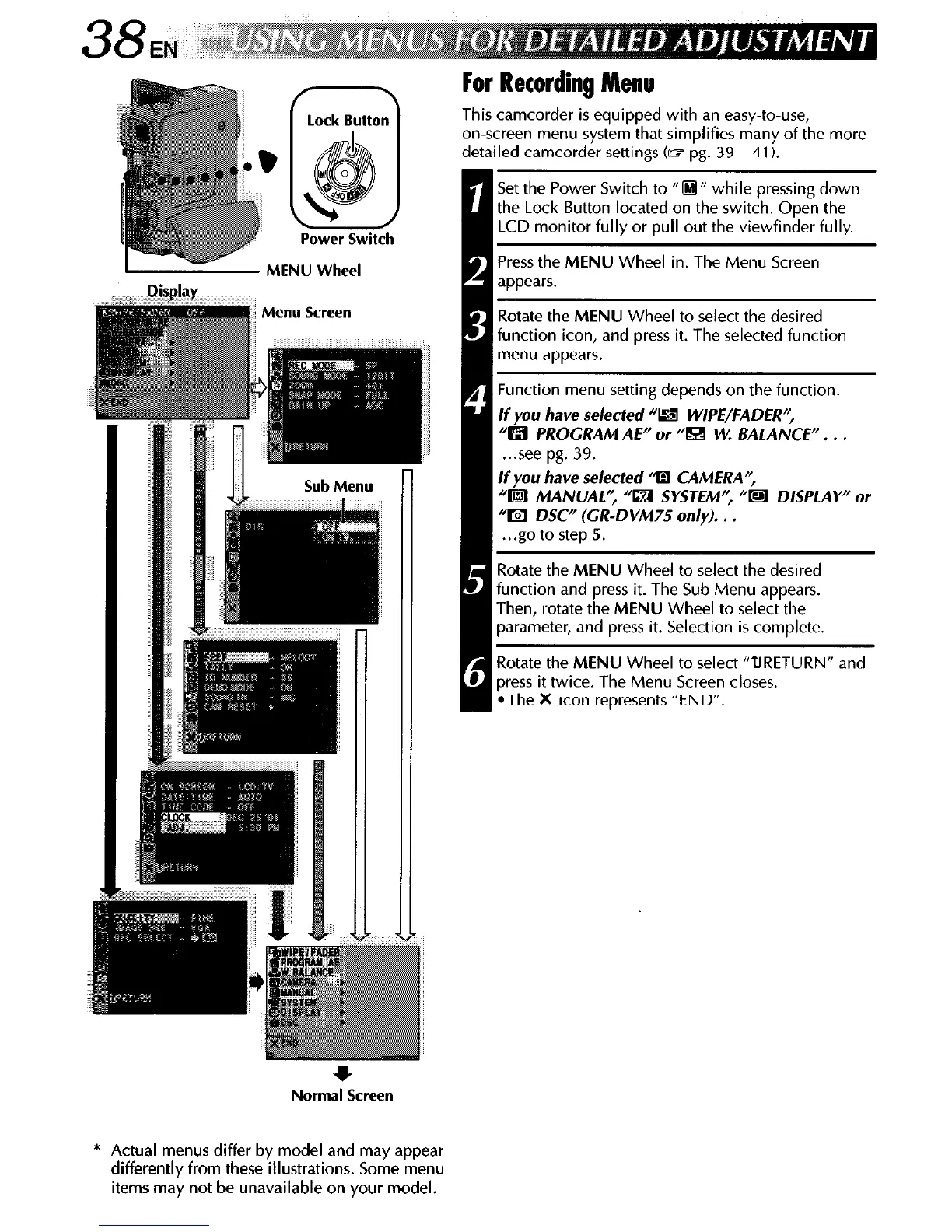
Power Switch
*
Normal Screen
For Recording Menu
This camcorder is equipped with an easy-to-use,
on-screen menu system that simplifies many of the more
detailed camcorder settings (II? pg. 39 - 41).
Set the Power Switch to “0” while pressing down
the Lock Button located on the switch. Open the
LCD monitor fully or pull out the viewfinder fully.
Press the MENU Wheel in. The Menu Screen
appears.
Rotate the MENU Wheel to select the desired
function icon, and press it. The selected function
menu appears.
1 Function menu setting depends on the function.
If
you have selected “Bl WIPE/FADER”,
“m PROGRAM AE” or “l&4 W. BALANCE”. . .
. ..see pg. 39.
If you have selected 4 CAMERA”,
“m MANUAL’; “IZI SYSTEM”, “m DISPLAY” or
“I!?3 DSC” (CR-DVM75 only). . .
. ..go to step 5.
Rotate the MENU Wheel to select the desired
function and press it. The Sub Menu appears.
Then, rotate the MENU Wheel to select the
parameter, and press it. Selection is complete.
Rotate the MENU Wheel to select “tiRETURN” and
8 press it twice. The Menu Screen closes.
*The
X
icon represents “END”.
* Actual menus differ by model and may appear
differently from these illustrations. Some menu
items may not be unavailable on your model.



 To Next Page