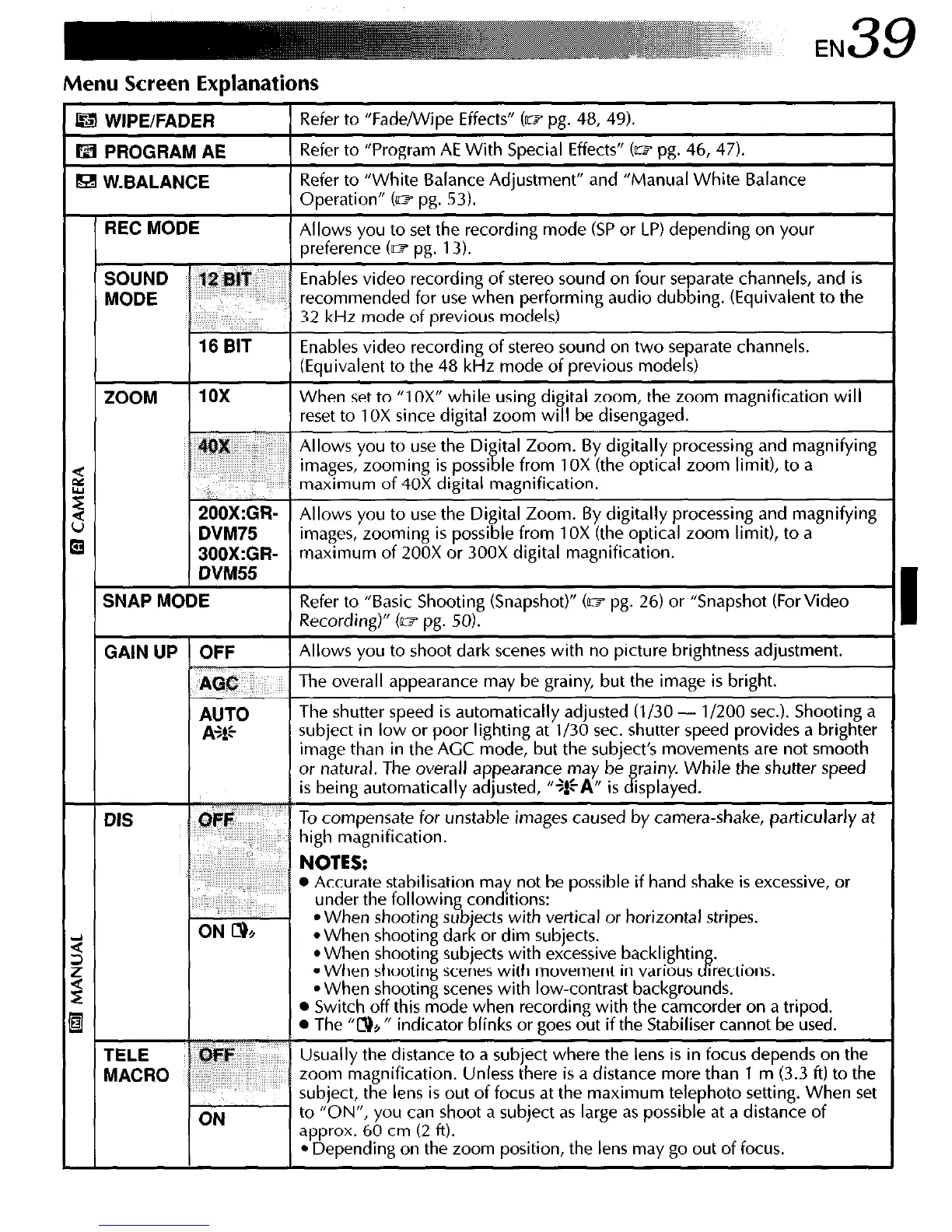
Menu Screen Explanations
I WIPE/FADER
I3 PROGRAM AE
91 W.BALANCE
Refer to “Fade/Wipe Effects” (m pg. 48, 49).
Refer to “Program AE With Special Effects” (~1 pg. 46, 47).
Refer to “White Balance Adjustment” and “Manual White Balance
Operation” Cm pg. 53).
REC MODE
recording mode (SP or LP) depending on your
ZOOM
When set to “1 OX” while usin
SOOX:GR-
Allows you to use the Digital Zoom. By digitally processing and magnifying
DVM75
images, zooming is possible from 1 OX (the optical zoom limit), to a
BBBX:GR- maximum of 200X or 300X digital magnification.
DVM55
SNAP MODE
Refer to “Basic Shooting (Snapshot)” Cm pg. 26) or “Snapshot For Video
Recording)” (UY pg. 50).
GAIN UP OFF
Allows you to shoot dark scenes with no picture brightness adjustment.
AGC
The overall appearance may be grainy, but the image is bright.
are not smooth
l
Accurate stabilisation may not be possible if hand shake is excessive, or
under the following conditions:
l
When shooting sub’ects with vertical or horizontal stripes.
l
When shooting dar I or drm subjects.
l
When shooting subjects with excessive backlightin
l
When shooting scenes with movement in various
8’
rrectrons.
l
When shooting scenes with low-contrast backgrounds.
l
Switch off this mode when recording with the camcorder on a tripod.
l
The “N+ ” indicator blinks or goes out if the Stabiliser cannot be used.
Usually the distance to a subject where the lens is in focus depends on the
zoom magnification. Unless there is a distance more than 1 m (3.3 ft) to the
subiect, the lens is out of focus at the maximum teleohoto setting. When set
(ON
to “bN’“, you can shoot a subject as large as possible at a distan:e of
aoprox. 60 cm (2 ft).
*‘Depending on the zoom position, the lens may go out of focus.



 To Next Page