EN
41
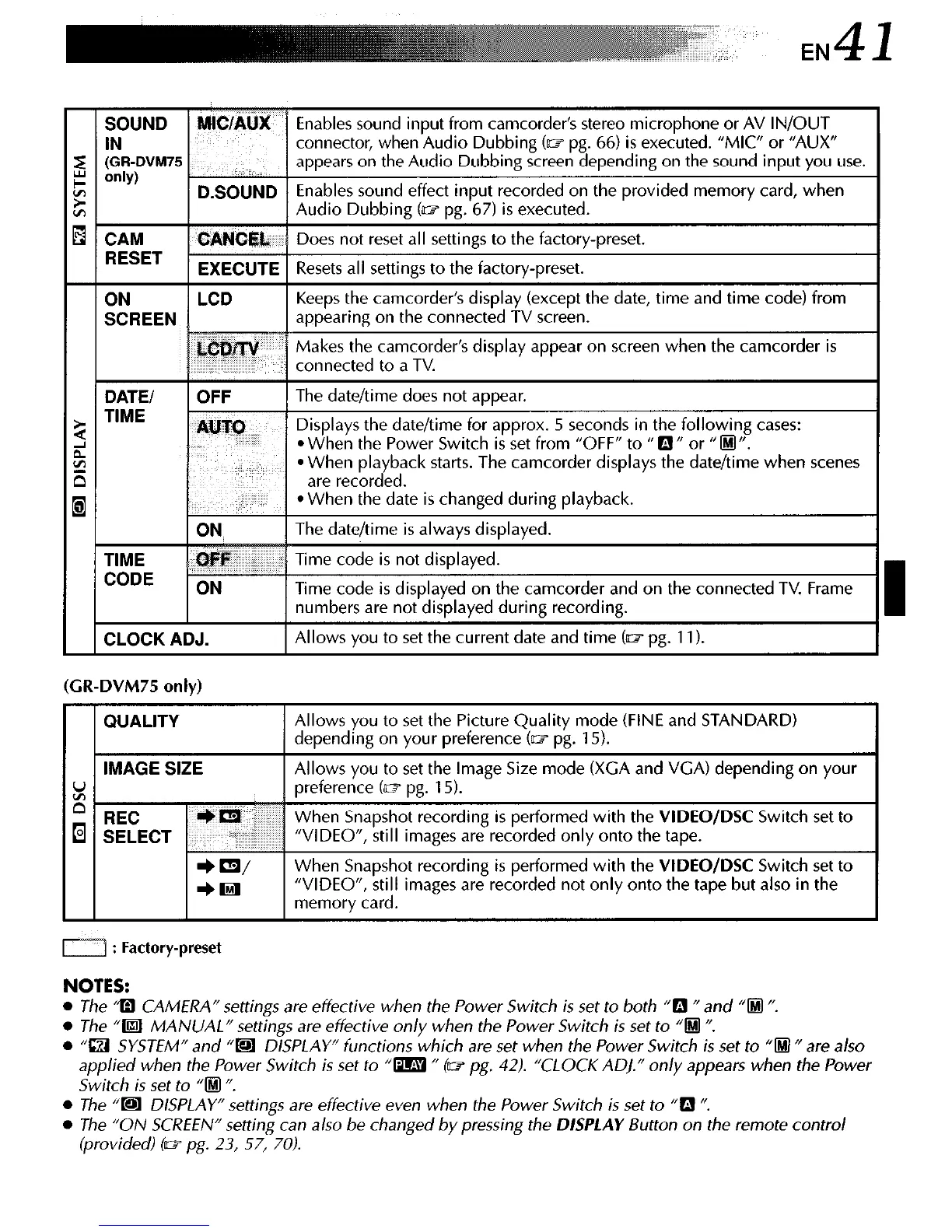
ay appear on screen w
me when scenes
(CR-DVM75 only)
D : Factory-preset
NOTES:
l
The ‘a CAMERA” settings are effective when the Power Switch is set to both “0 N and “@I “.
l
The “Bll MANUAL” settings are effective only when the Power Switch is set to “0 N.
l
“IZI SYSTEM” and “@l DISPLAY” functions which are set when the Power Switch is set to “0 fl are a/so
applied when the Power Switch is set to “m n (w pg. 42). “CLOCK AD].” only appears when the Power
Switch is set to “IHI “.
l
The “@I DISPLAY” settings are effective even when the Power Switch is set to “0 “.
l
The “ON SCREEN” setting can also be changed by pressing the
DISPLAY
Button on the remote control
(provided) (w pg. 23, 57, 70).



 To Next Page