Playback Sound
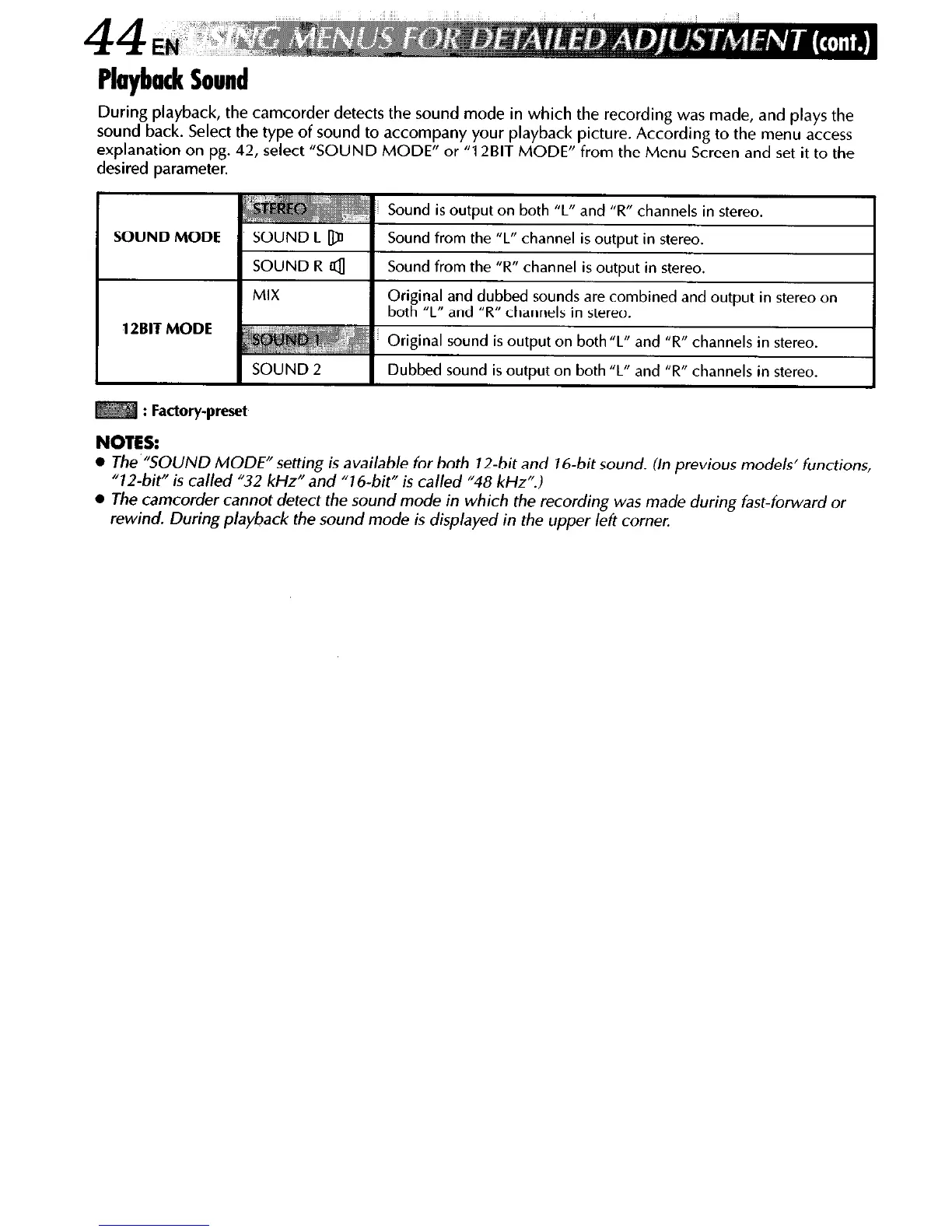
During playback, the camcorder detects the sound mode in which the recording was made, and plays the
sound back. Select the type of sound to accompany your playback picture. According to the menu access
explanation on pg. 42, select “SOUND MODE” or “12BIT MODE” from the Menu Screen and set it to the
desired parameter.
SOUND MODE
12BIT MODE
SOUND 2
Dubbed sound is output on both “L” and “R” channels in stereo.
: Factory-preset
NOTES:
l
The “SOUND MODE” setting is available for both J2-bit and J6-bit sound. (In previous models’ functions,
“72-bit” is called “32 kHz” and “76-bit” is called “48 kHz”.)
l
The camcorder cannot detect the sound mode in which the recording was made during fast-forward or
rewind. During playback the sound mode is displayed in the upper left corner.



 To Next Page