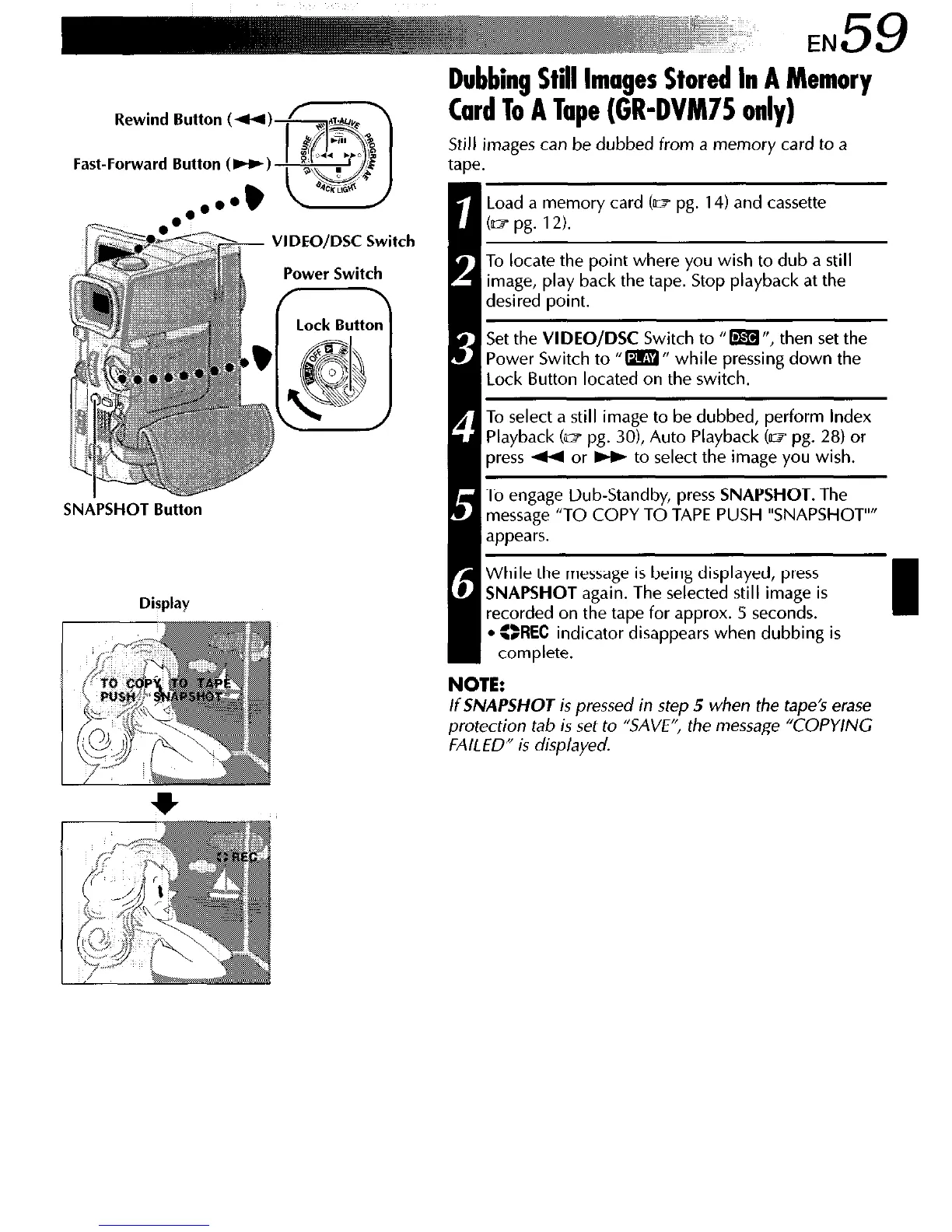
Fast-Forward Button (W)
VIDEO/D% Switch
Power Switch
SNAPSHOT Button
Display
Dubbing Still Images Stored In A Memory
Card To A Tape (GR-DVM75 only)
Still images can be dubbed from a memory card to a
tape.
Load a memory card (e pg. 14) and cassette
b-7 pg.
12).
To locate the point where you wish to dub a still
image, play back the tape. Stop playback at the
desired point.
Set the VIDEO/DSC Switch to 0 m “, then set the
Power Switch to “m” while pressing down the
Lock Button located on the switch.
d ’
1 To select a still image to be dubbed, perform index
Playback (m pg. 301, Auto Playback (mpg. 28) or
press 4 or w to select the image you wish.
To engage Dub-Standby, press SNAPSHOT. The
message “TO COPY TO TAPE PUSH “SNAPSHOT””
appears.
0
While the message is being displayed, press
SNAPSHOT again. The selected still image is
recorded on the tape for approx. 5 seconds.
l SREC
indicator disappears when dubbing is
complete.
NOTE:
If
SNAPSHOT
is pressed in step 5 when the tape’s erase
protection tab is set to “SAVE”, the message “COPYING
FAILED” is displayed.



 To Next Page