EN
63
Functions
Buttons
With the camcorder’s Power
Switch set to ” fl “ or “ 0 “.
With the camcorder’s Power
Switch set to * m “.
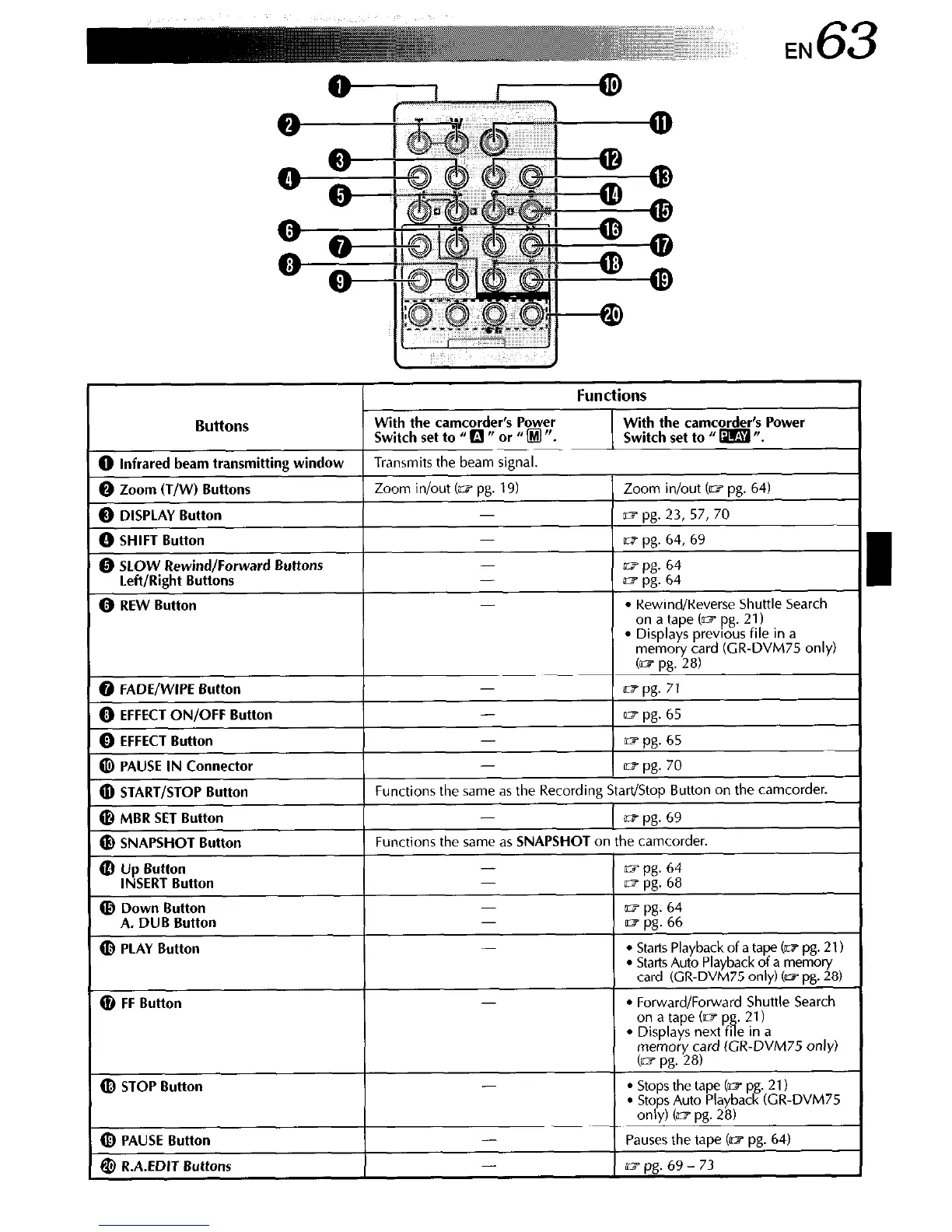
0 Infrared beam transmitting window
Transmits the beam signal.
0 Zoom (T/W) Buttons
Zoom in/out (G pg. 19)
Zoom in/out Cm pg. 64)
0 DISPLAY Button
1? pg. 23, 57, 70
0 SHIFT Button
m pg. 64, 69
@ SLOW Rewind/Forward Buttons
-
ST pg. 64
Left/Right Buttons
-
a~ pg. 64
0 REW Button
-
l
Rewind/Reverse Shuttle Search
on a tape Cm pg. 21)
l
Displays previous file in a
memory card (CR-DVM75 only)
co? pg. 28)
@ FADE/WIPE Button
0 EFFECT ON/OFF
Button
0 EFFECT Button
-
UTpg. 71
UT pg. 65
m pg. 65
PAUSE IN Connector
@ START/STOP Button
@ MBR SET Button
Functions the same as the Recording Start/Stop Button on the camcorder.
-
~7 pg. 69
@ SNAPSHOT Button
cl ~s~:‘“B”utto”
(D Down Button
A. DUB Button
(D PLAY Button
Functions the same as SNAPSHOT on the camcorder.
-
mpg. 64
m pg. 68
lt7 pg. 64
aj pg. 66
-
l
Starts Playback of a tape (a7 pg. 21)
l
Starts Auto Playback of a memory
card (CR-DVM75 only) t= pg. 28)
@ FF Button
l
Forward/Forward Shuttle Search
(D STOP Button
(b PAUSE Button
@ R.A.EDIT Buttons
-
-
-
l
Stops the tape (a7 pg. 21)
. Stops Auto Playback (CR-DVM75
only) (mpg. 28)
Pauses the tape Cm pg. 64)
=pg.b9-73



 To Next Page