EN
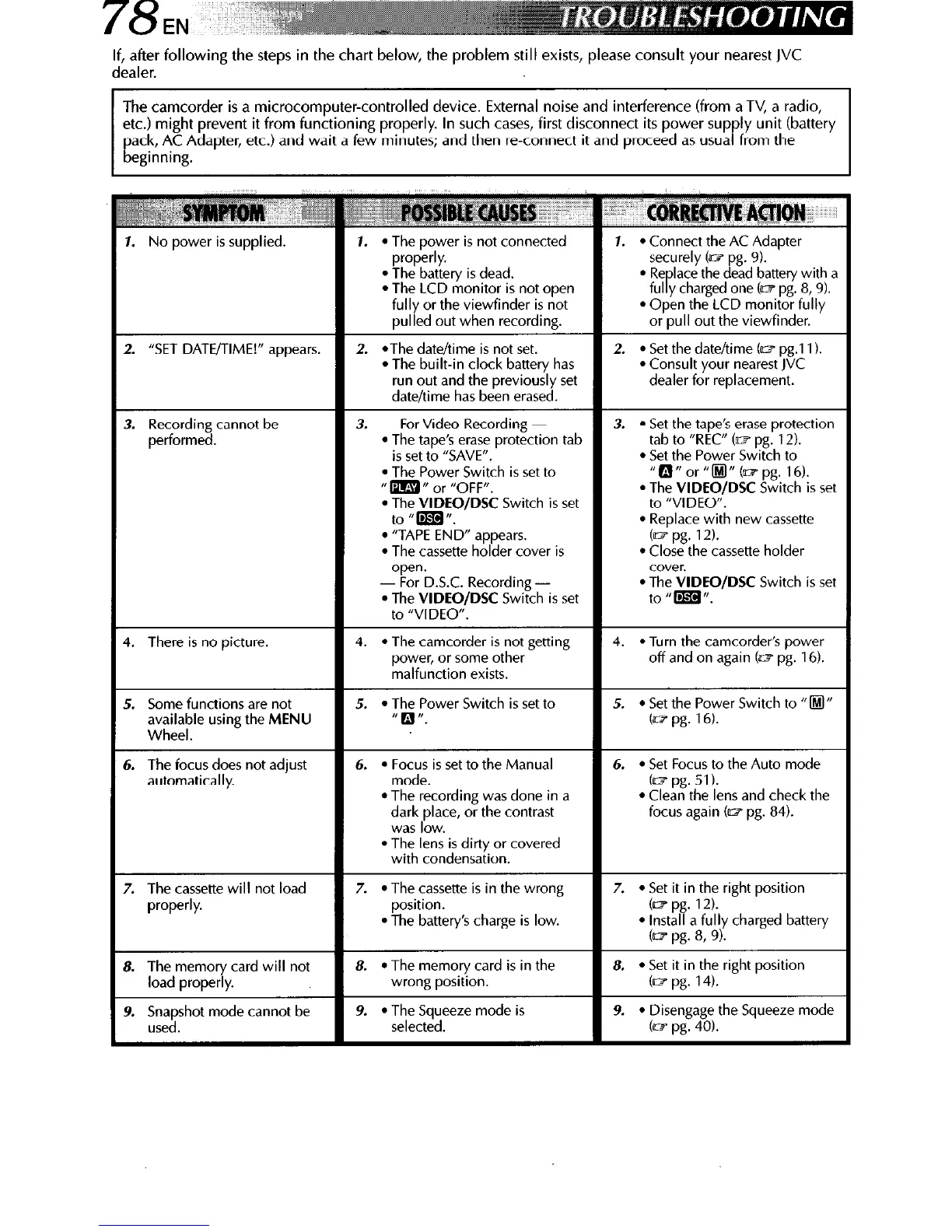
If, after following the steps in the chart below, the problem still exists, please consult your nearest JVC
dealer.
The camcorder is a microcomputer-controlled device. External noise and interference (from aTV, a radio,
etc.) might prevent it from functioning properly. In such cases, first disconnect its power supply unit (battery
pack, AC Adapter, etc.) and wait a few minutes; and then re-connect it and proceed as usual from the
beginning.
l
The Power Switch is set to
II m n or “OFF”,
l
The VIDEO/DSC Switch is set
l
The VIDEO/DSC Switch
is set
to “VIDEO”.
l
Replace with new cassette
/DSC Switch
is set
focus does not adjust
automatically.
l
Focus is set to the Manual
l
Set Focus to the Auto mode



 To Next Page