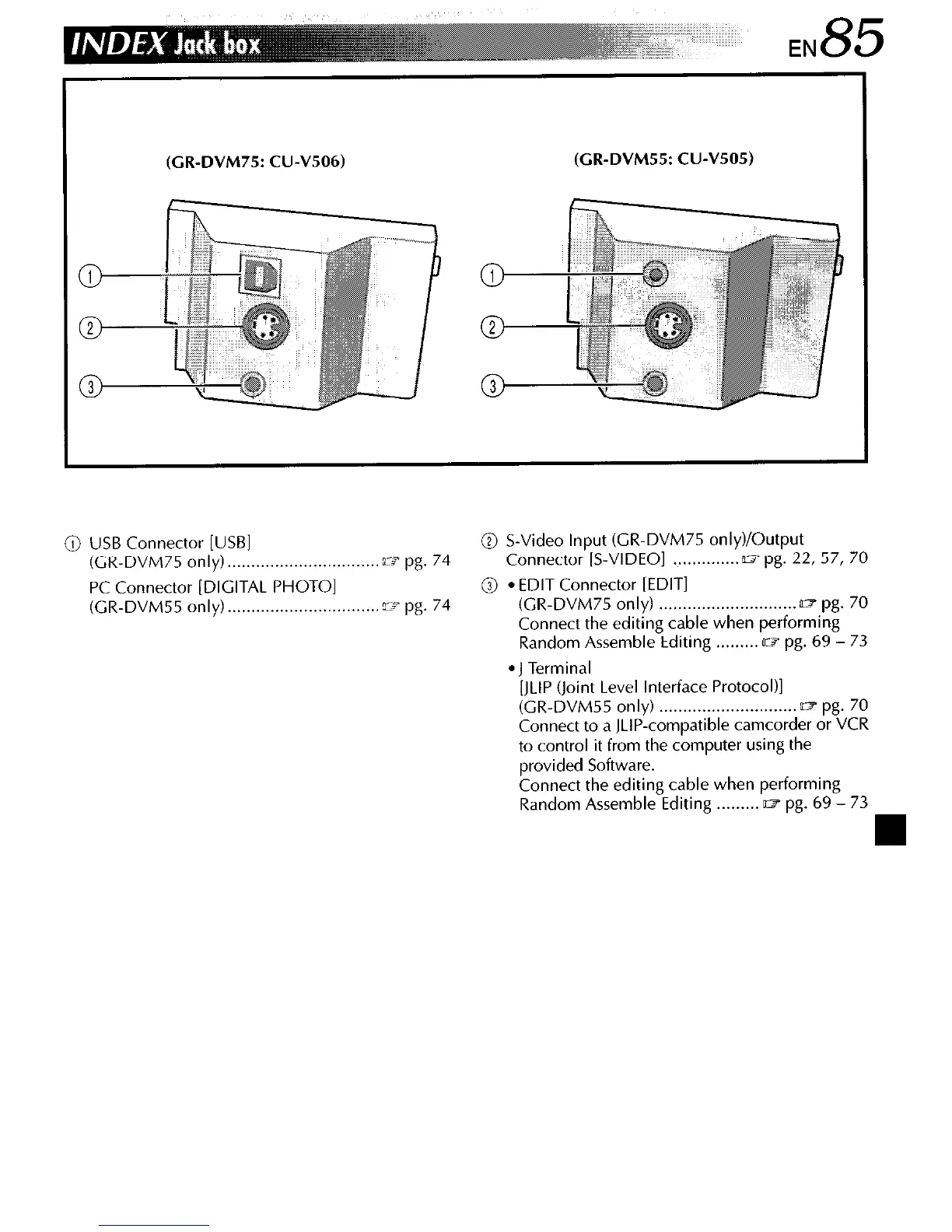
(CR-DVM75: CU-V506)
(CR-DVM55: CU-V505)
@ USB Connector [USBI
@ S-Video Input (CR-DVM75 only)/Output
(CR-DVM75
only) . . . . . . . . . . . . . . . . . . . . . . . . . . . . . . . . ~3 pg.
74
Connector [S-VIDEO]
. . . . . . . . . . . . . . 07 pg.
22,
57, 70
PC Connector [DIGITAL PHOTO]
@
l
EDIT Connector [EDIT]
(CR-DVM55
only) . . . . . . . . . . . . . . . . . . . . . . . . . . . . . . . . ~3 pg.
74
(GR-DVM75
only) . . . . . . . . . . . . . . . . . . . . . . . . . . . . . n=l pg.
70
Connect the editing cable when performing
Random Assemble Editing . . . . . . . . . OII pg. 69 - 73
l
J Terminal
[JLIP (Joint Level Interface Protocol)]
(GR-DVM55
only) . . . . . . . . . . . . . . . . . . . . . . . . . . . . . = pg.
70
Connect to a JLIP-compatible camcorder or VCR
to control it from the computer using the
provided Software.
Connect the editing cable when performing
Random Assemble Editing . . . . . . . . . o? pg. 69 - 73



 To Next Page