EasyManua.ls Logo

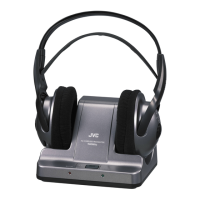
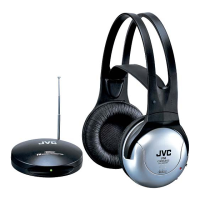
JVC HA-W500RF - User Manual

JVC HA-W500RF
40 pages
Print Icon
To Next Page IconTo Next Page
Loading...
CORDLESS FM STEREO HEADPHONES
KABELFREIER FM STEREO-KOPFHÖRER
DRAADLOZE FM STEREO HOOFDTELEFOON
CASQUE STEREO FM SANS FIL
TRÅDLÖSA FM STEREO HÖRLURAR MED
UPPLADDNINGSBART BATTERI
LADATTAVAT LANGATTOMAT FM STEREOKUULOKKEET
HA-W500RF (EG)
HA-W500RF (EG) CORDLESS FM STEREO HEADPHONES
INSTRUCTIONS
BEDIENUNGSANLEITUNG
GEBRUIKSAANWIJZING
MANUEL D’INSTRUCTIONS
ANVISNINGAR
KÄYTTÖOHJEET
J5500-114A
Printed in China
J5500-114A
© 2002 VICTOR COMPANY OF JAPAN, LIMITED
HA-W500RF (EG)E.G 10/25/2002 12:53 Page B

Other manuals for JVC HA-W500RF

Questions and Answers

  • L
    Larry TorresAug 11, 2025
    How to fix JVC HA-W500RF when there is no sound?
    • B
      brownmarthaAug 11, 2025
      If you're not getting any sound from your JVC Headphones, here are a few things to check: * Make sure the transmitter is powered on and properly connected. * Ensure your headphones are switched on (the indicator should light up). * Check the battery level of your headphones and fully charge them if they're low. * Verify that the headphone volume isn't set too low; adjust it to a comfortable level. * Also, check the volume level of the connected AV equipment and increase it as much as possible without causing distortion.
  • C
    cynthia77Aug 17, 2025
    What to do if there is no sound from the R-channel on my JVC Headphone?
    • F
      fperezAug 17, 2025
      If you're not getting any sound from the right channel (R-channel) on your JVC Headphone, the transmitter may be connected to equipment with monaural audio output. In this case, connect them with an optional plug adaptor to convert monaural audio output to stereo audio output.
  • A
    Anthony LaraAug 22, 2025
    How to fix JVC HA-W500RF when battery charging is impossible?
    • K
      Kevin LongAug 22, 2025
      If you're unable to charge the battery of your JVC Headphone, the rechargeable Ni-Cd battery may have expired. Replace it with a new Ni-Cd battery. Please consult your dealer for replacement.
  • D
    Duane NelsonAug 29, 2025
    What to do if my JVC Headphone has distorted sound?
    • J
      Julie NashAug 29, 2025
      If your JVC Headphone's sound is distorted, it could be due to a couple of reasons. First, check if the battery in the headphones is low and fully charge them. Also, the volume of the connected AV equipment might be set too high. Try adjusting the volume level of the connected AV equipment as high as possible without causing distortion.
  • D
    Diana ScottSep 4, 2025
    Why does my JVC HA-W500RF Headphone have noisy sound?
    • T
      Theresa DeanSep 4, 2025
      Noisy sound from your JVC Headphone can stem from several factors. Ensure the headphone battery isn't low by fully charging it. Also, check if the frequency modulation signals are being received correctly by using the TUNING controls on the headphones, or select the CHANNEL on the transmitter to adjust them. The volume of the connected AV equipment may be too low, so adjust it upwards, but avoid distortion. Finally, make sure you're within the transmitter's range; if you are too far away the signal can be compromised.

JVC HA-W500RF Specifications

General IconGeneral
BrandJVC
ModelHA-W500RF
CategoryHeadphone
LanguageEnglish

Related product manuals