June 24, 2002 4:13 pm Page 3
—3—
Master Page: Right
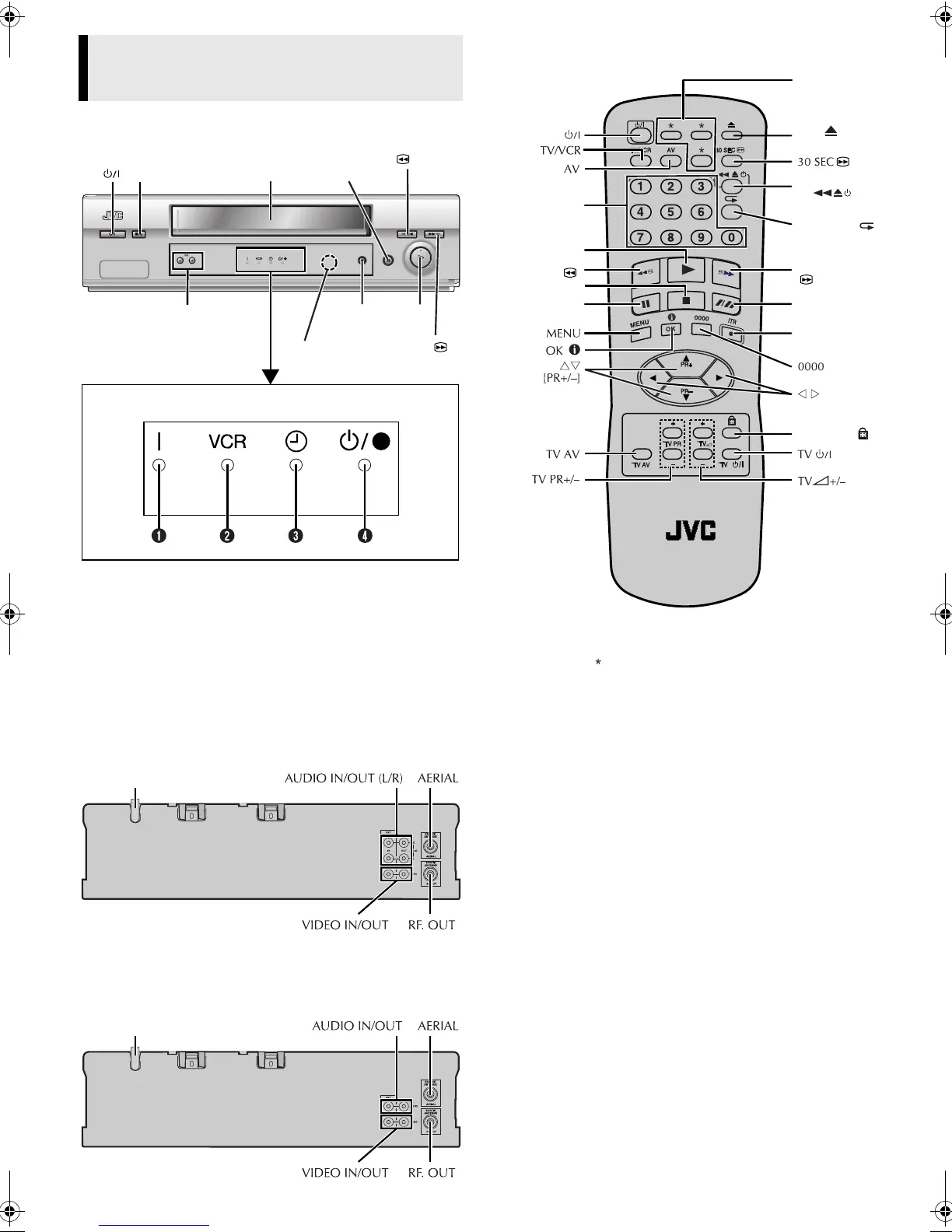
Front Panel
A Power Indicator
B VCR Indicator
C Timer Indicator
D Standby/Record Indicator*
* Standby/Record Indicator lights when the recorder is in standby mode
or during recording.
Rear Panel
HR-J695EA
HR-J291EA
Remote control
NOTE:
The buttons with do not function with this recorder.
Buttons, Connectors and
Indicators
Cassette
loading slot
PR +/–
Display panel
Infrared beam
receiving window
Paus e
9
Play
4
Stop/Eject
0
Record
7
Rewind
3
Fast
Forward
5
Mains power cord
Mains power cord
Number keys
Rewind
3
Record
7
[ITR]
Play
4
Fast Forward
5
Pau se
9
Stop
8
Child Lock
Eject
See “NOTE”
below.
Easy Power
off
Easy Repeat
SP/LP (
p
)
HR-J291_695EA-001EN.fm Page 3 Monday, June 24, 2002 4:13 PM



 To Next Page