EasyManua.ls Logo

JVC HR-J443U - Initial Settings: Clock; Preparation and Menu Access; Accessing Clock Set Modes

JVC HR-J443U
48 pages
Print Icon
To Next Page IconTo Next Page
To Previous Page IconTo Previous Page
Loading...
EN 9
Clock
Perform clock setting only if the clock has not been set correctly
by the Plug & Play function. Access the Override Auto Clock
Set screen to choose the Auto, Semi-Auto or Manual clock
setting procedure. Each procedure starts from step 5. *Auto
need only be selected if Semi-Auto or Manual had previously
been selected.
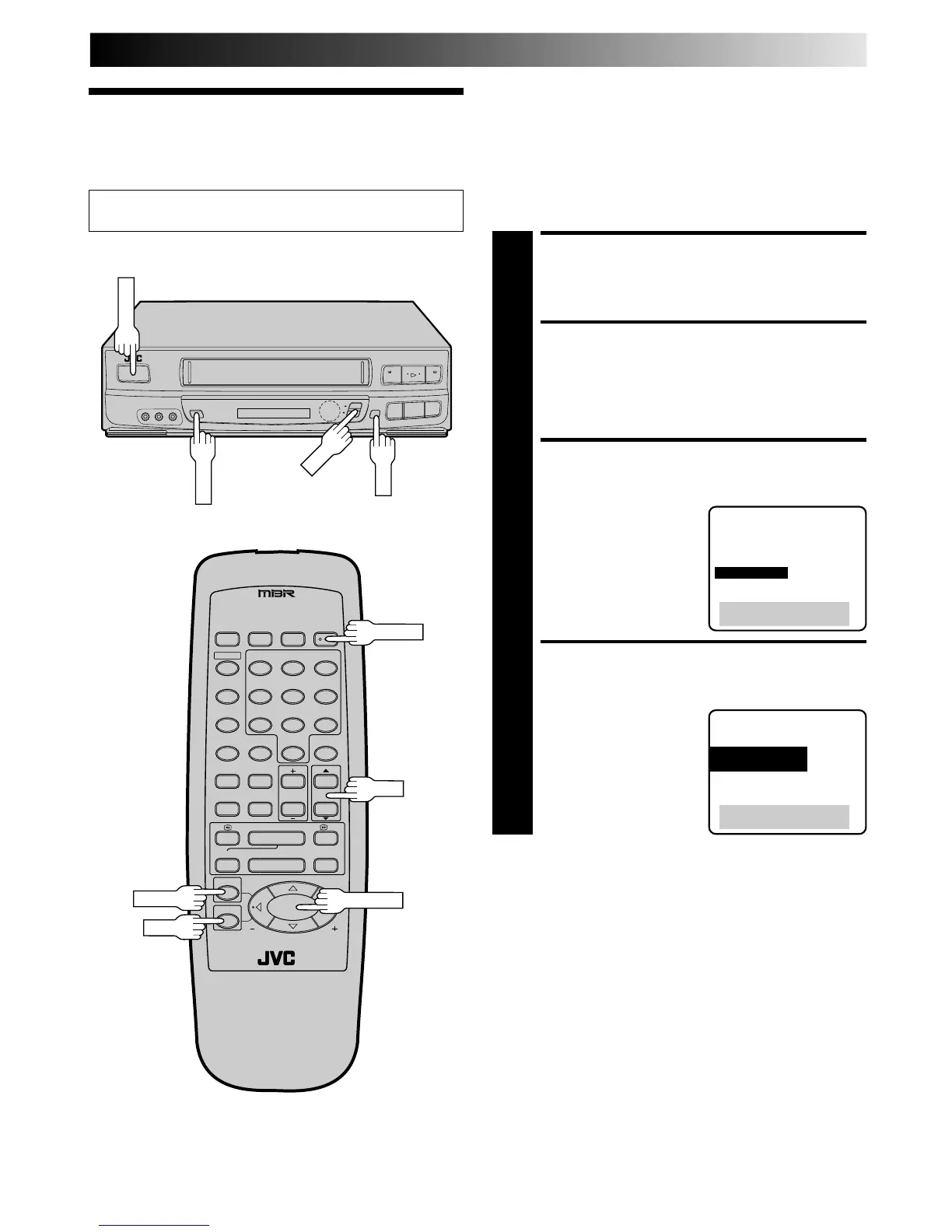
Preparation
Turn on the TV and select the VCR channel 3 or 4 (or AV
mode).
3
78
1
¡
1
2
3
456
7
8
0
9
2
2
q5
/
8
6

POWER
OK
MENU
POWER
MENU
OK
CH
CH
SHUTTLE PLUS
TURN ON THE VCR
1
Press POWER.
ACCESS ON-SCREEN
MENU
2
Press MENU.
ACCESS CUSTOM SET
SCREEN
3
At the Main Menu screen,
move the highlight bar
(arrow) to “CUSTOM SET”
by pressing CH
5
or
SHUTTLE PLUS
%
, then
press OK.
ACCESS CLOCK SET MODE
SELECT SCREEN
4
Move the highlight bar
(arrow) at the Custom Set
screen to “OVERRIDE
AUTO CLOCK SET” by
pressing CH5
or
SHUTTLE PLUS %
, then
press OK.
MAIN MENU
PROGRAM SET
FUNCTION SET
TUNER SET
=CUSTOM SET
VIDEO CALIBRATION
VIDEO STABILIZER
PRESS (5,), THEN (OK)
PRESS (MENU) TO END
CUSTOM SET
=OVERRIDE
AUTO CLOCK SET
LANGUAGE SELECT
PRESS (5,), THEN (OK)
PRESS (MENU) TO END

Table of Contents

Related product manuals