28 EN
Remote A/B Code Switching
The remote control is capable of controlling two JVC video
recorders independently; one set to respond to the remote
control’s A code control signals and another set to respond to B
code control signals. The remote control is preset to send A
code signals because your video recorder is initially set to
respond to A code signals. You can easily modify your video
recorder to respond to B code signals.
REMOVE POWER SUPPLY
1
Unplug the mains power cord from the mains outlet.
SET REMOTE CONTROL
CODE
2
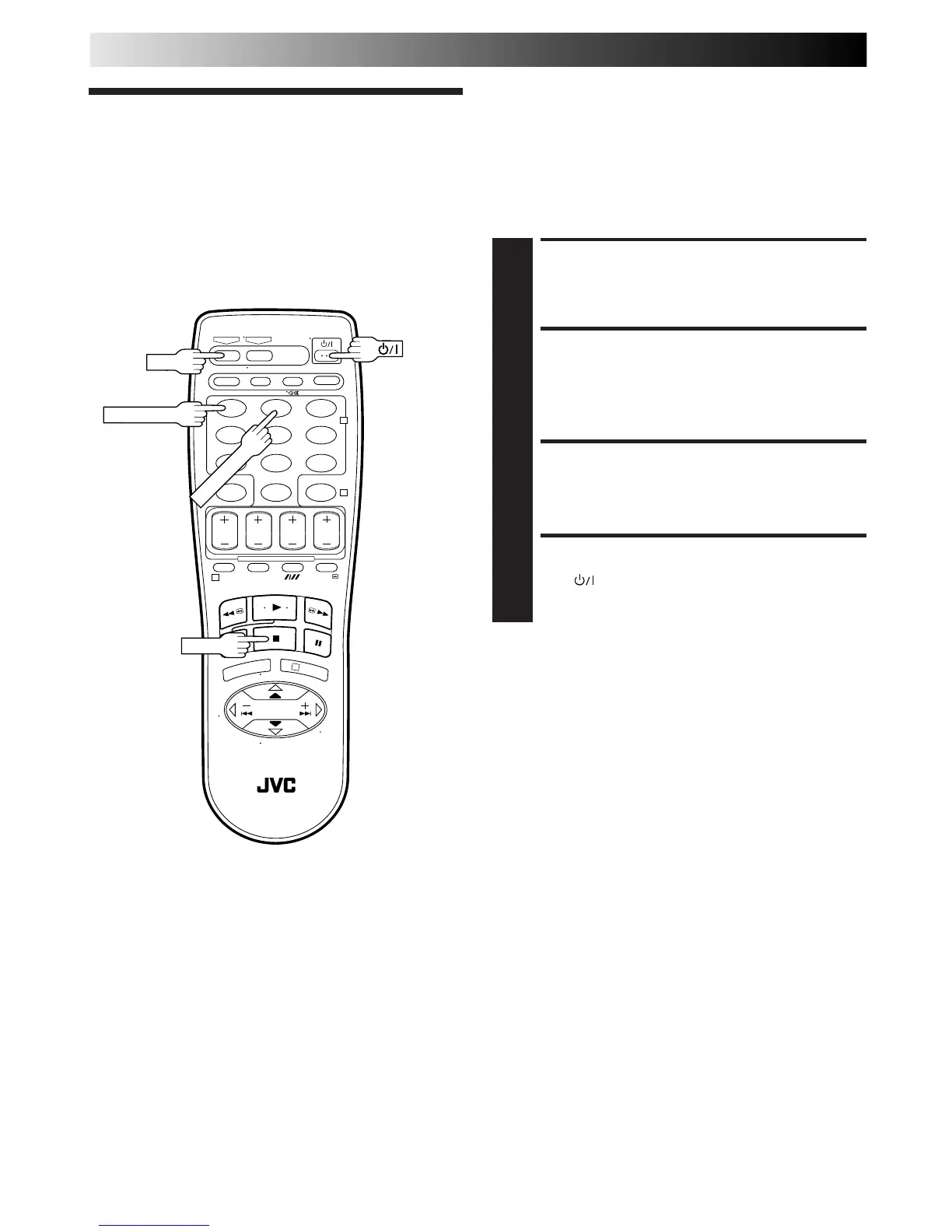
While holding down VCR on the remote control, press
the NUMBER key "2" and then press STOP.
RE-SUPPLY POWER
3
Plug the mains power cord back into the mains outlet.
TURN THE RECORDER ON
4
Press on the remote control. The recorder will now
only respond to B code signals.
NOTES:
●
Some TV sets may malfunction in response to the B code. If
this happens, switch back to the A code.
●
To set the recorder back to respond to A code signals, repeat
the same procedure as shown above except pressing
NUMBER key "1" instead of "2" in step 2.
SPECIAL FEATURES
Remote
Control
Functions
123
456
7
89
0
2
4
1
3



 To Next Page