EN 45
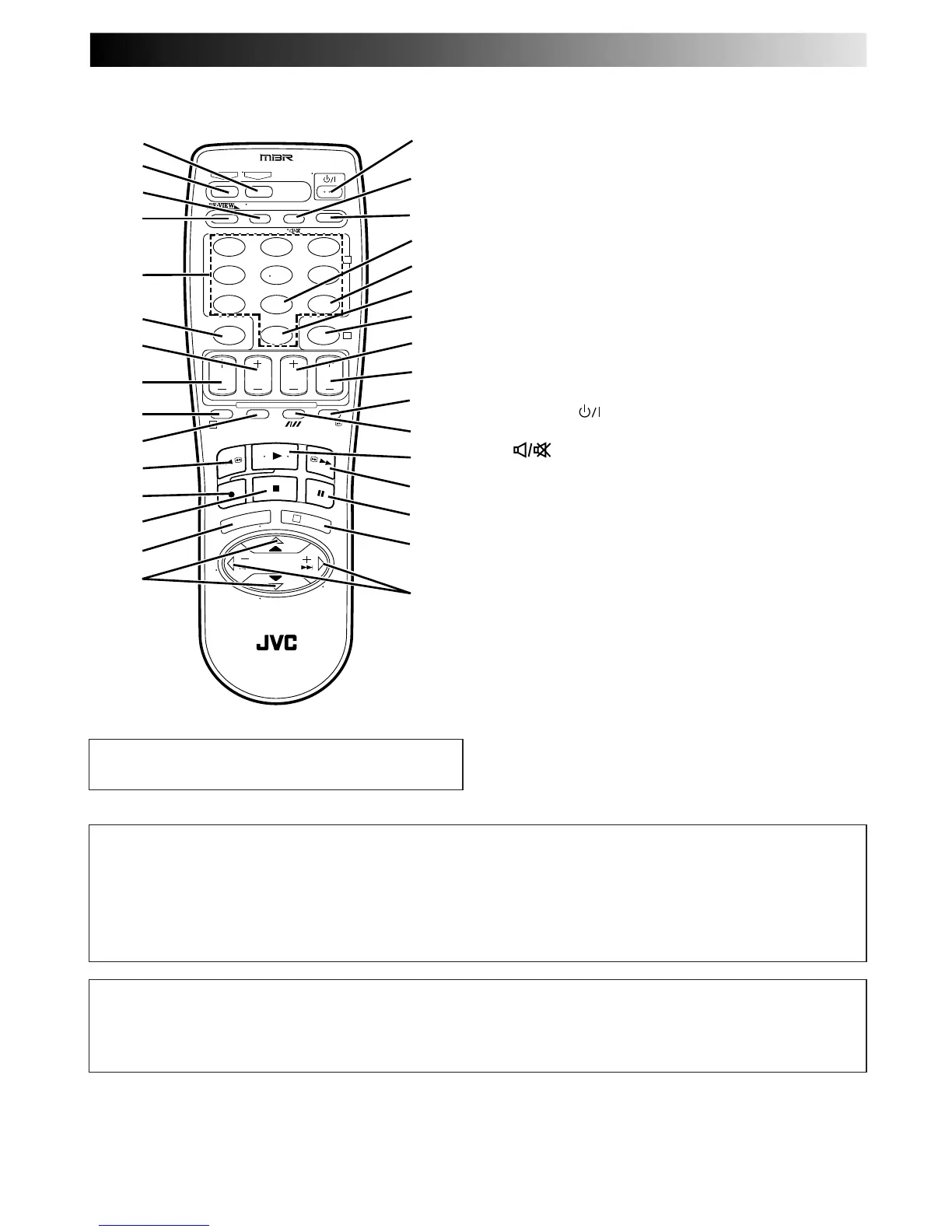
REMOTE CONTROL
Buttons with a small dot on the left side of the name can also
be used to operate your TV Z pg 29.
1 TV Button Z pg. 29
2 VCR Button Z pg. 29
3 TV/VCR Button Z pg. 29
4 REVIEW Button Z pg. 13
5 NUMBER Keys Z pg. 15
6 CANCEL Button Z pg. 26
Counter [C.] RESET Button Z pg. 16
7 STOP +/– Button Z pg. 24
8 START +/– Button Z pg. 24
9 PROG. Button Z pg. 22, 24
0 PROG. CHECK Button Z pg. 26
! Rewind [REW] Button Z pg. 10, 11
@ RECORD Button Z pg. 15
# STOP Button Z pg. 10
$ MENU Button Z pg. 8
% PUSH JOG %fi Button Z pg. 6
TV PROG +/– Z pg. 29
^ POWER Button Z pg. 8
& AUDIO Button Z pg. 14
(TV Muting) Button Z pg. 29
* DISPLAY Button Z pg. 16
( DAILY Button Z pg. 23, 25
) WEEKLY Button Z pg. 23, 25
q AUX Button Z pg. 32
w TIMER Button Z pg. 23, 25
e DATE +/– Button Z pg. 24
r TV PROG +/– Button Z pg. 15, 24
t 30 SEC Button Z pg. 13
y Tracking Button Z pg. 12
SP/LP/EP Button Z pg. 15
u PLAY Button Z pg. 10
i Fast Forward [FF] Button Z pg. 10, 11
o PAUSE Button Z pg. 11
p OK Button Z pg. 4
Q PUSH JOG (™£ Button Z pg. 11, 13
TV VOL +/–Button Z pg. 29
T
V
P
R
O
G
+
T
V
V
O
L
–
T
V
P
R
O
G
–
T
V
V
O
L
+
VCR
CANCEL
TIMER
START STOP DATE
PUSH JOG
MENU
OK
TV
PROG
TV/VCR
(MONITOR)
C. RESET
DAILY
AUX
WEEKLY
PROG.
CHECK
PROG.
DISPLAY
AUDIO
123
456
7
89
0
2
4
1
3
EXPRESS PROGRAMMING
MULTI BRAND
REMOTE CONTROL UNIT
TV
30 SEC
%
%
How To Use
The remote control can operate most of your video recorder's
functions, as well as basic functions of TV sets of JVC and other
brands. Z pg. 29.
● Point the remote control toward the sensor window.
● The maximum operating distance of the remote control is
about 8 m.
NOTES:
●
When inserting the batteries, be sure to insert in the correct
directions as indicated under the battery cover.
●
If the remote control doesn't work properly, remove its batteries,
wait a short time, replace the batteries and then try again.
ATTENTION
The remote control can operate not only the video recorder but also some of your TV's functions.
● To operate your video recorder, first press the VCR button to set the remote control to the Video mode.
● To operate your TV, first press the TV button to set the remote control to the TV mode (Z pg. 29).



 To Next Page