38 EN
Fine-Tuning Channels
ACCESS TUNER SET
SCREEN
1
Perform steps 1 – 3 of "Auto Channel Set" on page 35.
ACCESS CHANNEL LIST
2
Press PUSH JOG %fi to place the pointer next to "CH
EDIT", then press OK or PUSH JOG .
SELECT CHANNEL TO
FINE-TUNE
3
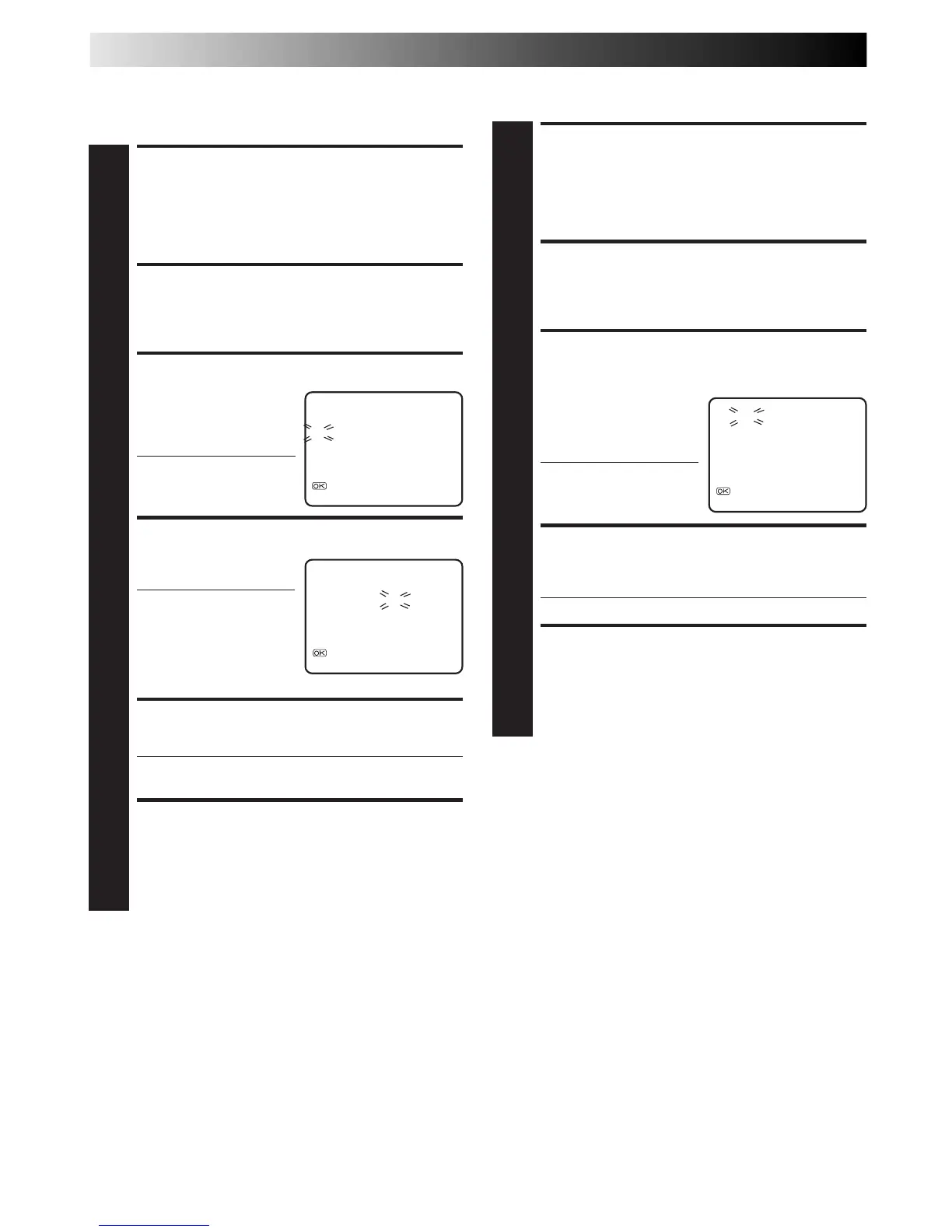
Press PUSH JOG %fi until
the channel you want to
tune begins blinking, then
press OK twice.
● The "FRQ" number for
that channel starts
blinking.
PERFORM TUNING
4
Press PUSH JOG %fi until the picture becomes clearer,
then press OK or PUSH JOG .
● Repeat steps 3 and 4 as necessary.
RETURN TO NORMAL
SCREEN
5
Press MENU.
CH FRQ CH FRQ
01 150 07 229
02 165 08 237
03 195 09 355
04 205 10 365
05 213 11 374
06 221 12 384
[
5
/∞] : FINE TUNING
: OK
[MENU] : EXIT
fi
fi
Swap Channel Positions
Example:To swap CH03 and CH09.
ACCESS TUNER SET
SCREEN
1
Perform steps 1 – 3 of "Auto Channel Set" on page 35.
ACCESS CHANNEL LIST
2
Press PUSH JOG %fi to place the pointer next to "CH
EDIT", then press OK or PUSH JOG .
SELECT POSITION (e.g. 03)
3
Press PUSH JOG %fi until
the section of CH "03"
begins blinking, then press
OK or PUSH JOG .
● Only "03" will blink.
SELECT POSITION (e.g. 09)
4
Press NUMBER keys to
input "0" and "9".
● The two selected
channels will be
swapped.
● To cancel the channel
swapping, press PUSH
JOG .
STORE NEW POSITIONS
5
Press OK or PUSH JOG .
● Repeat steps 3 – 5 as necessary.
RETURN TO NORMAL
SCREEN
6
Press MENU.
CH FRQ CH FRQ
01 150 07 229
02 165 08 237
03 195 09 355
04 205 10 365
05 213 11 374
06 221 12 384
[0 – 9]: INPUT CH
: FINE TUNING
[MENU] : EXIT
CH FRQ CH FRQ
01 150 07 229
02 165 08 237
03 355 09 195
04 205 10 365
05 213 11 374
06 221 12 384
[ ]: CANCEL
: OK
[MENU] : EXIT
%
5
fi
fi
fi



 To Next Page