
 To Next Page
M
Mary SnowAug 12, 2025
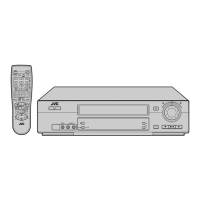
Why won't the remote control function on my JVC VCR?
- MMr. Paul EvansAug 12, 2025
If your JVC VCR's remote control isn’t working, the batteries might be dead. Replace the old batteries with new ones to solve this.

Why won't the remote control function on my JVC VCR?
If your JVC VCR's remote control isn’t working, the batteries might be dead. Replace the old batteries with new ones to solve this.
What to do if the playback picture is blurred on my JVC HR-J770EU?
If the playback picture on your JVC VCR is blurred or interrupted, but TV broadcasts are clear, or if you see a "USE CLEANING CASSETTE" message, it's likely that the video heads are dirty. To resolve this, use a dry cleaning cassette TCL-2UX or consult your JVC dealer.
How to fix noise during normal playback on JVC VCR?
If you're experiencing noise during normal playback on your JVC VCR, it might be because the automatic tracking mode is engaged. You can resolve this by trying manual tracking.
What to do if the playback picture does not appear while the tape is running on JVC HR-J770EU VCR?
If the playback picture doesn't appear while the tape is running on your JVC VCR, check your connection type. If using an RF connection, ensure the TV receiver is set to the correct video channel and that the recorder’s video channel is correctly set. If using an AV connection, make sure the TV is set to AV mode.
How to fix breaks in Hi-Fi soundtrack on JVC HR-J770EU VCR?
If you notice breaks in the Hi-Fi soundtrack on your JVC VCR, it could be because the automatic tracking mode is engaged. Try switching to manual tracking to resolve this issue.
Why is no power supplied to my JVC HR-J770EU?
If your JVC VCR isn't powering on, make sure the mains power cord is properly connected.
What to do if JVC HR-J770EU clock is working but the recorder cannot be powered?
If your JVC VCR clock is working but the recorder won't power on, check the front display panel. If “#” is displayed with Auto Timer set to “OFF”, press the # button to turn the “#“ indicator off.
What to do if the tape does not run during recording on JVC HR-J770EU?
If the tape isn't running during recording on your JVC VCR and “i“ is displayed on the front panel, press 4 to turn the “i“ indicator off.
Warnings and cautions to prevent fire, shock, and damage to the unit.
Steps and diagrams for connecting the recorder to a TV and mains power.
Automatic channel, clock, and program number setup.
Downloading TV data for automatic channel and clock setup via T-V Link.
Procedure for installing and connecting a satellite controller for remote operation.
Steps for loading a cassette and starting playback.
Using JOG dial, SHUTTLE ring for various playback modes.
Steps to load tape, select channel, set speed, and record.
Using Instant Timer Recording (ITR) and recording while watching another programme.
Programming recordings using SHOWVIEW codes.
Setting timer recordings without SHOWVIEW codes.
Manually sets Guide Program numbers for SHOWVIEW timer programming.
Sets the recorder's internal clock and Just Clock function.
Common power-related problems and their solutions.
Problems with tape movement (loading, FF/RW) and solutions.
Issues with picture and sound during playback and their solutions.
Problems preventing recording and their solutions.
Issues with timer programming and recording and their solutions.
 General
| Type | VCR |
|---|---|
| Video Format | PAL |
| Recording Formats | VHS |
| Number of heads | 4 |
| Hi-Fi Stereo | Yes |
| Tuner | Yes |
| ShowView | Yes |
| Noise Reduction | Yes |
| Remote Control | Yes |
| Power Consumption | 18W |
| Recording Speed | SP, LP |
| Playback Features | Auto Tracking |
| Connections | SCART |
| Inputs | Composite Video |
| Outputs | Composite Video, Audio |
| Playback Formats | VHS |